We’d like to remind Forumites to please avoid political debate on the Forum.
This is to keep it a safe and useful space for MoneySaving discussions. Threads that are – or become – political in nature may be removed in line with the Forum’s rules. Thank you for your understanding.
'Rich' Editor feedback.
Comments
-
Trying to follow a discussion within a thread is hopeless now that there's a lack of continuity for quoted posts. I find this intolerable, and for those of us with sight issues I think this is the most user unfriendly change that's ever been made since the start of the MSE forums.
Edit: I used the word copied, but I meant to say quoted.
5 -
In addition it's looking as though the text editor may have claimed its first victim in the form of The Top Regular Savers Discussion Thread.
I've discovered when copying and pasting the listings from p1 of this thread into the archived thread the formatting goes a bit all over the shop.
The formatting seems to be alright when copying/pasting listings from posts that were created in the old text editor to other posts made in the old text editor. It also appears fine when copying pasting listings from posts that were created in the new text editor to other posts made in the new text editor.
The listings on p1 of the thread under the old text editor looked like this:
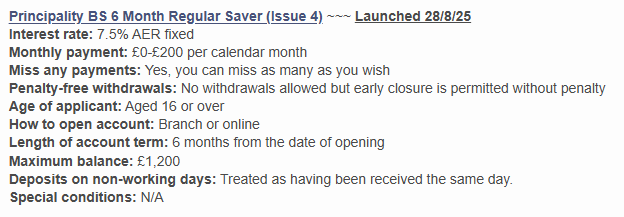
When an account is added or goes NLA I post an update, including the listing in The Archived History Of Regular Savers Thread *** NO CHAT***.
I've tried doing this because the Loughborough BS 2 Year Super Saver has been withdrawn and the formatting's come out like this:
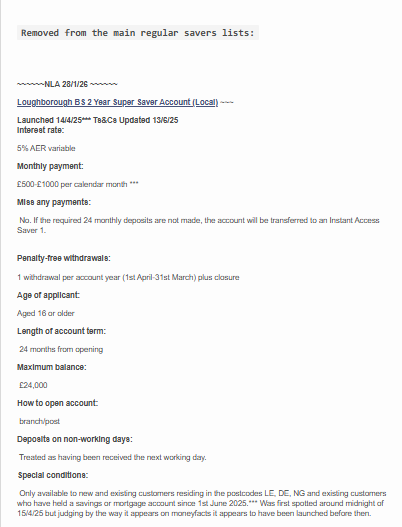
It's looking as though all the listings are now going to have to be redone and the thread relaunched otherwise it'll be a recurring issue with the formatting.
It's going to take several hours to redo all that.
3 -
I’m seeing another issue regularly since the new function was launched.
I use “Latest Threads” from the quick links menu to see recent posts/threads. Once I’ve finished reading a thread, I’ll page back until I get to the list of threads again. It’s worked for as long as I can remember but now instead of getting back to the latest threads list, I’m sometimes getting the page below with no threads shown….
 0
0 -
What a nightmare Bridlington1. And to correct myself, I used the word copied in my earlier post, when I meant to say quoted.
1 -
Another issue I’m seeing is the quote preview boxes not always rendering/loading properly. Sometimes I just see the box with the first part of the quoted post with no arrow to expand the box. Other times I’m just seeing the URL to the quoted post and no box at all, for example…
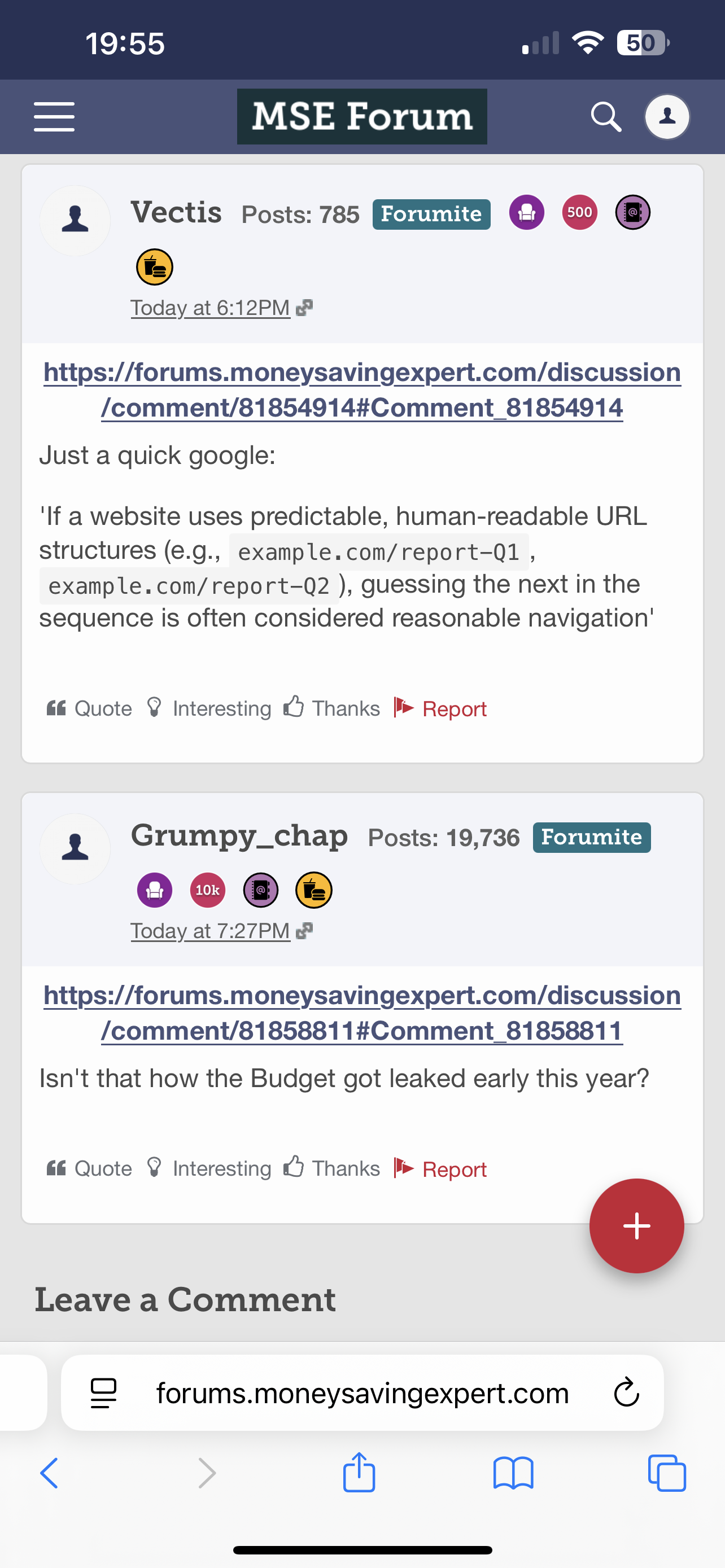
Screenshot from the following thread. I just went back in to it again and the quote boxes were showing correctly. But refreshing the page removed the boxes and just showed the links again as above.
This is on an iPhone/Safari with latest updates installed.
0 -
At the end of the day it all boils down to money, can't see them refusing to update if were paid for doing so.
That leaves the staff doing the best they can hammering in a square peg in a round hole.
Let's Be Careful Out There0 -
Can't hack that 'down arrow' thing (now you see it, now you don't) to read a quote. It's like the forum has folded every page of a book closed so you have to take twice as long to read it.
"for those of us with sight issues I think this is the most user unfriendly change that's ever been made since the start of the MSE forums."
Totally agree with you and everyone else. It looks truly awful and must be worse for those with sight impairment.
This must be reversed.
It's unusable, especially the quotes. We MUST be able to edit quoted posts to cut them down to the bit we are replying to, or just to highlight relevant sections.
2026 is my 20 year anniversary of joining MSE forum - nearly 160k posts to my name - and this editor is the worst I have EVER seen.
Where are the emojis when you want an angry face?
PRIVATE 'PCN'? DON'T PAY BUT DON'T IGNORE IT (except N.Ireland).
CLICK at the top or bottom of any page where it says:
Home»Motoring»Parking Tickets Fines & Parking - read the NEWBIES THREAD6 -
😤😡 😫🤬. Bottom left of text box.
But, it’s still a negative step upgrade. Keep on improving it ….. until it breaks!
Please note, we are not a legal advice forum. I personally don't get involved in critiquing court case Defences/Witness Statements, so unable to help on that front. Please don't ask. .
I provide only my personal opinion, it is not a legal opinion, it is simply a personal one. I am not a lawyer.
Give a man a fish, and you feed him for a day; show him how to catch fish, and you feed him for a lifetime.#Private Parking Firms - Killing the High Street2 -
emojis are not showing bottom left of the text box for me?
I see this on my phone:
 PRIVATE 'PCN'? DON'T PAY BUT DON'T IGNORE IT (except N.Ireland).
CLICK at the top or bottom of any page where it says:
Home»Motoring»Parking Tickets Fines & Parking - read the NEWBIES THREAD1 -
… MSE_Stephen: "Many members think [the old editor's] fine but don't hear the regular complaints we receive."
It seems you had the choice to either annoy fewer people by keeping it the same until a better version became available, or far more people by changing it to a worse version.
Yes - I'd like to know where all these "regular complaints" are as I don't think I've seen very many of them on this board.
All the complaints I do see here are nearly always about the latest update being a retrograde step and losing whatever functionality the forum previously still had.
Where else do these mystery users regularly complain about the forum if not here?
And if there is somewhere else to complain, do the MSE Team take disproportionately more notice of those complaints than complaints here?
6













Confirm your email address to Create Threads and Reply

Categories
- All Categories
- 353.7K Banking & Borrowing
- 254.2K Reduce Debt & Boost Income
- 455.1K Spending & Discounts
- 246.8K Work, Benefits & Business
- 603.2K Mortgages, Homes & Bills
- 178.2K Life & Family
- 260.8K Travel & Transport
- 1.5M Hobbies & Leisure
- 16K Discuss & Feedback
- 37.7K Read-Only Boards