We’d like to remind Forumites to please avoid political debate on the Forum.
This is to keep it a safe and useful space for MoneySaving discussions. Threads that are – or become – political in nature may be removed in line with the Forum’s rules. Thank you for your understanding.
📨 Have you signed up to the Forum's new Email Digest yet? Get a selection of trending threads sent straight to your inbox daily, weekly or monthly!
The Forum now has a brand new text editor, adding a bunch of handy features to use when creating posts. Read more in our how-to guide
Full Fibre installation - will they pull through fibre internally?
Comments
-
There's a few different models but they all look a bit like thisInforapennyinforapound said:Not sure what the ONT is,but it seems that this must be hidden behind the bookcase then?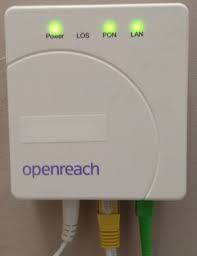
1 -
In this image the plug from (or to depending on your perspective) the ONT is the yellow one , the fibre is the green plug and the power is the white plug ……Openreach and most other FTTP networks use this type of arrangement, although some alternative networks may differ , but you are on Openreach , the network is passive ( PON=passive optical network) in that the network (the fibre) itself isn’t powered , the terminal equipment at either end is , that’s the OLT at the ‘exchange’ and the ONT at the customer1
-
Interesting but a little confusing for me. Yes I am Open Reach. So,I won’t have this ONT as in the pic above? Or o will but it’s different?iniltous said:In this image the plug from (or to depending on your perspective) the ONT is the yellow one , the fibre is the green plug and the power is the white plug ……Openreach and most other FTTP networks use this type of arrangement, although some alternative networks may differ , but you are on Openreach , the network is passive ( PON=passive optical network) in that the network (the fibre) itself isn’t powered , the terminal equipment at either end is , that’s the OLT at the ‘exchange’ and the ONT at the customer
Anyhow,updated today to 500 thingamies with EE….works a treat!0 -
Not sure what is confusing, your ONT will be pretty much same as the the one in the image ( given the image is of an Openreach ONT and you have have an Openreach based FTTP service , FYI EE are only on Openreach ) .Inforapennyinforapound said:
Interesting but a little confusing for me. Yes I am Open Reach. So,I won’t have this ONT as in the pic above? Or o will but it’s different?iniltous said:In this image the plug from (or to depending on your perspective) the ONT is the yellow one , the fibre is the green plug and the power is the white plug ……Openreach and most other FTTP networks use this type of arrangement, although some alternative networks may differ , but you are on Openreach , the network is passive ( PON=passive optical network) in that the network (the fibre) itself isn’t powered , the terminal equipment at either end is , that’s the OLT at the ‘exchange’ and the ONT at the customer
Anyhow,updated today to 500 thingamies with EE….works a treat!
Your ONT ( you do have one ) will be just like one in the image or very similar, Openreach use several vendors so the ONT design may vary a little depending on the manufacturer, but they in essence are all the same.
Obviously if you had the opportunity to look at your ONT you would expect to see the connections as described, the incoming fibre with a green plug , the power supply the white plug and the Ethernet cable to your router , possibly with a red plug to mirror the red plug on the router end of the Ethernet cable , TBH the Ethernet plug colour is irrelevant , they can be white , yellow , grey .
Openreach used red plugs on the cables they supplied for a while , simply to make it obvious where the cable needed to be inserted but in the image the Ethernet cable has a yellow plug .1 -
I have to say I’m very impressed with the EE setup, it’s the 1.6Gbps and is far faster/ more stable than the old 1gb Virgin broadband.
The mesh ‘booster’ box thingie has definitely improved the wireless network upstairs, far better than the plug in wifi extenders of old.
The blue lights on both gizmos are just this side of blinding though, I’ve turned down the brightness via the app and it’s still like Blackpool!The router and extender boxes come with the crappiest little ethernet cables though.0 -
Gaffer tape.SVaz said:
The blue lights on both gizmos are just this side of blinding though, I’ve turned down the brightness via the app and it’s still like Blackpool!0 -
@Roy1234
I realise its a while since this thread started but thought I would give a update on how my upgrade to FTTP went.
On day of instal got call from Circet engineer who was carrying out instal for OR. He called at 08.00 to give Eta and arrived shortly afterwards.
On arrival he had look around and explained he would disconnect exsisting copper cable at termination point in living area and connect the new Fibre Optic tail / cable to that and go outside and recover old cable pulling in new tail along with it so it reached splicing point outside, this thankfully went very well even though it ran under floor from middle of living area through dining area then partly through bedroom where it exited through wall to a round metal conduit that was installed under the harling at time property was built in the mid 1990,s. The engineer explained if the tail/cable did not pull through he would have had to drill a new hole through wall in dining area and fit the ONT adjacent the power socket there and BT would have needed then to supply a new digi box at the TV that would work wirelessly,but thankfully that was not necessary.
The engineer had done a few previous installs on this estate so knew the lay of the land before starting the work.
I am very pleased with the instal, the ONT is in a corner two feet away from router and behind sofa so not visible unless you go looking for it. I was particularly impressed that a pre connectorised tail is used that just plugs directly into ONT thus saving any splicing needing to be carried out in customers premises.
I have heard transmission engineers talk about 'traffic' on the network and areas where bottlenecks can occur, well I would now say I have the equivalent of a telecomm Motorway junction two foot from my router capable of giving Autobahn speeds throughout the network.Play with the expectation of winning not the fear of failure. S.Clarke2 -











Confirm your email address to Create Threads and Reply

Categories
- All Categories
- 354.6K Banking & Borrowing
- 254.4K Reduce Debt & Boost Income
- 455.5K Spending & Discounts
- 247.5K Work, Benefits & Business
- 604.3K Mortgages, Homes & Bills
- 178.5K Life & Family
- 261.8K Travel & Transport
- 1.5M Hobbies & Leisure
- 16.1K Discuss & Feedback
- 37.7K Read-Only Boards