We’d like to remind Forumites to please avoid political debate on the Forum.
This is to keep it a safe and useful space for MoneySaving discussions. Threads that are – or become – political in nature may be removed in line with the Forum’s rules. Thank you for your understanding.
Zopa Current account
Comments
-
My son's have switched. When you claim your coffee then Caffe Nero app opens up automatically.. we haven't got any further than that last night because he doesn't want an account and I can't get in using my details (verification emails take so long to arrive they're already expired). He went out so it's not resolved.
Ideally he would set up an account to see if the coffee code or whatever can be used by other people. I'll report back.
1 -
I'd like to know if the Caffe Nero account has to have same email as zopa, and does the nero app need to be on the same phone as zopa app?
Since I use unique email addresses for every company and don't have banking apps on the phone I carry with me.
0 -
Got to agree, the 'How does the free monthly Caffè Nero drink work?' Zopa page is remarkably short on the detail of 'how does the free coffee thing work'.
Just saying install the Cafe Nero app (where? as who?) and the free coffee voucher will appear (how?) is just a tad light on explaining how it works.
How long before someone actually tries to make this work?
If it turns out that I have to connect a coffee shop app to my Zopa bank account by Open Banking then I wouldn't be as surprised as I should be.
1 -
….then why don't they simply say that…..?
0 -
Re the Zopa Biscuit and the Caffè Nero offer…
The way it's set up is on the basis that the Caffè Nero app is on the same device as the Zopa app.
You need to download and install the Caffè Nero app and set up an account with it (unless you've already got one). The app is available from Google Play / the Apple App Store.
You do not need to use the same email address for the Caffè Nero app account as you use with Zopa - also when creating an account you're asked for a name and a date of birth, but you can state whatever you want here - they're not cross-checking these details with Zopa.
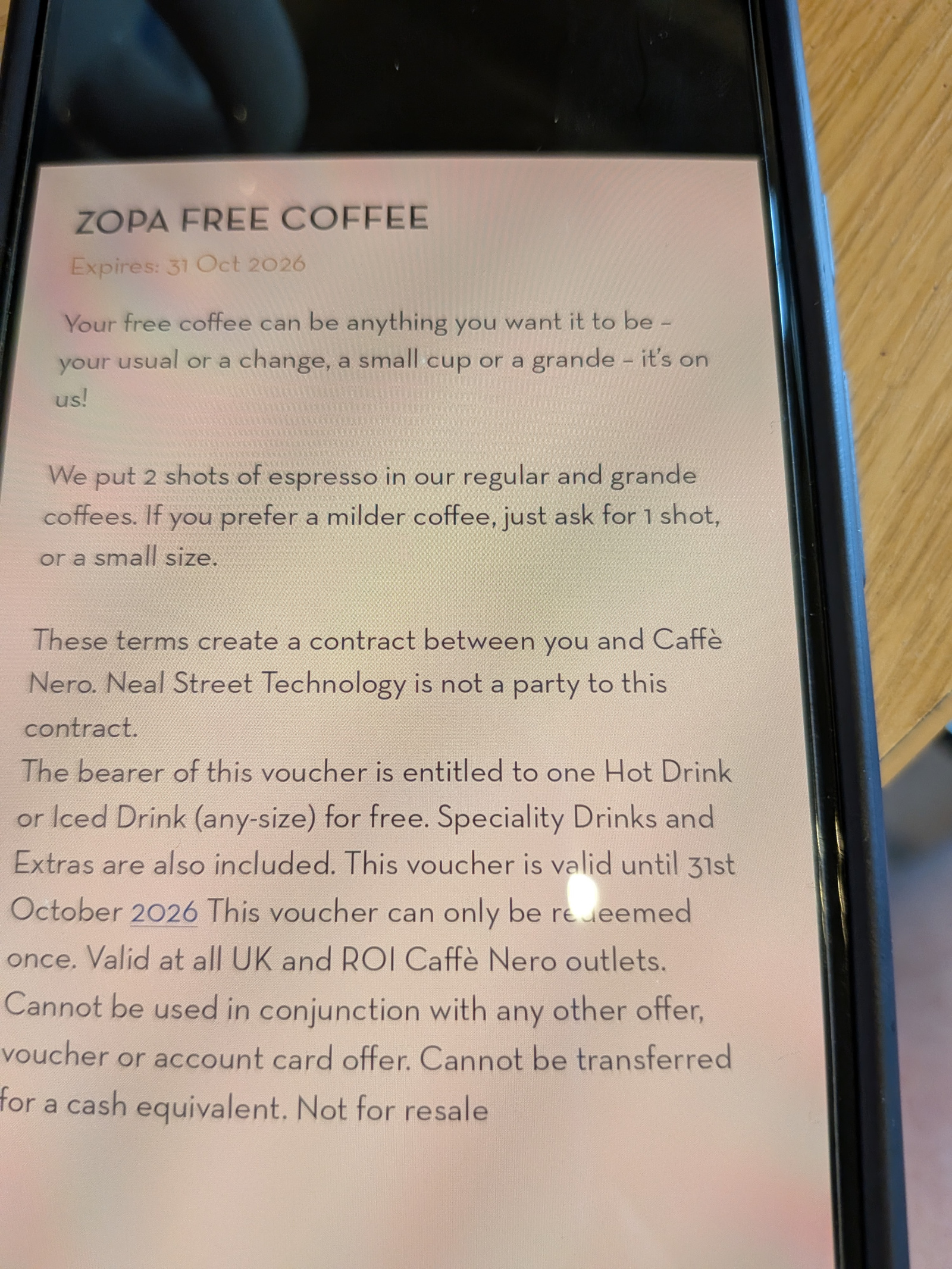
In the Zopa app, you head to the Benefits page, tap on "A monthly coffee on us" and then tap on the button to claim a free coffee, whereupon you are handed off to the Caffè Nero app and a QR code appears in the Wallet / Vouchers section of the app, labelled "Zopa Free Coffee" along with an expiry date (the expiry for mine being 31 Oct 2026). The Caffè Nero app prevents you from screenshotting this voucher page with the QR code.
On Android at least this handoff from the Zopa app to the Caffè Nero apps appears to happen via a hyperlink (using the domain 'nero.app.link') - if you uninstall the Caffè Nero app, you're instead redirected to the Google Play store page to (re)install the Caffè Nero app.
I guess it might be possible to hack the handoff link from the Zopa app to the Caffè Nero app, but the intention is undoubtedly for it all to happen on the same device.
In the Zopa app, on the Coffee Benefits page it shows that I'll be able to claim my next free coffee on my Biscuit account's 'monthiversary'.
(Given that my existing voucher in the Caffè Nero app expires at the end of October, I suspect it may be possible to actually have two unexpired vouchers sat in the Caffè Nero app and claim them both at the same time - e.g. free coffee for you and a friend.)2 -
Zopa and Caffe Nero:
You'll need to go in the Zopa app > 'spend' tab, scroll to 'benefits', select 'a monthly coffee on us', then 'claim' or 'view' coffee voucher. This will take you to the Caffe Nero app (or to your respective store to download the app).
I use gmail and have different '+' extensions for my Zopa and Caffe Nero accounts, so I guess they are technically different email addresses but still work ok? I did use the same mobile number for both apps, and had to enter a 6-digit code texted to that number before the voucher appeared in the app.
They have coded the app to prevent you taking screenshots and sharing with others, however once you have added the voucher from the Zopa app onto the Caffe Nero app, someone else can use your Caffe Nero log-in to access the voucher on another device (with, as far as I can tell, no backwards access to your Zopa account).
1 -
My son has opened a caffe nero account to see if he can give his vouchers to me. I don't think he can but maybe someone will find a way :)
When you claim or view your free coffee, the zopa app opens up your caffe nero app, and I can't see any alternative to that. The voucher is in your caffe nero wallet as a QR code. If you screenshot, the screenshot is a black screen, same as if you try to screenshot from your bank. We use android phones, if that makes a difference.
I've tried taking a photo of his voucher but it looks really bad and I doubt it will work. I could try it but not sure it will get accepted, they seem to not want you to transfer codes. The only other thing I can think of is to log out of my own app and log in as him. I haven't tried that because it was so difficult when I tried to reset my password, and I ended up giving up so my only access to my own caffe nero account is if I never log out. Also the app wanted his phone number so they might restrict you from logging into the app on someone else's phone.
0 -
Thanks useful information. So sounds like I can install Nero app on phone with banking apps, load the voucher. Then if I also have the Nero app on the phone I carry with me, I can use it from that phone. I will give it a go when the new deal starts for me.
0 -
I've just tested this, and yes, the solution of two devices - both loaded with Caffè Nero apps, with both apps logged into the same account - does work. 👍
Worth noting that when logging into the Caffè Nero app that 2FA via an SMS code may be required - I guess it's possible that the Caffè Nero app could request 2FA at other times if the company wished to dissuade people from sharing a Caffè Nero app account.
3













Confirm your email address to Create Threads and Reply

Categories
- All Categories
- 355.7K Banking & Borrowing
- 254.9K Reduce Debt & Boost Income
- 456.1K Spending & Discounts
- 248.3K Work, Benefits & Business
- 605.8K Mortgages, Homes & Bills
- 179K Life & Family
- 263.6K Travel & Transport
- 1.5M Hobbies & Leisure
- 16.2K Discuss & Feedback
- 37.7K Read-Only Boards