We’d like to remind Forumites to please avoid political debate on the Forum.
This is to keep it a safe and useful space for MoneySaving discussions. Threads that are – or become – political in nature may be removed in line with the Forum’s rules. Thank you for your understanding.
📨 Have you signed up to the Forum's new Email Digest yet? Get a selection of trending threads sent straight to your inbox daily, weekly or monthly!
The Forum now has a brand new text editor, adding a bunch of handy features to use when creating posts. Read more in our how-to guide
Broadband receiving constant errors - HELP!!!

x_Wilco_x
Posts: 283 Forumite
in Techie Stuff
Please help, this is driving me to distraction...
I get my broadband via ADSL using a Speedtouch USB 330 Modem, after being connected for a short period the connection slows down and the broadband connection status box shows that I am receiving errors. As I try to surf the connection just gets slower and slower and the errors received gets more and more. If I disconnect and then reconnect it makes no difference. The only way to get some broadband back is to restart the computer until the errors start again.
I have tried reinstalling the modem and updating the drivers, changing the USB port and have checked all the cables to the phone socket. I have even tried installing an old modem and it still does the same...
Any ideas before I tackle Pipex (who provide my broadband) as I can do without that stress if it is something my end! :mad:
Thanks...
Oh, the errors tend to start on my connection during the evening but seem to be fine in the morning. Somedays I can go the whole day without any problems and others I just find the broadband unusable.
I get my broadband via ADSL using a Speedtouch USB 330 Modem, after being connected for a short period the connection slows down and the broadband connection status box shows that I am receiving errors. As I try to surf the connection just gets slower and slower and the errors received gets more and more. If I disconnect and then reconnect it makes no difference. The only way to get some broadband back is to restart the computer until the errors start again.
I have tried reinstalling the modem and updating the drivers, changing the USB port and have checked all the cables to the phone socket. I have even tried installing an old modem and it still does the same...
Any ideas before I tackle Pipex (who provide my broadband) as I can do without that stress if it is something my end! :mad:
Thanks...
Oh, the errors tend to start on my connection during the evening but seem to be fine in the morning. Somedays I can go the whole day without any problems and others I just find the broadband unusable.
0
Comments
-
Ok, first thing I'd say is that you may want to go through the standard procedures for checking stuff from your end. This usually means plugging your adsl filter directly into the master test socket of your house which should eliminate any internal wiring issues. It would also help to try different hardware (filters and modems specifically).
If you still get problems after this then it's probably an issue with your phone line.
You mention that the connection is worse during the evening which could be a clue. Does something electrical come on near your home around these times? Examples could be street lights or a neighbor's piece of dodgy wiring.
As a general piece of advice, I would look into buying a dedicated router which takes the processing of your broadband away from the computer and means you maintain a constant connection regardless of whether your computer is on or off. They also have the added bonus of being able to connect multiple machines to the net at once.
Is your phone line clear or is it sometimes noisy? A noisy line (crackling for example) could point to a faulty filter or a physical fault on the line such as a loose connection.
If you don't mind leaving your computer on for a few days you can download some programs that will continuously monitor and graph the various components of your connection so that a better assessment can be made as to what may be causing the problem. My favourite is 'Routerstats' but I've heard that 'Wireshark' works just as well. There are others too. I'm not sure if these work with modems though (so another reason for a router!)
The odd thing about your problem is that it gets worse over short periods of time and then gets better on a modem reboot. If it was a line fault it would not conform to such a regular pattern. That could indicate that the modem (or the computer) are playing some part.0 -
My first thought would be to bin your USB modem and get your ISP to supply you with a router.
http://www.kitz.co.uk/adsl/frogstats.php#44
Will show you how to obtain your line statistics, post them and maybe we can identify whats going on.That gum you like is coming back in style.0 -
Hi ComplexP,
Firstly, thank you for your very comprehensive response. To pin down some of the things that you mention...
My master phone socket is a dual ADSL & BT socket. I plug my modem direct into the wall socket with a good quality sheilded cable. Because of this I am unable to run the broadband through the test socket. I also do not run the broadband cable through the filter but do have a filter on the phone which (obviously) plugs into the BT socket on the wall.
I have not noticed any noise on the phone line when making phone calls but will check this, particularily when I am getting errors.
There is no difference to electrical appliances on or off at any time during the day within my house - I am unable to account for anything outside or in a neighbours house but there is nothing out of the ordinary around.
When I say that the faults get worse over a short period of time, that is not always the case. Sometimes I will get a slow connection (with the faults) and think f*** it, leave it and come back at a later stage and it is fine again (even though the status box shows the previous errors it is not, at that particular time, registering new errors). Also, if I restart and then reconnect the line tends to connect at a slower speed - what is interesting, and consistent, is that the faster I am connected the more likely I am to get errors...
If it is a computer issue, what is it likely to be? I have tried 2 modems on the computer and both suffer the same problem so assume I have eliminated a modem fault. I also don't want to purchase a router (I understand USB Modems are old technology now) if the fault will still exist!0 -
Hi Penrhyn, I have run 'Dr Speedtouch' diagnostics as directed by your link and have a log file. What part/s should I post? It is long and double dutch!!!0
-
Does seem not to be a modem fault, but regardless of that you should be using a router for a stable connection. USB connection is inferior and flakey. Ask your ISP for a free one, say you have gone wireless with your new laptop so can't connect with your old modem, so you will have to leave if they can't oblige...
Worst case is you can buy a basic wireless G router on eBay for £20 tops, something like a Netgear DG834G will be fine.No free lunch, and no free laptop 0
0 -
Does seem not to be a modem fault, but regardless of that you should be using a router for a stable connection. USB connection is inferior and flakey.
Thanks macman - could it be just the fact it is USB and that can be unstable? I have been meaning to buy a modem/router for a while (WiFi phone etc) so now could be the time...
Unlikely to get one out of Pipex free, infact the thought of just phoning them gives me shivers! I am no longer in contract so may be able to swing it but they will probably just cut me off by mistake, overbill me by mistake and then send the router to the wrong address!!! :eek:0 -
It could be. You need to eliminate all the possible causes one by one, and that's the obvious one to start with. What have you got to lose by asking them? In fact it sounds like you ought to migrate anyway, as you're obviously not that enamoured of Pipex (who is).
You also need to do the BT test socket check (just use a different cable for the test) and swap your ADSL filter(s). Do you have filters on all active sockets (including fax machines and Sky boxes)? Unplug any cordless phone/baby monitors while testing.No free lunch, and no free laptop0 -
Would you have an issue with switching to another supplier?, if not, then both Demon and Sky give free routers to new customers (as do Virgin Media).
If you do buy a wireless Router/modem please make sure to check it uses 'WPA2' encryption, as WEP & WPA are now next to useless, and can be hacked in under 3 minutes.Never Knowingly Understood.
Member #1 of £1,000 challenge - £13.74/ £1000 (that's 1.374%)
3-6 month EF £0/£3600 (that's 0 days worth)0 -
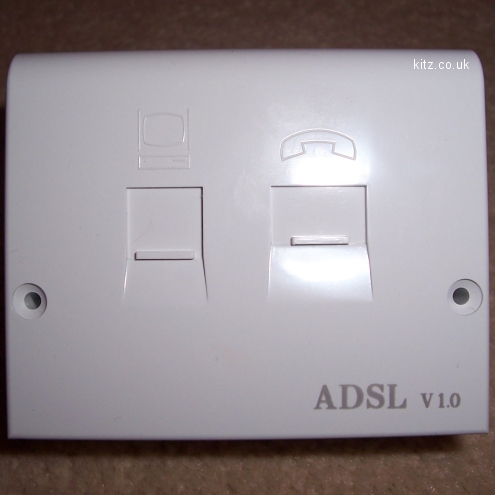
if you have a dual adsl / bt phone socket, is it one of these?
http://www.kitz.co.uk/adsl/images/phone/NTE5_adsl_faceplate_large.jpg
if so, you DON'T need a filter on any phone, as you have a filtered faceplate, which has an adsl filter built in.
M0 -
Hi ComplexP,
Firstly, thank you for your very comprehensive response. To pin down some of the things that you mention...
My master phone socket is a dual ADSL & BT socket. I plug my modem direct into the wall socket with a good quality sheilded cable. Because of this I am unable to run the broadband through the test socket. I also do not run the broadband cable through the filter but do have a filter on the phone which (obviously) plugs into the BT socket on the wall.
I have not noticed any noise on the phone line when making phone calls but will check this, particularily when I am getting errors.
There is no difference to electrical appliances on or off at any time during the day within my house - I am unable to account for anything outside or in a neighbours house but there is nothing out of the ordinary around.
When I say that the faults get worse over a short period of time, that is not always the case. Sometimes I will get a slow connection (with the faults) and think f*** it, leave it and come back at a later stage and it is fine again (even though the status box shows the previous errors it is not, at that particular time, registering new errors). Also, if I restart and then reconnect the line tends to connect at a slower speed - what is interesting, and consistent, is that the faster I am connected the more likely I am to get errors...
If it is a computer issue, what is it likely to be? I have tried 2 modems on the computer and both suffer the same problem so assume I have eliminated a modem fault. I also don't want to purchase a router (I understand USB Modems are old technology now) if the fault will still exist!
You're welcome
It sounds like the consensus here is to get hold of a router and see if that helps. I have been with Plusnet for 2 years and needed a new router a few months back since my old one wasn't ADSL2 compatible. They said I could have it for free as long as I stayed with them for another 6 months.
Most ISPs have a stock of them because they're now very cheap.
If you want to migrate I believe that O2 are considered to be amongst the best and I think you can get a free wireless router on several of their packages.
Happy hunting.0







This discussion has been closed.
Confirm your email address to Create Threads and Reply

Categories
- All Categories
- 353.5K Banking & Borrowing
- 254.1K Reduce Debt & Boost Income
- 455K Spending & Discounts
- 246.6K Work, Benefits & Business
- 602.9K Mortgages, Homes & Bills
- 178.1K Life & Family
- 260.6K Travel & Transport
- 1.5M Hobbies & Leisure
- 16K Discuss & Feedback
- 37.7K Read-Only Boards