We’d like to remind Forumites to please avoid political debate on the Forum.
This is to keep it a safe and useful space for MoneySaving discussions. Threads that are – or become – political in nature may be removed in line with the Forum’s rules. Thank you for your understanding.
📨 Have you signed up to the Forum's new Email Digest yet? Get a selection of trending threads sent straight to your inbox daily, weekly or monthly!
The Forum now has a brand new text editor, adding a bunch of handy features to use when creating posts. Read more in our how-to guide
Help - Hubbies PC keeps crashing
Comments
-
So go into the BIOS by tapping F2 oe Del on start up and change the boot sequence so that the PC Boots from the CDrom drive first...
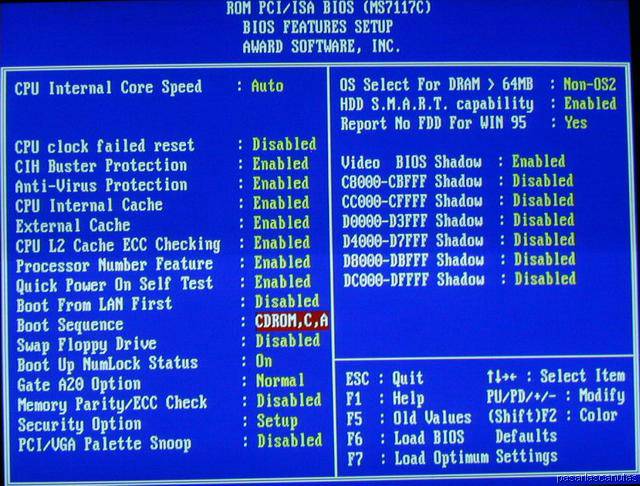
May look similar to this screen, If you dont know what to do ask someone
to come over and take a gander.. remember to save on exit0 -
Another way to check that your booting from the CD-Rom first, is to shove your winxp disk in there. It's definately a boot disk.Sarahjovi wrote:No the pc tries to boot from the disc and them goes into windows! I've read and re-read the instructions to make the boot disc, but it just doesn't want to work! I originally tried making the floppy disc version, but kept getting the read error, hence trying making a CD!
Equally, if it's not booting from the memtest boot disk then windows should show you whether there is anything on the CD-ROM - my memtest shows the CD title.
Look in .... emmm ... 'My Computer' ... does it show a CD inserted?0 -
Ahhhh... Its not showing the Cd title! Does this mean I've done it wrong? It does show the file on the CD when you click on it though! I think I must be missing something! I haven't got a clue!
I'll see if I can upload a pic of my nero settings, and perhaps you can tell me where I'm going wrong?
Sarah
Edit: It is showing me the title...
Any clues
Sarah :grinheart0 -
When I burn in image in Nero, I use Recorder - Burn Image and browse to the .iso file.
PS did you see post 20?0 -
Prime95 does a good test for RAM/PSU and CPU under torture....
This is run from windows....
http://www.mersenne.org/freesoft.htm
memtest86 is a better RAM tester as it doesnt need windows to run....0 -
When nero wizrd comes up close it down.....
Click open on nero......find the .ISO file and select it.....all the rest is straight forward..0 -
Probably the simplest way to burn an ISO is using Alex Feinman ISO recorder . Once installed (free download) you just right click the ISO file and select 'copy image to CD'. Its a lot more straightforward than the likes of Nero.0
-
Right ok... I have now burnt a new disc using Alex Feinman ISO recorder. And it still won't run the programme. I really must be doing something so wrong.
I download the ZIP file from Memtest86, unzipped the file to the desktop which is memtest86-3.2.iso.
The computer is set to Boot from the CD/DVD first? I just don't understand what I am not doing right.
Sarah :mad:0





This discussion has been closed.
Confirm your email address to Create Threads and Reply

Categories
- All Categories
- 354.1K Banking & Borrowing
- 254.3K Reduce Debt & Boost Income
- 455.3K Spending & Discounts
- 247.1K Work, Benefits & Business
- 603.7K Mortgages, Homes & Bills
- 178.3K Life & Family
- 261.2K Travel & Transport
- 1.5M Hobbies & Leisure
- 16.1K Discuss & Feedback
- 37.7K Read-Only Boards