We’d like to remind Forumites to please avoid political debate on the Forum.
This is to keep it a safe and useful space for MoneySaving discussions. Threads that are – or become – political in nature may be removed in line with the Forum’s rules. Thank you for your understanding.
📨 Have you signed up to the Forum's new Email Digest yet? Get a selection of trending threads sent straight to your inbox daily, weekly or monthly!
Reorganising the Android apps. Is this possible?




Swipe up & see your list of apps - that's what I'm referring to.
Is it possible to change the order? I'm not talking about dragging to the home page & positioning them where you want, I'm talking about the list of apps.
Reason being - because if you want the Vue (cinema) app you'd automatically, like I have been doing, swipe-swipe-swipe all the way to where the V apps are.
Yet it's not there.... Because some idiot in their infinite wisdom decided to rebrand it 'Club Vue' so now it sits in with the C apps. This has happened with some other apps I've had in the past too.
I can rename it, which I did, but it still sits in with the C apps & doesn't reposition back to V.
If it ain't broke then break it!
🤐🤐🤐
Comments
-
One option is to create folders on that screen, and you can pop little used apps into a folder. Or perhaps group them (my approach). I created folders for Media, Travel, Finance, Shopping, Games, System. If I used the Vue app it would be in Media (along with BBC Iplayer, Amazon KIndle, etc). I do similar on my main screen. (I moved from Samsung to Pixel a while back so assume you can still do this with Sammy)
I'm not aware of a means to change app icon positions - suspect there will be a way using a 3rd party app or launcher though.I’m a Forum Senior Ambassador and I support the Forum Team on the Credit Cards, Savings & Investments, Budgeting & Bank Accounts, and Techie Stuff boards. If you need any help on these boards, do let me know. Please note that Ambassadors are not moderators. Any posts you spot in breach of the Forum Rules should be reported via the report button, or by emailing forumteam@moneysavingexpert.com. All views are my own and not the official line of MoneySavingExpert.1 -
For apps I use a lot I have folders on my home screen - the app shortcuts there appear in the order you set them.
Currently one folder for frequent use (banking, study, pictures, social media) one for news websites...
0 -
Click and drag should allow you to sort whatever you use most.
Edit @BobbyEwingBy default, Samsung sets the App Drawer to Alphabetical order. In this mode, even if you rename the shortcut, the system often clings to the original package metadata for its positioning.
To take control:
- Open your App Drawer (swipe up).
- Tap the three vertical dots (top right) → Sort.
- Select Custom order.
The Catch: Once you switch to "Custom order," the phone stops alphabetizing everything automatically. You will have to manually drag the "Club Vue" icon down to the 'V' section yourself. The upside? It stays exactly where you put it, regardless of what it’s named.
0 -
True for the Home Screen(s). But not the App Drawer I think? That's the ask by the OP.TimeLord1 said:Click and drag should allow you to sort whatever you use most.I’m a Forum Senior Ambassador and I support the Forum Team on the Credit Cards, Savings & Investments, Budgeting & Bank Accounts, and Techie Stuff boards. If you need any help on these boards, do let me know. Please note that Ambassadors are not moderators. Any posts you spot in breach of the Forum Rules should be reported via the report button, or by emailing forumteam@moneysavingexpert.com. All views are my own and not the official line of MoneySavingExpert.2 -
With me it's the Virgin Credit Card app, lives with the C's not the V's.
You can replace the entire user interface on an Android phone, there are dozens of them that will allow you to customise to your heart's content. Probably a bit of overkill when you just want to do a bit of app icon reordering.
Home screen - where you put your most used apps and widgets. Can extend over several screens. Well worth thinking about rationalising and removing/reordering this across just a couple of screens.
App Draw - where all the apps installed in your phone are displayed. This is customisable, have you tried moving the Vue icon from the C's to the V's (hold and drag)?
I had no idea you could rename the icons - how please?
0 -
S25 Ultra here, so should be identical on your phone.In the app drawer, click on the three dots next to the search bar and select sort >> custom order.
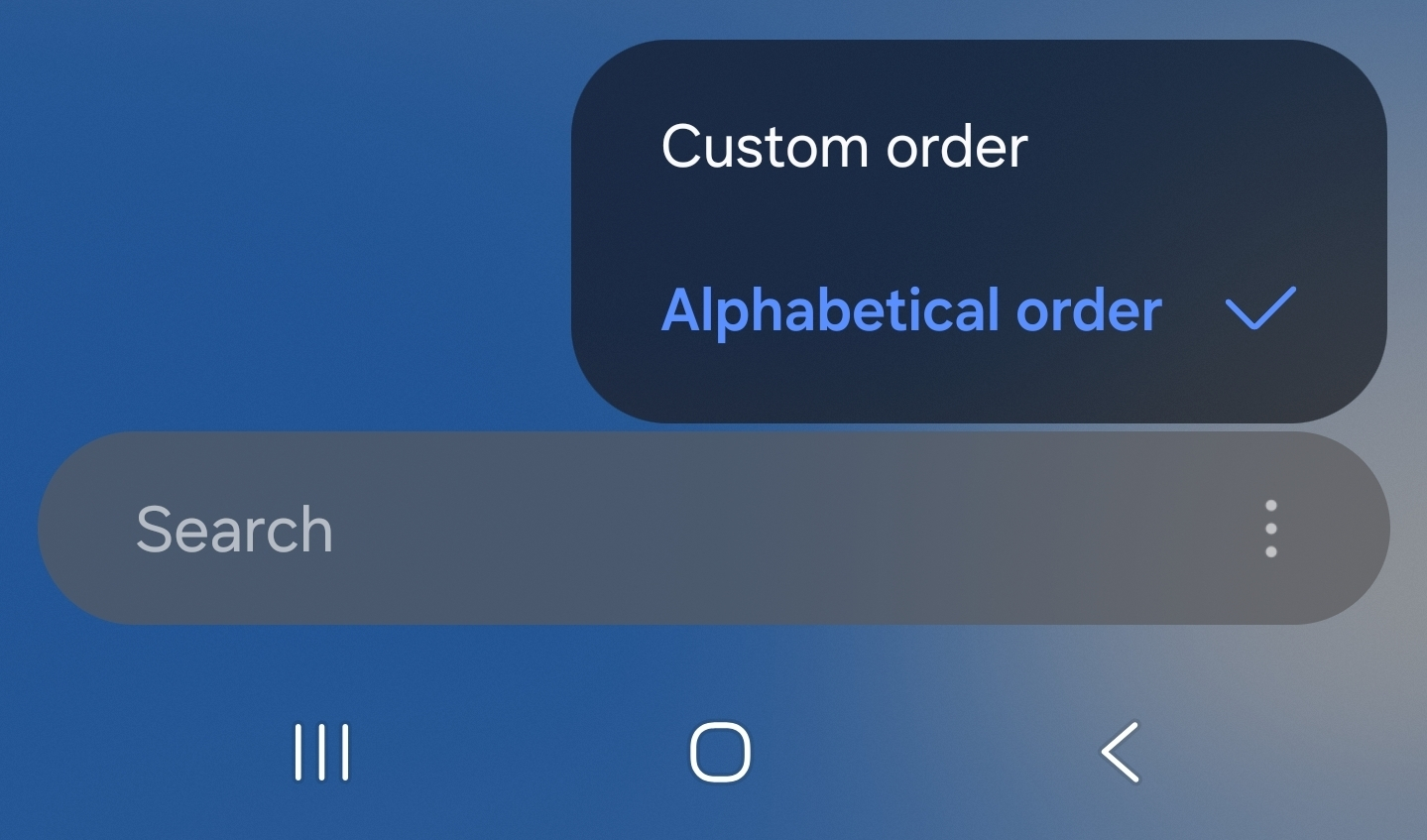 2
2 -
That way is creating a lot of employment in the I.T. industry! 😉B0bbyEwing said:If it ain't broke then break it!
2 -
Thanks for the replies.
I'm aware that I can drag whatever app I want on to the home page & organise it however I want. So it's a workaround and may be what I opt for in the end but it's not what I was looking to do. I don't use the Vue app all that much so wasn't really bothered about it being on my home page.
Long press the app in the app drawer which brings up a menuflaneurs_lobster said:I had no idea you could rename the icons - how please?
Uninstall
App Info
Hide
Edit
It's obviously the Edit you want
But if this isn't an option for you then it may be because of what I'm about to respond to Rogue with....
Had a look & I don't seem to have that.powerful_Rogue said:S25 Ultra here, so should be identical on your phone.In the app drawer, click on the three dots next to the search bar and select sort >> custom order.
And then I realised .... I'm running Nova Launcher, paid for version. Not the stock Samsung launcher or whatever it's called.
Which could be why.🤐🤐🤐
0 -
Just checked and Nova Launcher does not have a custom order function.1
-
Ya think?Had a look & I don't seem to have that.
And then I realised .... I'm running Nova Launcher, paid for version. Not the stock Samsung launcher or whatever it's called.
Which could be why.1









Confirm your email address to Create Threads and Reply

Categories
- All Categories
- 355.8K Banking & Borrowing
- 254.9K Reduce Debt & Boost Income
- 456.2K Spending & Discounts
- 248.3K Work, Benefits & Business
- 605.9K Mortgages, Homes & Bills
- 179K Life & Family
- 263.8K Travel & Transport
- 1.5M Hobbies & Leisure
- 16.2K Discuss & Feedback
- 37.7K Read-Only Boards