We’d like to remind Forumites to please avoid political debate on the Forum.
This is to keep it a safe and useful space for MoneySaving discussions. Threads that are – or become – political in nature may be removed in line with the Forum’s rules. Thank you for your understanding.
📨 Have you signed up to the Forum's new Email Digest yet? Get a selection of trending threads sent straight to your inbox daily, weekly or monthly!
The Old Regular Savers Discussion Thread 28/12/24-29/1/26
Comments
-
Thanks for your reply but I'm afraid I'm a bit of a luddite when it comes to stuff like this. I'll reply to them tomorrow and ask if there is any other methods to upload documents. If not I'll probably just not bother. Might try re-applying at the end of the month using an older nominated account and see If I pass the electronic verification.masonic said:
To receive an encrypted message (and consequently send an encrypted reply), you'd need to have a digital ID set up on your email account. There might be an option to do this even in the free version, but S/MIME encryption is not widely supported in general. Evidently HEBS have set it up.fuzzzzy said:
I use free outlook, not office 365. I did not have to sign into anything with a password to read the message. No option to encrypt when I hit reply.roked said:
I have had the same request. If you hit reply within the message itself (after signing in with passcode), it states it is still encrypted and you can attach your documentsWillPS said:fuzzzzy said:Hanley RS online account
Just opened this account today with a £300 debit card payment. They have just emailed me to say I need to e-mail ID - documents and a selfie holding the ID documents. I usually pass the electronic verification with account openings and rarely get asked for ID so not a process I am familiar with. I'm not keen on supplying ID by e-mail. The e-mail is encrypted. Is it a secure way to supply ID by replying and attaching to an encrypted e-mail?Replying to the email directly - not secure.Replying via a trusted third party messaging portal, i.e. Mimecast - secure.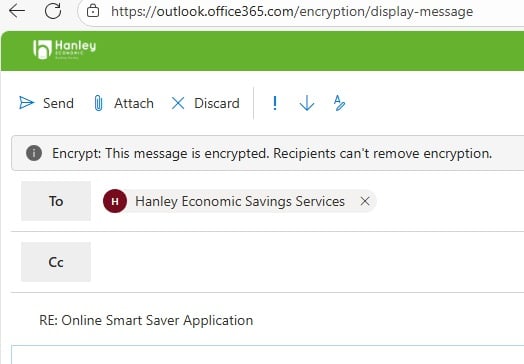 0
0 -
This made me smile, I too have moments in the day when you learn something so simple, that makes life easier, enjoy.Conditional Formatting - RS spreadsheet
Thank you SO much — I never knew this was possible! I have just proudly worked out how to do set a rule so that the cell changes colour if it's less than 30 days into the future, using Numbers (not as sophisticated as Excel, i guess, but, still, I like it)! I'm far too excited by this achievement and new feature!
2 -
Thanks for replying. I don't have a "view the message" link. I can just see the message. There is a banner across the top saying "This message is encrypted" but it does not appear to be. I will give them a ring tomorrow.roked said:
That's strange. Its not do with you having office, this is (or should be) what hanley redirect you to when you click 'view the message' in the email itself. While I have office365 on my PC (which I took the screenshot from), I don't have it on my phone and it does the same thing. My email is like this :fuzzzzy said:
I use free outlook, not office 365. I did not have to sign into anything with a password to read the message. No option to encrypt when I hit reply.roked said:
I have had the same request. If you hit reply within the message itself (after signing in with passcode), it states it is still encrypted and you can attach your documentsWillPS said:fuzzzzy said:Hanley RS online account
Just opened this account today with a £300 debit card payment. They have just emailed me to say I need to e-mail ID - documents and a selfie holding the ID documents. I usually pass the electronic verification with account openings and rarely get asked for ID so not a process I am familiar with. I'm not keen on supplying ID by e-mail. The e-mail is encrypted. Is it a secure way to supply ID by replying and attaching to an encrypted e-mail?Replying to the email directly - not secure.Replying via a trusted third party messaging portal, i.e. Mimecast - secure.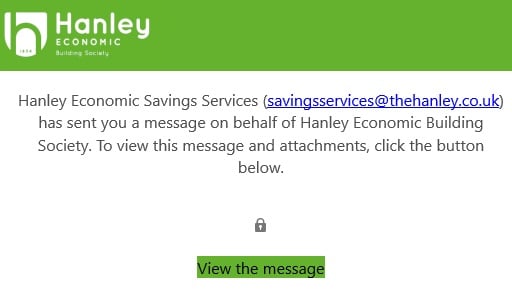 1
1 -
Yes, exactly the same pattern. I closed my account in March, can login and see my closed account and the app is working as normal too.Slinky said:allegro120 said:Slinky said:Slinky said:Hanley, my attempt to validate the application failed, currently number 2 in the queue on their phoneline, where I've been for about 15 minutes. If you're ahead of me, please hurry up!
Having spoken with Hanley, they've raised a ticket with their IT people as I'm not the only one who is getting an error message when trying to validate the application, and they can't work out why at the moment.I get this after each application attempt:
"You have successfully saved the progress on your application for our 1Yr Online Smart Saver.
Access to complete your application will expire on 05/11/2025.
To retrieve and complete your application please click the link below."
The link leads to a "Sorry...." page.
I phoned this morning, The CS person said "I think I know what the problem is, let's go through application process together". The process was exactly the same as the previous. He said that I will receive the email confirming the opening of this account within 24 hours... I have a feeling that tomorrow I'll be calling Hanley again.
Have you previously been a HEBS customer? I've got the feeling my failed attempt may be due to having closed an account in January but still having a login. I tried to apply via my old login, where I can still see the details of my old closed account, but when I tried to open the new account, it fell over with an error message at that point, so I tried as a new customer (using same security info), and got the same error message as you.
1 -
I've never seen this message before either! I'm not sure if I've had a paper letter this year - I imagine if I had I would have thought "I know what happens on maturity" and so maybe not read it properly. It was really frustrating talking to the customer service person on the phone - I'm not sure she understood everything I was saying. I'm tempted to try the secure messaging service so at least I have the response in writing.allegro120 said:
Halifaxtiptoe_mouse said:I've had a Halifax Regular Saver for years, and every year on maturity the balance has been transferred to my Instant Saver account, and the regular saver has renewed automatically. However, I've logged into the Halifax app today and the following message popped up:Your Regular SaverYour Regular Saver account term ends soon. Your account will then change into an Everyday Saver.Check out our range of products and best rates we have available for you.
I've just been on the phone with them, and spoken to someone who seems to think that this won't happen, but that an Everyday Saver account will be opened instead for the maturity balance, with the Regular Saver renewing automatically. She didn't instill me with great confidence as she appeared to be reading from this webpage https://www.halifax.co.uk/savings/fixed-term/regular-saver.html which says something slightly different.
Has anyone else had this message, and if so, what actually happened to your account(s)? I'd pop into my local branch to ask, but it's now closed down 😔.
My last renewal was in March, so I'm not up to date, but can say that I've never received such messages in my app. I always get a letter that explains what's going to happen (i.e money transfered to EA account and RS will roll over), and that's what always happen. I suspect whoever composed this message aren't familiar with this product.0 -
After receiving contradictory information, you can never really be sure, so it may be easiest just to see what happens and react accordingly. I strongly suspect it will empty and roll over for another year just like it has in the past. If not, a new one can be opened very quickly.tiptoe_mouse said:
I've never seen this message before either! I'm not sure if I've had a paper letter this year - I imagine if I had I would have thought "I know what happens on maturity" and so maybe not read it properly. It was really frustrating talking to the customer service person on the phone - I'm not sure she understood everything I was saying. I'm tempted to try the secure messaging service so at least I have the response in writing.allegro120 said:
Halifaxtiptoe_mouse said:I've had a Halifax Regular Saver for years, and every year on maturity the balance has been transferred to my Instant Saver account, and the regular saver has renewed automatically. However, I've logged into the Halifax app today and the following message popped up:Your Regular SaverYour Regular Saver account term ends soon. Your account will then change into an Everyday Saver.Check out our range of products and best rates we have available for you.
I've just been on the phone with them, and spoken to someone who seems to think that this won't happen, but that an Everyday Saver account will be opened instead for the maturity balance, with the Regular Saver renewing automatically. She didn't instill me with great confidence as she appeared to be reading from this webpage https://www.halifax.co.uk/savings/fixed-term/regular-saver.html which says something slightly different.
Has anyone else had this message, and if so, what actually happened to your account(s)? I'd pop into my local branch to ask, but it's now closed down 😔.
My last renewal was in March, so I'm not up to date, but can say that I've never received such messages in my app. I always get a letter that explains what's going to happen (i.e money transfered to EA account and RS will roll over), and that's what always happen. I suspect whoever composed this message aren't familiar with this product.1 -
Hanleyroked said:
I have had the same request. If you hit reply within the message itself (after signing in with passcode), it states it is still encrypted and you can attach your documents
I tried to reply directly from the encrypted message (after signing in with the passcode) but despite several attempts was unable to attach the files saved on my PC. Not something that is normally an issue when using my usual email service.1 -
When are you getting the issue? and how big are the files?HHUK said:
Hanleyroked said:
I have had the same request. If you hit reply within the message itself (after signing in with passcode), it states it is still encrypted and you can attach your documents
I tried to reply directly from the encrypted message (after signing in with the passcode) but despite several attempts was unable to attach the files saved on my PC. Not something that is normally an issue when using my usual email service.
If it is after selecting one for attachment, note that they are uploaded in the background (as it is a cloud based email) before they become visible. So depending on your internet connection and file size, it could take time and appears nothing has happened or worked + you can continue to use the email part as normal in the foreground
I also don't believe you can queue up attachments i.e. you have to wait for the first one to upload before you try and attach another file, otherwise it cancels the first one.
Once they are uploaded, it will suddenly appear as a box (without warning) above the message.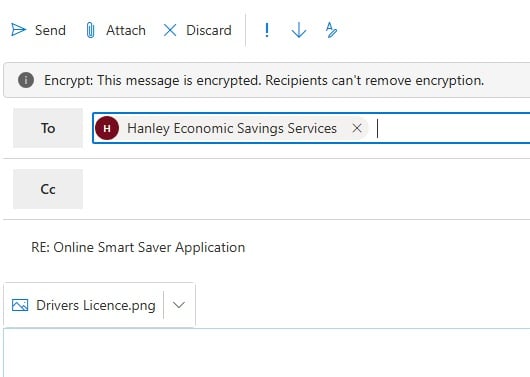
I have fast broadband with 25mg upload speed and it took around 8-10 secs to appear for me with a 5mb file.
1 -
Good point. However, if it doesn't roll over and is just converted, then it's underhand practice - I might not have logged into the app and noticed the message, in which case my standing order would be going into an account paying 1% instead of 5.5%. At the very least it's majorly confusing!masonic said:
After receiving contradictory information, you can never really be sure, so it may be easiest just to see what happens and react accordingly. I strongly suspect it will empty and roll over for another year just like it has in the past. If not, a new one can be opened very quickly.tiptoe_mouse said:
I've never seen this message before either! I'm not sure if I've had a paper letter this year - I imagine if I had I would have thought "I know what happens on maturity" and so maybe not read it properly. It was really frustrating talking to the customer service person on the phone - I'm not sure she understood everything I was saying. I'm tempted to try the secure messaging service so at least I have the response in writing.allegro120 said:
Halifaxtiptoe_mouse said:I've had a Halifax Regular Saver for years, and every year on maturity the balance has been transferred to my Instant Saver account, and the regular saver has renewed automatically. However, I've logged into the Halifax app today and the following message popped up:Your Regular SaverYour Regular Saver account term ends soon. Your account will then change into an Everyday Saver.Check out our range of products and best rates we have available for you.
I've just been on the phone with them, and spoken to someone who seems to think that this won't happen, but that an Everyday Saver account will be opened instead for the maturity balance, with the Regular Saver renewing automatically. She didn't instill me with great confidence as she appeared to be reading from this webpage https://www.halifax.co.uk/savings/fixed-term/regular-saver.html which says something slightly different.
Has anyone else had this message, and if so, what actually happened to your account(s)? I'd pop into my local branch to ask, but it's now closed down 😔.
My last renewal was in March, so I'm not up to date, but can say that I've never received such messages in my app. I always get a letter that explains what's going to happen (i.e money transfered to EA account and RS will roll over), and that's what always happen. I suspect whoever composed this message aren't familiar with this product.0 -
Is interest paid monthly? If so, I imagine one (the lower rate) reflects what the interest would be if it's paid into another account (or withdrawn as soon as it's paid) and the other is the interest rate if you leave it to compound.jameseonline said:Anybody got a Newcastle Regular Saver maturing soon?
I got an email recently explaining it will change to an Easy Saver, which is fine but what I don't understand is why the email shows BOTH a monthly rate AND a yearly rate for the account.
I contacted them via Instagram they seem to suggest instructions being given?
Tried contacting them again they now saying they won't talk about account specifics over social media, I'm like I'm not talking about transaction history or anything 😌
Here's a much better explanation - scroll down to where it says Where interest is paid monthly:
https://www.moneysavingexpert.com/banking/interest-rates/#AER0















This discussion has been closed.
Confirm your email address to Create Threads and Reply

Categories
- All Categories
- 355.1K Banking & Borrowing
- 254.6K Reduce Debt & Boost Income
- 455.8K Spending & Discounts
- 247.8K Work, Benefits & Business
- 604.9K Mortgages, Homes & Bills
- 178.8K Life & Family
- 262.6K Travel & Transport
- 1.5M Hobbies & Leisure
- 16.1K Discuss & Feedback
- 37.7K Read-Only Boards