We’d like to remind Forumites to please avoid political debate on the Forum.
This is to keep it a safe and useful space for MoneySaving discussions. Threads that are – or become – political in nature may be removed in line with the Forum’s rules. Thank you for your understanding.
📨 Have you signed up to the Forum's new Email Digest yet? Get a selection of trending threads sent straight to your inbox daily, weekly or monthly!
The Forum now has a brand new text editor, adding a bunch of handy features to use when creating posts. Read more in our how-to guide
Malware: Spyware Guard 2008
Comments
-
So you have a copy of HijackThis.exe on the computer?0
-
No, its not letting me install it either from the Internet or via USB. I only have Malwarebytes.0
-
What happens exactly? Any error messages? Try installing in Safe Mode.0
-
I think I know what is going on. You have a relatively new infection that is preventing you from accessing anti-malware websites...
Download ComboFix from one of these locations:
Link 1
Link 2
Link 3
* IMPORTANT!!! Save ComboFix.exe to your Desktop- Disable your AntiVirus and AntiSpyware applications, usually via a right click on the System Tray icon. They may otherwise interfere with our tools See HERE for help
- Double click on ComboFix.exe & follow the prompts.
- As part of it's process, ComboFix will check to see if the Microsoft Windows Recovery Console is installed. With malware infections being as they are today, it's strongly recommended to have this pre-installed on your machine before doing any malware removal. It will allow you to boot up into a special recovery/repair mode that will allow us to more easily help you should your computer have a problem after an attempted removal of malware.
- Follow the prompts to allow ComboFix to download and install the Microsoft Windows Recovery Console, and when prompted, agree to the End-User License Agreement to install the Microsoft Windows Recovery Console.
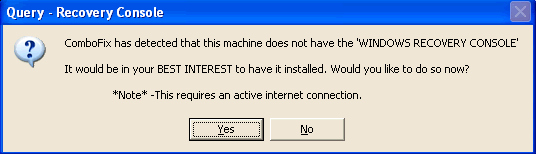
Once the Microsoft Windows Recovery Console is installed using ComboFix, you should see the following message: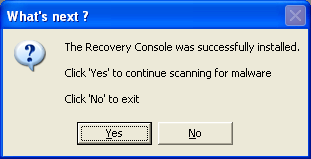
Click on Yes, to continue scanning for malware.
When finished, it shall produce a log for you. Please include the C:\ComboFix.txt in your next reply.0 - Disable your AntiVirus and AntiSpyware applications, usually via a right click on the System Tray icon. They may otherwise interfere with our tools See HERE for help
-
Have tried in safe mode as well. Don't get any error messages, Internet Explorer and Mozilla just shut down if I access any sites to do with anti-spyware or anti-virus, and if I try to install it from disc or usb it just closes the installation0
-
Sorry to say I had this exact same problem a couple of months ago and I tried everything I could think of including more or less all of the suggestions here. I had to concede defeat and take it to my local PC shop. Luckily for me they are good guys not rip off merchants and charged me £37 to save all my important info, clean my PC of the infection and re-install everything ( I thought it was reasonable anyway)
Have you tried switching System Restore off then running all of your clean up programs and rebooting as a lot of the bad guys hide, so to speak, within System Restore and will just come back when you turn the PC on no matter what you do.
Good luck0 -
Combofix has downloaded
I want to try and exhaust all options before I go for the format option.0 -
If its stopping you even in safe mode its possible we could run HIJACK in safe mode and FIX the problem from there so we can move on perhaps?
Its a tricky one obviously so theres no guarantees:idea:0 -
Another option is to remove the hardrive and scan it using another computer?:idea:0
-
Please run ComboFix according to the instructions above, and post the log. We can take it from there.0



This discussion has been closed.
Confirm your email address to Create Threads and Reply

Categories
- All Categories
- 354.8K Banking & Borrowing
- 254.5K Reduce Debt & Boost Income
- 455.6K Spending & Discounts
- 247.6K Work, Benefits & Business
- 604.5K Mortgages, Homes & Bills
- 178.6K Life & Family
- 262.2K Travel & Transport
- 1.5M Hobbies & Leisure
- 16.1K Discuss & Feedback
- 37.7K Read-Only Boards