We’d like to remind Forumites to please avoid political debate on the Forum.
This is to keep it a safe and useful space for MoneySaving discussions. Threads that are – or become – political in nature may be removed in line with the Forum’s rules. Thank you for your understanding.
Can you help? POP UPS




I am desperately looking for help. I have got a Microsoft Laptop. I can use EDGE. I have had the laptop for probably about 2 years.
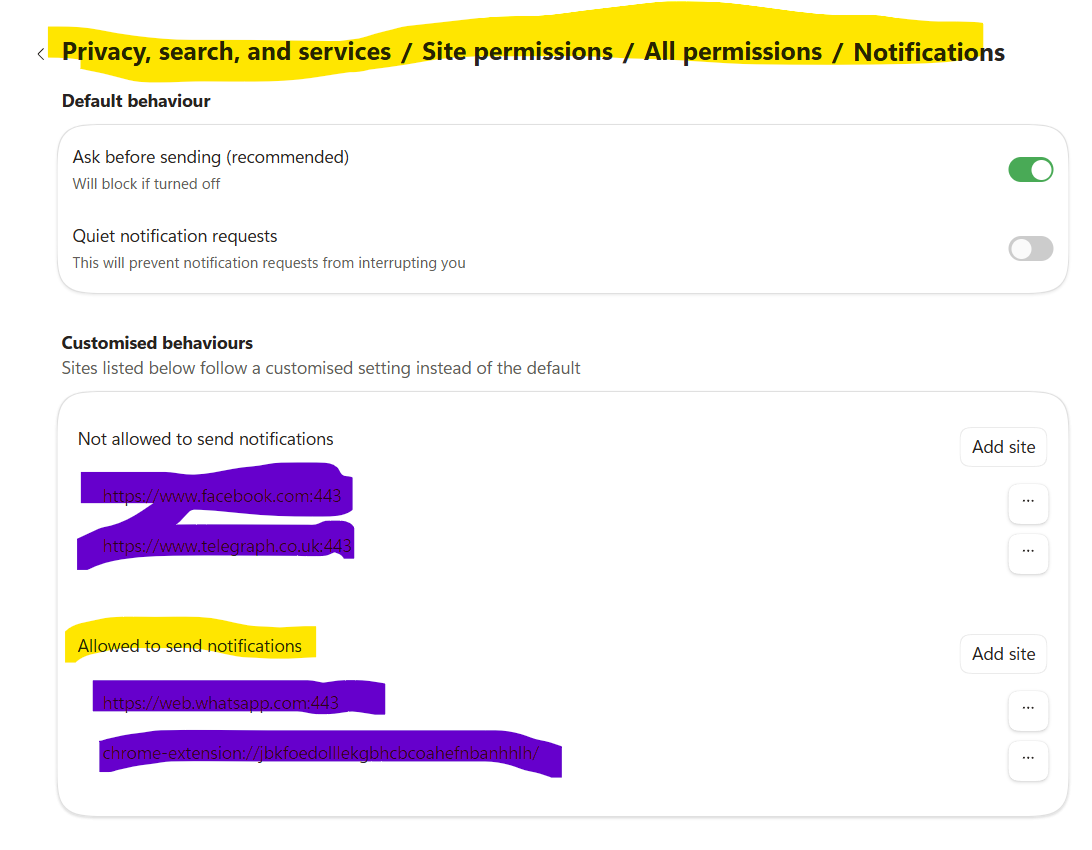
Recently I am getting continuous pop ups. So much so that I am really struggling to use the laptop. The pops are coming at a really fast rate and on the left lower screen EG I had a great problem getting to the RED cross on this sight so I could start a question. I have googled this and have followed all the instructions like go to EDGE then Settings Then privacy search and services Then site permissions All permissions click Pops ups and redirect The block toggle is ON Done all this numerous times to no avail. The pops up are newspapers, emails, adverts all sorts of things that I reckon I have used. Can anyone help me ??I am desperate.
Sue
Comments
-
Other more knowledgeable posters will probably offer better technical advice than I can, but I think you're going to need to start Windows in Safe Mode, download Malwarebytes Free (and possibly CCleaner) and run it to get rid of anything nasty that has got onto your computer.
(I think you'll need option 6, Enable Safe Mode with Networking)
(Click on Free Dowload, top right)
2 -
I use edge once to download Firefox or Brave and then I disable EDGE because MS have a habit or switching which
browser various apps open automatically.
Try the Brave Browser, whatever you use install Ublock Origin or uBlock Lite.Censorship Reigns Supreme in Troll City...2 -
Thank you all for the advice and recommendations/ You will see from my name and the 1942 that I am 84. I am tired so will look at it tomorrow. Once again many thanks Sue
1 -
Hi I have had a look at the situation and followed notifications advice. I am unsure if this will stop so so many pop ups. As I say trying to do anything is almost impossible due to so many pops covering the whole right side of screen. I will see how that does and is it persists will look at the other options. Once again many thanks Sue
0 -
Susan
Just curious … when you stop using your computer, what do you do?
Shut the lid? Press the power button? Or just let it 'go to sleep'?
1 -
Can you do a screen grab (Windows Key-Shift-S togther) and post what you're seeing with the 'pop ups'?
0 -
Thank you both. I just let it go to sleep. Sometimes I will shut the lid. I am using it at the moment and I am getting pops just as bad as ever.
Can you tell me how to open that and do the screen to take a photo> I am so late in getting back to you. I could not get myself on to this forum again. I was changing my password but still not get on to it until now and it is 1 08 am and should be sleeping. What I did do on that page with blocking I put in a few of the pops I get and blocked them so for now it is less. 1 was for emails and that did not pop up as my sister emails every night to I clocked AOL.
0 -
Have you run a Malwarebytes scan as suggested earlier?
Here is a direct link to their software: https://downloads.malwarebytes.com/file/mb5_offline
Choose to Save it to your PC and then double click on the saved file in order to begin the installation process. Once installed, reboot your PC, open the Malwarebytes program and choose to run a scan with it. Agree to remove anything it finds. Reboot the PC and then review the Pop-up situation again.
If there is still an issue, try a different Browser:
0 -
I wonder whether the best next step is to ask a younger relative or an IT-savvy friend to sit beside you for ten minutes and go through the Edge notification settings with you.
A relative, neighbour, local computer shop, or IT-savvy friend should be able to check the notification permissions and run a Windows Security scan quite quickly.
1





Confirm your email address to Create Threads and Reply

Categories
- All Categories
- 355.8K Banking & Borrowing
- 254.9K Reduce Debt & Boost Income
- 456.2K Spending & Discounts
- 248.3K Work, Benefits & Business
- 605.9K Mortgages, Homes & Bills
- 179K Life & Family
- 263.7K Travel & Transport
- 1.5M Hobbies & Leisure
- 16.2K Discuss & Feedback
- 37.7K Read-Only Boards