We’d like to remind Forumites to please avoid political debate on the Forum.
This is to keep it a safe and useful space for MoneySaving discussions. Threads that are – or become – political in nature may be removed in line with the Forum’s rules. Thank you for your understanding.
📨 Have you signed up to the Forum's new Email Digest yet? Get a selection of trending threads sent straight to your inbox daily, weekly or monthly!
Edit pdfs fixed sort off




Is there a free or cheap (i.e not paying £5-10 pcm forever) to edit PDFs?
The output doesn't have to be in a PDF.
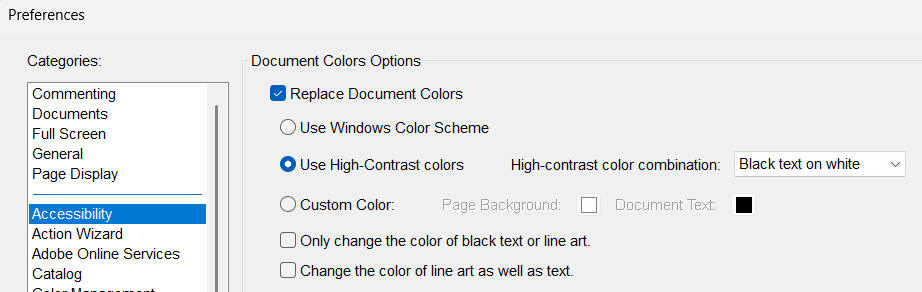
The reason is because I often have to read PDFs with coloured text which causes me headaches.
Sadly the people who send me PDFs won't provide text in black and white (I have tried)
I have tried converting my tablet screen to grey scale but it doesn't help.
Comments
-
You say tablet, is it Android or Apple app you need, or would a Windows one be OK?
Member of "Rubbish at Radishes" club1 -
I would rather edit on windows and then read on my android tablet.
Thank you for that.
0 -
Can you "print" a B&W or grayscale PDF from the PDF? I can do this on Linux, but I'm sure Windows has this option too.
You may also want to disable background graphics too (if your document has them).
I’m a Forum Senior Ambassador and I support the Forum Team on the Credit Cards, Savings & Investments, Budgeting & Bank Accounts, and Techie Stuff boards. If you need any help on these boards, do let me know. Please note that Ambassadors are not moderators. Any posts you spot in breach of the Forum Rules should be reported via the report button, or by emailing forumteam@moneysavingexpert.com. All views are my own and not the official line of MoneySavingExpert.0 -
That is another option although my printer is a bit tricky also if there is a way to edit the pdfs that would be easier.
0 -
Google Docs can read, edit and save PDFs.
2 -
I was suggesting generating a new (monochrome/grayscale) PDF using the "print to PDF" option, not actually printing to paper.
I’m a Forum Senior Ambassador and I support the Forum Team on the Credit Cards, Savings & Investments, Budgeting & Bank Accounts, and Techie Stuff boards. If you need any help on these boards, do let me know. Please note that Ambassadors are not moderators. Any posts you spot in breach of the Forum Rules should be reported via the report button, or by emailing forumteam@moneysavingexpert.com. All views are my own and not the official line of MoneySavingExpert.2 -
If you have the PDFs on your computer, are you able to select the text?
If you can then it's a proper PDF and most word processors can open and edit PDFs these days, if they have highly complex layout then it can break in the conversion. Apple's own Wordprocessor actually uses PDF as its file format (though they zip it with a small jpg of the front page in the zip)
If when trying to select text you get the whole page then it's likely it's an image instead meaning a Word type conversion isnt going to work. "Print" to greyscale PDF (which is generating another file, not actually printing) could work as long as the colours are reasonable dark, a light yellow will go to an even lighter grey which may be hard to read.
You may be able to use accessibility settings too to convert the display to greyscale but may be a pain to switch to and from it
1 -
You should be able to pdf print, a pdf to convert it to B&W - no physical printer needed...
If you want to edit PDFs that's a different question
1 -
No as in go to Print but instead of your printer, select "Print to PDF". You can setup the settings how you wantjust like if you were printing to paper eg only certain pages, grayscale, etc. Once you click 'Print' it will create a new PDF and open a dialog box asking where you want to save the PDF.
1










Confirm your email address to Create Threads and Reply

Categories
- All Categories
- 355.8K Banking & Borrowing
- 254.9K Reduce Debt & Boost Income
- 456.2K Spending & Discounts
- 248.3K Work, Benefits & Business
- 605.9K Mortgages, Homes & Bills
- 179K Life & Family
- 263.7K Travel & Transport
- 1.5M Hobbies & Leisure
- 16.2K Discuss & Feedback
- 37.7K Read-Only Boards