We’d like to remind Forumites to please avoid political debate on the Forum.
This is to keep it a safe and useful space for MoneySaving discussions. Threads that are – or become – political in nature may be removed in line with the Forum’s rules. Thank you for your understanding.
Automatically Save Draft (Merged)
Comments
-
Yes!
When enabling the Rich Editor, I flipped the switch. We'll monitor how members feel about the change.
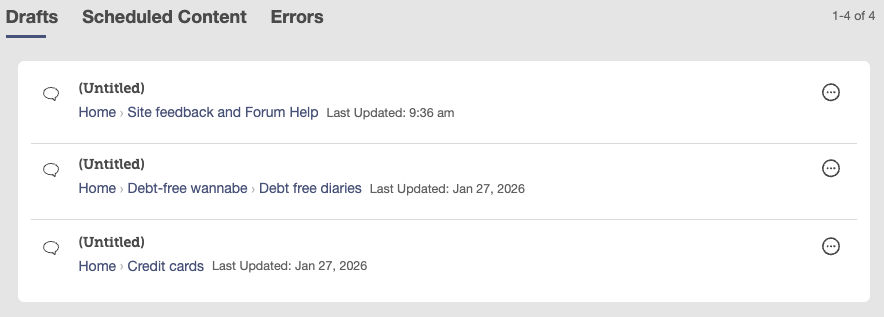
Personally, yesterday I was getting annoyed that some text I didn't want was sticking around, and got into the habit of blanking the box and clicking 'Save Draft' to get rid of it - until I realised that empty drafts were piling up on my Drafts page:
 Join the MSE Forum
Get the Free MoneySavingExpert Money Tips E-mail
To report inappropriate posts: click the report button
Flag a news story: news@moneysavingexpert.com0 -
It's very annoying
Let's Be Careful Out There0 -
When I realised that this was happening - I’d changed my mind about posting and navigated away, then came back to the thread later to find my comment still there - I deleted all the text. But when I came back to the thread again, my deleted text was back! The only way to remove it was to remove the saved draft explicitly.
0 -
Did you try explicitly pressing the Save Draft button after deleting the text? That worked for me, and was quicker than going into the drafts (just a quick Ctrl+A (select all), Delete, then press Save Draft).
1 -
No, I hadn’t thought of that, but have just tried it. So the blank draft supersedes the previous, automatically saved one, but only if explicitly saved. A rather odd design - I suspect imprecise user requirements - it was ever thus. But this is a good workaround that ensures the unwanted text is eliminated. Thank you.
0 -
Is there a setting where we can disable automatically saving drafts? I do appreciate that the page no longer randomly refreshes and loses a long message, but most of the time it's just annoying. I frequently start typing a response, decide against it and clear the box, then when I next visit the thread the abandoned draft is there including quotes which don't always go away with 'select all → backspace'. It's just a little niggle in the grand scheme of things (the quoting system is the real abomination here) but it is annoying that clearing the box doesn't override the previous draft.
If there isn't a setting to choose for ourselves, even a Cancel button for replies would probably do the job, I think.
0 -
Pretty sure that I save no drafts unless I hit the 'save draft' button, next to the 'post draft'.Or there used to be.
Seems this latest update (with stupid oversized reply box) has done an autosave feature… and no obvious way/place to alter that.
Oh well it's not my server space that'll get eaten up and warm the planet via the Data Centre's leccy.
EDIT you can delete the Drafts one at a time in your profile Drafts via the <three dots in circle> to the right of each one.
0 -
Hi
Autosaving of drafts is a setting we have that's separate from the new Rich Editor.
There were some issues with using it with the previous editor, so we only turned it on when we switched to the new editor.There is no setting for members to change this individually - it's on for everyone or it's off.
Some of the issues member have mentioned will be resolved when we update our layouts in the future.
For example, a popup will prompt you if you have an empty draft:
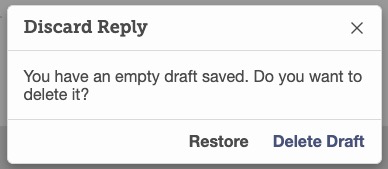
But for now, we've created a poll to see if members would like us to continue using this feature:
Join the MSE Forum
Get the Free MoneySavingExpert Money Tips E-mail
To report inappropriate posts: click the report button
Flag a news story: news@moneysavingexpert.com0 -
When you "flipped the switch" to turn this on, did MSE not carry out any testing on how it functions?
0 -
Just to give a fuller answer in response to this question - and to point to for similar questions about testing -
There are some functions of this forum that can be switched on by 'role' or 'rank', but many that can only be enabled site-wide to all users: As in the quote, there is essentially a single setting that can be 'flipped' on or off.
Auto save-draft falls into that second category, so we couldn’t roll it out to a small subset of members first.
We do test new features in our test environments, but even weeks or months of testing can’t fully replicate the huge variety of real-world use - hundreds of different devices, connection speeds and browsing set-ups, and very different posting habits across the boards. The way people post on Competitions, for example, is quite different to Parking, Debt-Free Diaries, or Challenges - and those differences only really show up at scale.
As one example, one auto-save issue that's been reported is that a post may not be created if you click 'Post Comment' while a draft is saving simultaneously. This isn't something I've never seen over years of this setting being enabled on our test environment, or when posting as a regular member on other Vanilla forums with this feature.
Join the MSE Forum
Get the Free MoneySavingExpert Money Tips E-mail
To report inappropriate posts: click the report button
Flag a news story: news@moneysavingexpert.com0















Confirm your email address to Create Threads and Reply

Categories
- All Categories
- 355.7K Banking & Borrowing
- 254.9K Reduce Debt & Boost Income
- 456.1K Spending & Discounts
- 248.3K Work, Benefits & Business
- 605.8K Mortgages, Homes & Bills
- 179K Life & Family
- 263.6K Travel & Transport
- 1.5M Hobbies & Leisure
- 16.2K Discuss & Feedback
- 37.7K Read-Only Boards