We’d like to remind Forumites to please avoid political debate on the Forum.
This is to keep it a safe and useful space for MoneySaving discussions. Threads that are – or become – political in nature may be removed in line with the Forum’s rules. Thank you for your understanding.
📨 Have you signed up to the Forum's new Email Digest yet? Get a selection of trending threads sent straight to your inbox daily, weekly or monthly!
Something broken? Let us know on the new Report a Technical Issue board. Please use Site Feedback and Forum Help for other feedback.
Automatically Save Draft (Merged)

System
Posts: 178,487


 Community Admin
This discussion was created from comments split from: Admin of posts in ongoing correspondence.
This is a system account and does not represent a real person. To contact the Forum Team email forumteam@moneysavingexpert.com
0
Comments
-
Is there a way of asking the moderators to make it possible, when in the middle of composing a post, to flick back temporarily to a previous post for reference, but not loose the text of the original unsent post? It is easy to forget to click on "Save Draft" in the heat of the moment.Telegraph Sam
There are also unknown unknowns - the one's we don't know we don't know0 -
A workaround that I find viable is to open another browser tab or window, within which to review other content, rather than exiting from the editing window, but info about how to communicate with forum admins was on the previous page.Telegraph_Sam said:Is there a way of asking the moderators to make it possible, when in the middle of composing a post, to flick back temporarily to a previous post for reference, but not loose the text of the original unsent post? It is easy to forget to click on "Save Draft" in the heat of the moment.
If memory serves correctly, there was some sort of autosave facility introduced as part of an upgrade a couple of years ago and it wasn't a success.1 -
Depends on having your wits about you when composing a post - when instinct tells you otherwise ! "Save Draft" should be made default before the text is lostTelegraph Sam
There are also unknown unknowns - the one's we don't know we don't know0 -
Out of curiosity, I just went looking for references to the earlier incarnation of this and it was clearly unpopular, although perhaps down to flawed implementation rather than the concept itself:
https://forums.moneysavingexpert.com/discussion/6409595/why-can-039-t-i-erase-unwanted-replies-before-posting
but it does have fans too (point 3):
https://forums.moneysavingexpert.com/discussion/comment/80199233/#Comment_801992330 -
Hi everyone,
We do indeed have an 'Automatically Save Drafts' setting available.
From memory, we turned this off because it was annoying for many members.
The current editor can have the issue of the cursor getting 'stuck' when you quote a post: You can't get the cursor to type text below the quote, and the editor refuses to create your post because it thinks you haven't added any new text. So it's preferrable that you can blank the editor by navigating away rather than there being an automatic draft.
As we're moving to a new editor soon, this is something we can look at re-enabling since the new editor won't have that issue.
Join the MSE Forum
Get the Free MoneySavingExpert Money Tips E-mail
To report inappropriate posts: click the report button
Flag a news story: news@moneysavingexpert.com2 -
In Firefox there is a 'Duplicate Tab' option if you right click on the tab. It makes it easy to review previous content, perhaps there is an equivalent in other browsers0
-
For the latest Desktop version of Chrome, there's now the ability to "Open in Split View" (which will be "Right View" or "Left View" if you've already opened it).eskbanker said:
Just found that on Chrome too.ColdIron said:In Firefox there is a 'Duplicate Tab' option if you right click on the tab. It makes it easy to review previous content, perhaps there is an equivalent in other browsers
So, right-clicking on a page number would be a quick way to open a separate pane showing another parts of the thread: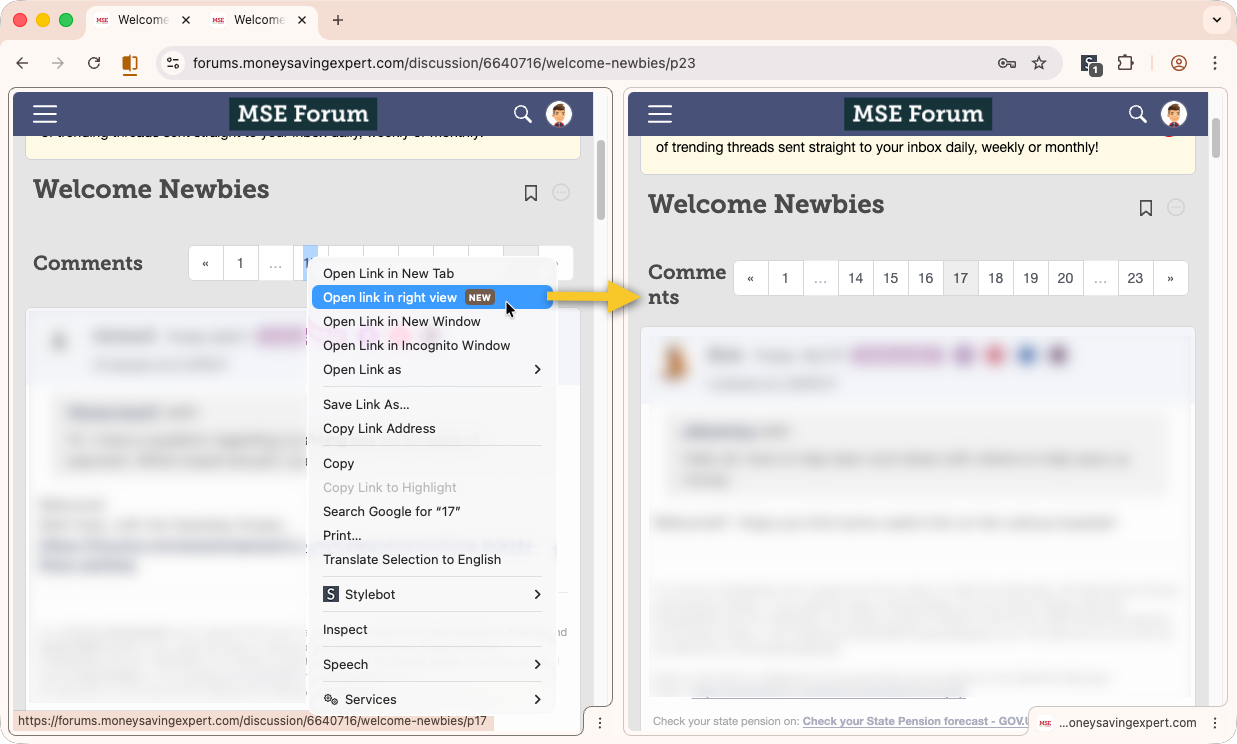
Join the MSE Forum
Get the Free MoneySavingExpert Money Tips E-mail
To report inappropriate posts: click the report button
Flag a news story: news@moneysavingexpert.com3 -
Looks like this autosaving of drafts has now been re-enabled as part of the new editor implementation?
0 -
In Edge, the default command for 'duplicate tab' is Ctrl-Shift-K. Interesting that it also reproduces the post I was drafting …
I'm not being lazy ... I'm just in energy-saving mode.
If you're asked to post a photo of your meter Meter Configuration Tables v2.0.xlsx0









Confirm your email address to Create Threads and Reply

Categories
- All Categories
- 355.7K Banking & Borrowing
- 254.9K Reduce Debt & Boost Income
- 456.1K Spending & Discounts
- 248.3K Work, Benefits & Business
- 605.8K Mortgages, Homes & Bills
- 179K Life & Family
- 263.6K Travel & Transport
- 1.5M Hobbies & Leisure
- 16.2K Discuss & Feedback
- 37.7K Read-Only Boards