We’d like to remind Forumites to please avoid political debate on the Forum.
This is to keep it a safe and useful space for MoneySaving discussions. Threads that are – or become – political in nature may be removed in line with the Forum’s rules. Thank you for your understanding.
📨 Have you signed up to the Forum's new Email Digest yet? Get a selection of trending threads sent straight to your inbox daily, weekly or monthly!
Do you use Google Sheets budget template? Running in to bother.

B0bbyEwing
Posts: 2,561


 Forumite
I use it but with a few tweaks (as in add on various categories plus I have sections for variable / income / fixed / savings). I have a template which I then just make a copy of for the months of the year.
I've checked this template & it doesn't look like it's that as it's default is £0.
I've just now looked at it & noticed one category sitting at £500 spend on the Summary tab which I knew was incorrect. This category is a "Supermarkets no receipt" category - usually for when my wife loses the receipt (as since a Supermarket spend can fall in to various categories I have, these often get broken down in to different categories when I enter the receipt).
There's been some of these but I haven't completed the drop down yet. I'll only do that once she's checked her bags & it turns out that the receipt is actually gone.
Go to the transactions tab & have a look for where I've marked any spends with this category - and I haven't, I haven't marked a single one as Supermarket no receipt, yet it's showing £500 has been spent in this category.
Even if you tot up the spends that are potentially going to end up being marked as this, it's only £11 so far. Not £500.
It'll take a fair bit of tedious time to re-do the month so far so can anyone shed some light on why a category may be adding up when nothing has even been entered?
EDIT: Just checked December's & there's £2,500 been spent on that category. Something isn't right.
[=if(isblank($B29), "", sumif(Transactions!$E:$E,$B29,Transactions!$C:$C))]
That's the formula in the cell.
Which is the same as the formula above (B28) and below (B30) and those categories are correct.
I've checked this template & it doesn't look like it's that as it's default is £0.
I've just now looked at it & noticed one category sitting at £500 spend on the Summary tab which I knew was incorrect. This category is a "Supermarkets no receipt" category - usually for when my wife loses the receipt (as since a Supermarket spend can fall in to various categories I have, these often get broken down in to different categories when I enter the receipt).
There's been some of these but I haven't completed the drop down yet. I'll only do that once she's checked her bags & it turns out that the receipt is actually gone.
Go to the transactions tab & have a look for where I've marked any spends with this category - and I haven't, I haven't marked a single one as Supermarket no receipt, yet it's showing £500 has been spent in this category.
Even if you tot up the spends that are potentially going to end up being marked as this, it's only £11 so far. Not £500.
It'll take a fair bit of tedious time to re-do the month so far so can anyone shed some light on why a category may be adding up when nothing has even been entered?
EDIT: Just checked December's & there's £2,500 been spent on that category. Something isn't right.
[=if(isblank($B29), "", sumif(Transactions!$E:$E,$B29,Transactions!$C:$C))]
That's the formula in the cell.
Which is the same as the formula above (B28) and below (B30) and those categories are correct.
🤐🤐🤐
0
Comments
-
Do you have a link to the template you are using?I’m a Forum Senior Ambassador and I support the Forum Team on the Credit Cards, Savings & Investments, Budgeting & Bank Accounts, and Techie Stuff boards. If you need any help on these boards, do let me know. Please note that Ambassadors are not moderators. Any posts you spot in breach of the Forum Rules should be reported via the report button, or by emailing forumteam@moneysavingexpert.com. All views are my own and not the official line of MoneySavingExpert.0
-
Problem there is I'll have to change things. There's categories with our names in which I don't want on a public forum.sausage_time said:Do you have a link to the template you are using?
I also don't know whether sharing it can then identify me (so don't know whether I'll have to move it to a no name account for sharing purposes). By that I mean if it's linked to the email joebloggs at Gmail then I don't know whether sharing it allows those it's shared with to see my name is Joe Bloggs - which obviously I don't want.🤐🤐🤐
0 -
Understood. What's in B29? B28? Columns C and E?
Edit: Could there be a space in B29?I’m a Forum Senior Ambassador and I support the Forum Team on the Credit Cards, Savings & Investments, Budgeting & Bank Accounts, and Techie Stuff boards. If you need any help on these boards, do let me know. Please note that Ambassadors are not moderators. Any posts you spot in breach of the Forum Rules should be reported via the report button, or by emailing forumteam@moneysavingexpert.com. All views are my own and not the official line of MoneySavingExpert.0 -
sausage_time said:Understood. What's in B29? B28? Columns C and E?
Edit: Could there be a space in B29?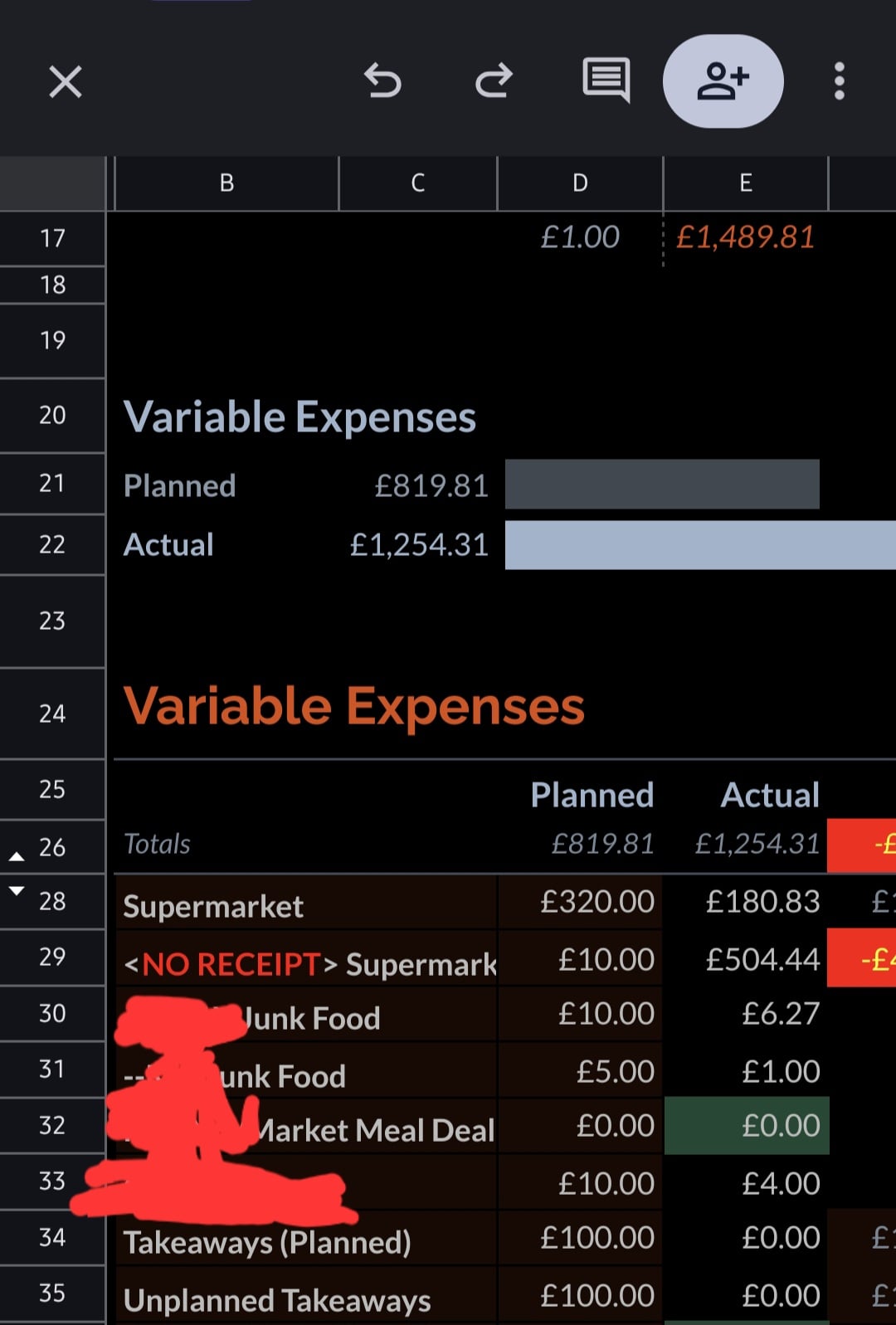
First off I want to point out - ignore the planned. I haven't planned on spending that much on takeaways 😂 I just haven't 'pulled my finger out' & gotten round to setting correct figures for all categories.
But that's not this issue.
When I go to the transactions tab at the bottom, highlight the drop down column for the categories & go to conditional formatting I see the correct cells appear to be selected.
Short of just running it & cross checking the summary every time I enter a transaction to see what triggers a change I don't know what else to do as I'm at a loss as to why a category is tallying up when nothing is entered for it.
🤐🤐🤐
0 -
Still trying to understand your sheet.
What cell is the equation from your OP in? And what do you expect the result to be?
Is B29 just formatted/coloured text?I’m a Forum Senior Ambassador and I support the Forum Team on the Credit Cards, Savings & Investments, Budgeting & Bank Accounts, and Techie Stuff boards. If you need any help on these boards, do let me know. Please note that Ambassadors are not moderators. Any posts you spot in breach of the Forum Rules should be reported via the report button, or by emailing forumteam@moneysavingexpert.com. All views are my own and not the official line of MoneySavingExpert.0 -
Also, from experimenting....
<NO RECEIPT> Supermarket
will aslo matchSupermarket
in SUMIF(..). Try not using <, >, or any special characters in your categories.I’m a Forum Senior Ambassador and I support the Forum Team on the Credit Cards, Savings & Investments, Budgeting & Bank Accounts, and Techie Stuff boards. If you need any help on these boards, do let me know. Please note that Ambassadors are not moderators. Any posts you spot in breach of the Forum Rules should be reported via the report button, or by emailing forumteam@moneysavingexpert.com. All views are my own and not the official line of MoneySavingExpert.0 -
The formula from the OP is from cell E29. The formula in all the E cells matches each other except for the cell identifier number so I would expect if one is wrong then they'd all be wrong.
Regards the actual formula....
I don't know formula so I haven't actually selected / chosen anything. What I did was this....
Take the budget template that's available in Google Drive - Sheets.
I then tweaked the categories to what I wanted to call them.
And when I wanted to add more categories I just selected the cell above & dragged down, renaming the new category.
This would obviously then need to be followed up in the Transactions sheet which is where I'd select the categories column, go to conditional formatting & just add on the next row number after adding a new category.
In other words I haven't actually chosen any formula myself. It's what the template began with.
It may be the weekend when I've more time (Work at the mo & not much time midweek after work) but I'll look at making a copy of this, renaming categories which don't display people's names & get it uploaded so you can have a closer look.
I also may look at making a copy & then just start deleting transactions from the copy until I identify what makes a change.
On the face of it it's JUST that one category which keeps being wrong. Which is weird. Other categories seem correct. Or, if they're wrong then it isn't obviously wrong like with this one.🤐🤐🤐
0 -
See my previous post. Remove the "<" and ">" symbols from NO RECEIPT category. That's messing up the match.B0bbyEwing said:The formula from the OP is from cell E29. The formula in all the E cells matches each other except for the cell identifier number so I would expect if one is wrong then they'd all be wrong.
Regards the actual formula....
I don't know formula so I haven't actually selected / chosen anything. What I did was this....
Take the budget template that's available in Google Drive - Sheets.
I then tweaked the categories to what I wanted to call them.
And when I wanted to add more categories I just selected the cell above & dragged down, renaming the new category.
This would obviously then need to be followed up in the Transactions sheet which is where I'd select the categories column, go to conditional formatting & just add on the next row number after adding a new category.
In other words I haven't actually chosen any formula myself. It's what the template began with.
It may be the weekend when I've more time (Work at the mo & not much time midweek after work) but I'll look at making a copy of this, renaming categories which don't display people's names & get it uploaded so you can have a closer look.
I also may look at making a copy & then just start deleting transactions from the copy until I identify what makes a change.
On the face of it it's JUST that one category which keeps being wrong. Which is weird. Other categories seem correct. Or, if they're wrong then it isn't obviously wrong like with this one.I’m a Forum Senior Ambassador and I support the Forum Team on the Credit Cards, Savings & Investments, Budgeting & Bank Accounts, and Techie Stuff boards. If you need any help on these boards, do let me know. Please note that Ambassadors are not moderators. Any posts you spot in breach of the Forum Rules should be reported via the report button, or by emailing forumteam@moneysavingexpert.com. All views are my own and not the official line of MoneySavingExpert.1 -
Thank you. Just edited that out & it immediately turned the spend to £0. You've just saved me a load of time!sausage_time said:
See my previous post. Remove the "<" and ">" symbols from NO RECEIPT category. That's messing up the match.B0bbyEwing said:The formula from the OP is from cell E29. The formula in all the E cells matches each other except for the cell identifier number so I would expect if one is wrong then they'd all be wrong.
Regards the actual formula....
I don't know formula so I haven't actually selected / chosen anything. What I did was this....
Take the budget template that's available in Google Drive - Sheets.
I then tweaked the categories to what I wanted to call them.
And when I wanted to add more categories I just selected the cell above & dragged down, renaming the new category.
This would obviously then need to be followed up in the Transactions sheet which is where I'd select the categories column, go to conditional formatting & just add on the next row number after adding a new category.
In other words I haven't actually chosen any formula myself. It's what the template began with.
It may be the weekend when I've more time (Work at the mo & not much time midweek after work) but I'll look at making a copy of this, renaming categories which don't display people's names & get it uploaded so you can have a closer look.
I also may look at making a copy & then just start deleting transactions from the copy until I identify what makes a change.
On the face of it it's JUST that one category which keeps being wrong. Which is weird. Other categories seem correct. Or, if they're wrong then it isn't obviously wrong like with this one.🤐🤐🤐
1



Confirm your email address to Create Threads and Reply

Categories
- All Categories
- 355.8K Banking & Borrowing
- 254.9K Reduce Debt & Boost Income
- 456.2K Spending & Discounts
- 248.3K Work, Benefits & Business
- 605.9K Mortgages, Homes & Bills
- 179K Life & Family
- 263.8K Travel & Transport
- 1.5M Hobbies & Leisure
- 16.2K Discuss & Feedback
- 37.7K Read-Only Boards