We’d like to remind Forumites to please avoid political debate on the Forum.
This is to keep it a safe and useful space for MoneySaving discussions. Threads that are – or become – political in nature may be removed in line with the Forum’s rules. Thank you for your understanding.
📨 Have you signed up to the Forum's new Email Digest yet? Get a selection of trending threads sent straight to your inbox daily, weekly or monthly!
Barclaycard issue

GTR_King
Posts: 2,155


 Forumite
Hi 👋 all, Is there anyway I can change my Barclaycard online PDF statements to look like this
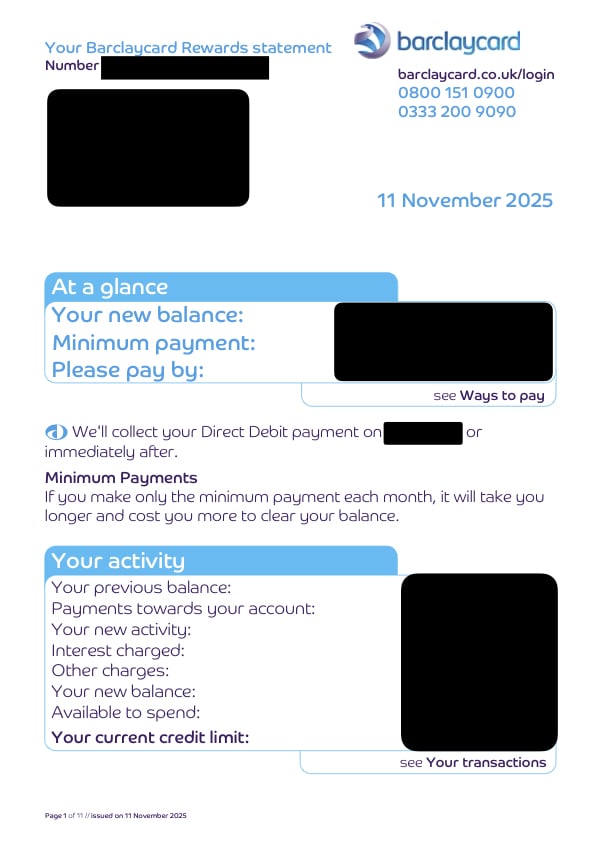
Without changing my Barclays statements to large print?
Without changing my Barclays statements to large print?
As my Barclaycard Online PDF statements have changed to look like this without my consent!
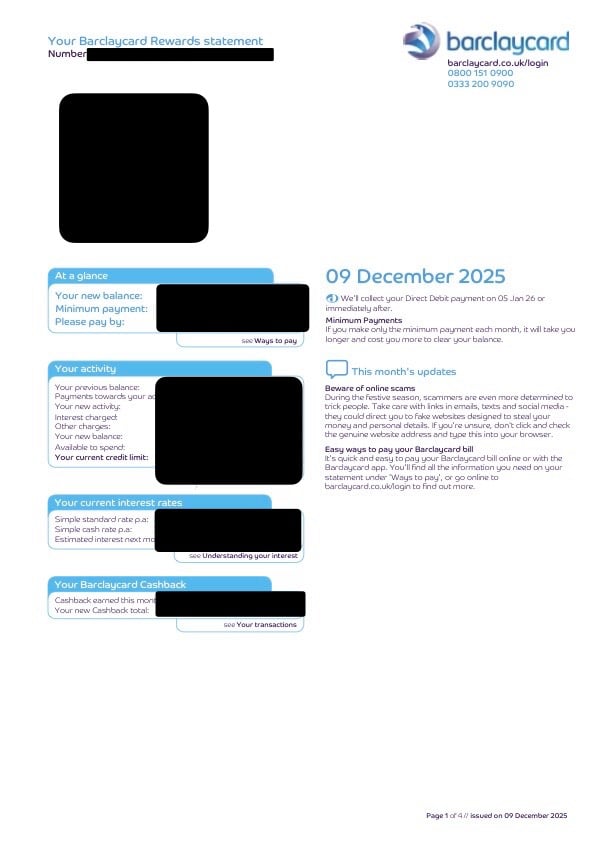
is this not possible? I am not Happy 😡 about it but will accept it if can’t be done
is this not possible? I am not Happy 😡 about it but will accept it if can’t be done
0
Comments
-
Barclaycard are free to change how they display their statements without any ones consent.Life in the slow lane2
-
I understand they can change layout!But the top picture was large print & they changed it to normal print without telling me & told me I am not allowed to change it back unless I do Barclays as well which I don’t wanna do
as that would come in a booklet with largen print letters in black & white! Not actual statement & they can’t do large print online PDF statements0 -
What's the issue?
All devices and browsers are able to zoom in these days.2 -
Can I ask why you want one large print but not the other?0
-
You could use a pdf editor, but why? Changing a statement and sending it to someone else potentially could be considered fraudulent or change the context of the statement.
0 -
The issue is they changed my settings without telling me (I am Autistic) & if something is gonna change I like to be told!Ayr_Rage said:What's the issue?
All devices and browsers are able to zoom in these days.northwalesd said:Can I ask why you want one large print but not the other?I have had Barclaycard Large print statement’s since 2021 & like layout & easier to read etc!Sadly Barclays don’t off colour large print statements just a booklet in black & white with large font for the transactions & details etc!sheenas said:You could use a pdf editor, but why? Changing a statement and sending it to someone else potentially could be considered fraudulent or change the context of the statement.I don’t want to use PDF editor (I blanked personal info out for this post to show the 2 different statement layouts) & I would never send my bank/credit card statements to anyone unless necessary but only official copies0 -
I assume you want to print hard copies of your statements? As a suggestion what about using poster mode in Adobe Acrobat? Looking at your screen grab, if you print 2x2 then the first column would be close to what you seek.
https://helpx.adobe.com/uk/acrobat/desktop/print-documents/booklets-posters-banners/posters-banners.htmlI’m a Forum Senior Ambassador and I support the Forum Team on the Credit Cards, Savings & Investments, Budgeting & Bank Accounts, and Techie Stuff boards. If you need any help on these boards, do let me know. Please note that Ambassadors are not moderators. Any posts you spot in breach of the Forum Rules should be reported via the report button, or by emailing forumteam@moneysavingexpert.com. All views are my own and not the official line of MoneySavingExpert.0 -
Have you considered using a magnifying app on your PC or phone to zoom in on the PDF statements.1
-
Thank you will try thatsausage_time said:I assume you want to print hard copies of your statements? As a suggestion what about using poster mode in Adobe Acrobat? Looking at your screen grab, if you print 2x2 then the first column would be close to what you seek.
https://helpx.adobe.com/uk/acrobat/desktop/print-documents/booklets-posters-banners/posters-banners.html
Nope all my other statements Are fine[Deleted User] said:Have you considered using a magnifying app on your PC or phone to zoom in on the PDF statements.
0








This discussion has been closed.
Confirm your email address to Create Threads and Reply

Categories
- All Categories
- 355.8K Banking & Borrowing
- 254.9K Reduce Debt & Boost Income
- 456.2K Spending & Discounts
- 248.3K Work, Benefits & Business
- 606K Mortgages, Homes & Bills
- 179K Life & Family
- 263.8K Travel & Transport
- 1.5M Hobbies & Leisure
- 16.2K Discuss & Feedback
- 37.7K Read-Only Boards