We’d like to remind Forumites to please avoid political debate on the Forum.
This is to keep it a safe and useful space for MoneySaving discussions. Threads that are – or become – political in nature may be removed in line with the Forum’s rules. Thank you for your understanding.
📨 Have you signed up to the Forum's new Email Digest yet? Get a selection of trending threads sent straight to your inbox daily, weekly or monthly!
Samsung Smart TV 48"-John Lewis

Robocop35
Posts: 40


 Forumite
in Techie Stuff
Hi,
My father bought a new TV from John Lewis yesterday.
I have an old Panasonic box which I was able to record programmes with and then watch them later and skip through the adverts etc.
Is there a way I can connect this to my new TV, and still use this facility. As all the apps on the new TV, mean you cant avoid sitting through the adverts when watching a programme on like ITV X for example.
Many thanks
James
My father bought a new TV from John Lewis yesterday.
I have an old Panasonic box which I was able to record programmes with and then watch them later and skip through the adverts etc.
Is there a way I can connect this to my new TV, and still use this facility. As all the apps on the new TV, mean you cant avoid sitting through the adverts when watching a programme on like ITV X for example.
Many thanks
James
0
Comments
-
More information needed. What model is the set-top box? Where did it record from? Off-air I assume? Digtial?
How did it connect to the TV? If older tech it might have been a scart connector and you will probably need an adaptor to HDMI.I’m a Forum Senior Ambassador and I support the Forum Team on the Credit Cards, Savings & Investments, Budgeting & Bank Accounts, and Techie Stuff boards. If you need any help on these boards, do let me know. Please note that Ambassadors are not moderators. Any posts you spot in breach of the Forum Rules should be reported via the report button, or by emailing forumteam@moneysavingexpert.com. All views are my own and not the official line of MoneySavingExpert.1 -
Buy a subscription then you don't get the ads?1
-
not a great money saving suggestion really?Vitor said:Buy a subscription then you don't get the ads?3 -
But a good, sensible option.searchlight123 said:
not a great money saving suggestion really?Vitor said:Buy a subscription then you don't get the ads?1 -
Plug your TV aerial into the back of your Panasonic box as before
Take the lead out of the back of the Panasonic box and plug it into your new TV aerial socket
Connect to your Panasonic box to the TV's hdmi socket either natively or using an adapter0 -
OP mentioned ITX ( streaming channel).
Worth pointing out even if no problem in connecting the box to new TV, they are still restricted to recording freeview channels only. Still have to endure adverts for the various free catch up streaming apps if they don't want to pay respective subscriptions.0 -
Hi,
Thanks for your comments. I have got it working, its an old Panasonic box. It was straight forward, just plugged it into the HDMI socket, and the TV found the box straight away. That was the easiest thing in setting up the TV!
I think I will buy a new recording machine. Years ago I had a fox recorder box which could record many programmes at the same time, but I think things have changed since then.
I think the best box is about £180.00 from John Lewis, which can tape up to programmes going on at the same time.
Watching things on catch up like ITV X etc with the adverts is a bit of a pain.
Many thanks
James0 -
Hi,
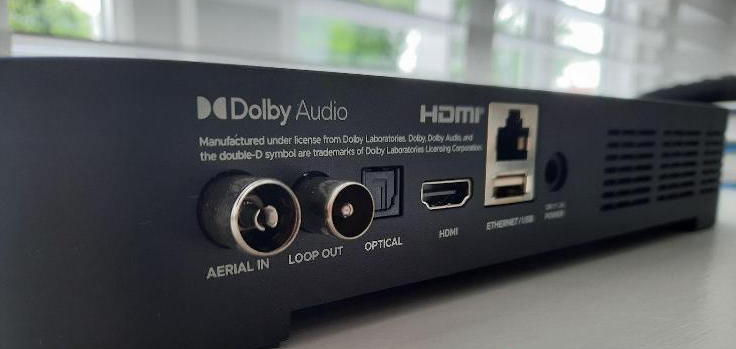
I was wondering anyone can help. I have bought a Manhattan TV Recorder Box from John Lewis. I have put the aerial straight into that box, and have connected it to the TV by the HDMI Cable.
On the Samsung tv, it comes up with no signal and does not display any TV Channels now?
Any ideas on how to fix this, as I would like the Samsung TV to show ordinary TV separate from the Manhattan Box.
Many thanks James0 -
Most Manhattan recorders have two aerial sockets: one marked ANT IN and one marked ANT OUT or LOOP OUT.• Wall aerial → Manhattan ANT IN• Manhattan ANT OUT / LOOP OUT → Samsung TV ANT IN• HDMI from Manhattan → Samsung TV
 0
0 -
Hi,
Thanks for the message. The correct leads are in the correct sockets as shown above.0








Confirm your email address to Create Threads and Reply

Categories
- All Categories
- 355.8K Banking & Borrowing
- 254.9K Reduce Debt & Boost Income
- 456.2K Spending & Discounts
- 248.3K Work, Benefits & Business
- 605.9K Mortgages, Homes & Bills
- 179K Life & Family
- 263.8K Travel & Transport
- 1.5M Hobbies & Leisure
- 16.2K Discuss & Feedback
- 37.7K Read-Only Boards