We’d like to remind Forumites to please avoid political debate on the Forum.
This is to keep it a safe and useful space for MoneySaving discussions. Threads that are – or become – political in nature may be removed in line with the Forum’s rules. Thank you for your understanding.
📨 Have you signed up to the Forum's new Email Digest yet? Get a selection of trending threads sent straight to your inbox daily, weekly or monthly!
The Forum now has a brand new text editor, adding a bunch of handy features to use when creating posts. Read more in our how-to guide
The Old Regular Savers Discussion Thread 28/12/24-29/1/26
Comments
-
I could do but then again it's not as simple as just accounts that are due to mature soon are the ones that get closed. Yes I do take into account maturity dates but it's not the full picture. I tend to just review each account and decide whether or not to fund it on a case by case basis and whether I should keep the account with minimal funding instead of closing.PixelPound said:
You should use Conditional Formatting. I have the maturity date and the cell changes colour if it's less than 30 days into the future and again if if it's on or in the past. Means at a glance I can see which accounts I need to start considering what to do with the cash or replacement / renewal options and also when I need to act.Bridlington1 said:
I'm a bit lazier with my spreadsheet than you are it seems so don't have that issue, mine's updated less frequently than yours. I certainly don't go checking account balances as frequently as that.clairec666 said:
Done. Nice to see my balance restored to yesterday's levels (plus interest).flaneurs_lobster said:
...or colour the cell, I use grey until the deposit is confirmed.Hal17 said:Clairec666 add a Pending Receipt cell to your spreadsheet.
I spend far too much of my time on my spreadsheet
I just have a tab with a list of all my accounts on it in the form of a table, all that's on this list is account, interest rate, date interest is paid and balance. This list gets copied/pasted and updated once every few months or so (whenever I get round to it). I don't bother to include the interest rates for a lot of the accounts either, the ones that are opened with a minimal balance at a low interest rate don't have the rates updated.
I've then got another tab with all my regular savers listed, a new list is created monthly with Bank/building society, Name, Interest rate, Paid from, Balance prior to deposit, Day of Month it can be paid, Matures, Interest paid, Withdrawals/early closure, Min deposit and Max deposit columns.
For the regular savers tab I just highlight them red if they're not getting funded and are getting closed this month, put them in orange if they're getting minimal/no funding but are to be kept and then green the regular savers off when I fund them. I never bother to check if the funds have arrived unless it's the first time I'm paying them, so far as I'm concerned as soon as it's green it's done.
I've then another tab which contains a list of interest earned to date (updated whenever I update the first tab) and another tab with a list of my nominated accounts (updated as and when).
Most of my other records (e.g. interest rate cuts, Ts&Cs for regular savers etc) are kept on this forum so I don't bother to keep a separate record of them.
If I've got a 12 month regular saver paying 5.25% with a max monthly deposit of £50 maturing on 28th November and it allows me to make a further deposit in November I'll probably fund it in November if I've the funds to do so, if the same account had a max monthly deposit of £2k and had been fully funded up to that point I might instead make an early withdrawal to fund other regular savers at the same rate so as not to end up with £26k being made available at maturity with not enough regular savers to take the money.
If I wanted to see which accounts are maturing soon I could also use a filter on the maturity date column instead which is generally my preferred option given the way my tables are structured.
If I'm going to use conditional formatting I tend to use it more for when I'm wanting to know which accounts are going to reduce their interest rates soon for the purposes of posting reminders on this thread (yes I do cheat a bit in this regard). I use all sorts of formulas/tools in excel, it really depends on what I'm wanting to do and what mood I'm in as to which I use.0 -
Another person missing my points 😌allegro120 said:
I have mine maturing on Saturday, I will be closing it on Friday morning so I can receive funds before it turns into an Easy Saver.jameseonline said:Anybody got a Newcastle Regular Saver maturing soon?
I got an email recently explaining it will change to an Easy Saver, which is fine but what I don't understand is why the email shows BOTH a monthly rate AND a yearly rate for the account.
I contacted them via Instagram they seem to suggest instructions being given?
Tried contacting them again they now saying they won't talk about account specifics over social media, I'm like I'm not talking about transaction history or anything 😌0 -
I use free outlook, not office 365. I did not have to sign into anything with a password to read the message. No option to encrypt when I hit reply.roked said:
I have had the same request. If you hit reply within the message itself (after signing in with passcode), it states it is still encrypted and you can attach your documentsWillPS said:fuzzzzy said:Hanley RS online account
Just opened this account today with a £300 debit card payment. They have just emailed me to say I need to e-mail ID - documents and a selfie holding the ID documents. I usually pass the electronic verification with account openings and rarely get asked for ID so not a process I am familiar with. I'm not keen on supplying ID by e-mail. The e-mail is encrypted. Is it a secure way to supply ID by replying and attaching to an encrypted e-mail?Replying to the email directly - not secure.Replying via a trusted third party messaging portal, i.e. Mimecast - secure.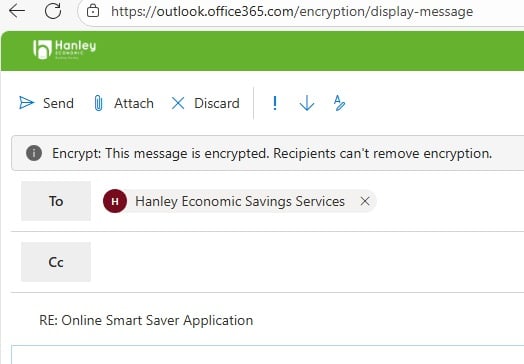 0
0 -
allegro120 said:Slinky said:Slinky said:Hanley, my attempt to validate the application failed, currently number 2 in the queue on their phoneline, where I've been for about 15 minutes. If you're ahead of me, please hurry up!
Having spoken with Hanley, they've raised a ticket with their IT people as I'm not the only one who is getting an error message when trying to validate the application, and they can't work out why at the moment.I get this after each application attempt:
"You have successfully saved the progress on your application for our 1Yr Online Smart Saver.
Access to complete your application will expire on 05/11/2025.
To retrieve and complete your application please click the link below."
The link leads to a "Sorry...." page.
I phoned this morning, The CS person said "I think I know what the problem is, let's go through application process together". The process was exactly the same as the previous. He said that I will receive the email confirming the opening of this account within 24 hours... I have a feeling that tomorrow I'll be calling Hanley again.
Have you previously been a HEBS customer? I've got the feeling my failed attempt may be due to having closed an account in January but still having a login. I tried to apply via my old login, where I can still see the details of my old closed account, but when I tried to open the new account, it fell over with an error message at that point, so I tried as a new customer (using same security info), and got the same error message as you.Make £2026 in 2026
Prolific £156.37, TCB £8.24, Everup £12.17
Total £176.78 8.7%Make £2025 in 2025 Total £2241.23/£2025 110.7%
Prolific £1062.50, Octopoints £6.64, TCB £492.05, Tesco Clubcard challenges £89.90, Misc Sales £321, Airtime £70, Shopmium £53.06, Everup £106.08, Zopa CB £30, Misc survey £10
Make £2024 in 2024 Total £1410/£2024 70%Make £2023 in 2023 Total: £2606.33/£2023 128.8%0 -
That's strange. Its not do with you having office, this is (or should be) what hanley redirect you to when you click 'view the message' in the email itself. While I have office365 on my PC (which I took the screenshot from), I don't have it on my phone and it does the same thing. My email is like this :fuzzzzy said:
I use free outlook, not office 365. I did not have to sign into anything with a password to read the message. No option to encrypt when I hit reply.roked said:
I have had the same request. If you hit reply within the message itself (after signing in with passcode), it states it is still encrypted and you can attach your documentsWillPS said:fuzzzzy said:Hanley RS online account
Just opened this account today with a £300 debit card payment. They have just emailed me to say I need to e-mail ID - documents and a selfie holding the ID documents. I usually pass the electronic verification with account openings and rarely get asked for ID so not a process I am familiar with. I'm not keen on supplying ID by e-mail. The e-mail is encrypted. Is it a secure way to supply ID by replying and attaching to an encrypted e-mail?Replying to the email directly - not secure.Replying via a trusted third party messaging portal, i.e. Mimecast - secure.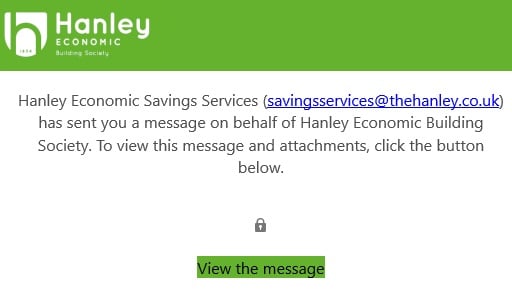
1 -
Conditional Formatting - RS spreadsheetPixelPound said:
You should use Conditional Formatting. I have the maturity date and the cell changes colour if it's less than 30 days into the future and again if if it's on or in the past. Means at a glance I can see which accounts I need to start considering what to do with the cash or replacement / renewal options and also when I need to act.Bridlington1 said:
I'm a bit lazier with my spreadsheet than you are it seems so don't have that issue, mine's updated less frequently than yours. I certainly don't go checking account balances as frequently as that.clairec666 said:
Done. Nice to see my balance restored to yesterday's levels (plus interest).flaneurs_lobster said:
...or colour the cell, I use grey until the deposit is confirmed.Hal17 said:Clairec666 add a Pending Receipt cell to your spreadsheet.
I spend far too much of my time on my spreadsheet
I just have a tab with a list of all my accounts on it in the form of a table, all that's on this list is account, interest rate, date interest is paid and balance. This list gets copied/pasted and updated once every few months or so (whenever I get round to it). I don't bother to include the interest rates for a lot of the accounts either, the ones that are opened with a minimal balance at a low interest rate don't have the rates updated.
I've then got another tab with all my regular savers listed, a new list is created monthly with Bank/building society, Name, Interest rate, Paid from, Balance prior to deposit, Day of Month it can be paid, Matures, Interest paid, Withdrawals/early closure, Min deposit and Max deposit columns.
For the regular savers tab I just highlight them red if they're not getting funded and are getting closed this month, put them in orange if they're getting minimal/no funding but are to be kept and then green the regular savers off when I fund them. I never bother to check if the funds have arrived unless it's the first time I'm paying them, so far as I'm concerned as soon as it's green it's done.
I've then another tab which contains a list of interest earned to date (updated whenever I update the first tab) and another tab with a list of my nominated accounts (updated as and when).
Most of my other records (e.g. interest rate cuts, Ts&Cs for regular savers etc) are kept on this forum so I don't bother to keep a separate record of them.Thank you SO much — I never knew this was possible! I have just proudly worked out how to do set a rule so that the cell changes colour if it's less than 30 days into the future, using Numbers (not as sophisticated as Excel, i guess, but, still, I like it)! I'm far too excited by this achievement and new feature!4 -
This is their own private encrypted email service, powered by office365. Not a reply from your personal email account. Which is where fuzzzzy is probably going wrong.roked said:
That's strange. Its not do with you having office, this is (or should be) what hanley redirect you to when you click 'view the message' in the email itself. While I have office365 on my PC (which I took the screenshot from), I don't have it on my phone and it does the same thing. My email is like this :fuzzzzy said:
I use free outlook, not office 365. I did not have to sign into anything with a password to read the message. No option to encrypt when I hit reply.roked said:
I have had the same request. If you hit reply within the message itself (after signing in with passcode), it states it is still encrypted and you can attach your documentsWillPS said:fuzzzzy said:Hanley RS online account
Just opened this account today with a £300 debit card payment. They have just emailed me to say I need to e-mail ID - documents and a selfie holding the ID documents. I usually pass the electronic verification with account openings and rarely get asked for ID so not a process I am familiar with. I'm not keen on supplying ID by e-mail. The e-mail is encrypted. Is it a secure way to supply ID by replying and attaching to an encrypted e-mail?Replying to the email directly - not secure.Replying via a trusted third party messaging portal, i.e. Mimecast - secure.0 -
Thanks for your reply but I'm afraid I'm a bit of a luddite when it comes to stuff like this. I'll reply to them tomorrow and ask if there is any other methods to upload documents. If not I'll probably just not bother. Might try re-applying at the end of the month using an older nominated account and see If I pass the electronic verification.masonic said:
To receive an encrypted message (and consequently send an encrypted reply), you'd need to have a digital ID set up on your email account. There might be an option to do this even in the free version, but S/MIME encryption is not widely supported in general. Evidently HEBS have set it up.fuzzzzy said:
I use free outlook, not office 365. I did not have to sign into anything with a password to read the message. No option to encrypt when I hit reply.roked said:
I have had the same request. If you hit reply within the message itself (after signing in with passcode), it states it is still encrypted and you can attach your documentsWillPS said:fuzzzzy said:Hanley RS online account
Just opened this account today with a £300 debit card payment. They have just emailed me to say I need to e-mail ID - documents and a selfie holding the ID documents. I usually pass the electronic verification with account openings and rarely get asked for ID so not a process I am familiar with. I'm not keen on supplying ID by e-mail. The e-mail is encrypted. Is it a secure way to supply ID by replying and attaching to an encrypted e-mail?Replying to the email directly - not secure.Replying via a trusted third party messaging portal, i.e. Mimecast - secure.0 -
This made me smile, I too have moments in the day when you learn something so simple, that makes life easier, enjoy.Conditional Formatting - RS spreadsheet
Thank you SO much — I never knew this was possible! I have just proudly worked out how to do set a rule so that the cell changes colour if it's less than 30 days into the future, using Numbers (not as sophisticated as Excel, i guess, but, still, I like it)! I'm far too excited by this achievement and new feature!
2 -
Thanks for replying. I don't have a "view the message" link. I can just see the message. There is a banner across the top saying "This message is encrypted" but it does not appear to be. I will give them a ring tomorrow.roked said:
That's strange. Its not do with you having office, this is (or should be) what hanley redirect you to when you click 'view the message' in the email itself. While I have office365 on my PC (which I took the screenshot from), I don't have it on my phone and it does the same thing. My email is like this :fuzzzzy said:
I use free outlook, not office 365. I did not have to sign into anything with a password to read the message. No option to encrypt when I hit reply.roked said:
I have had the same request. If you hit reply within the message itself (after signing in with passcode), it states it is still encrypted and you can attach your documentsWillPS said:fuzzzzy said:Hanley RS online account
Just opened this account today with a £300 debit card payment. They have just emailed me to say I need to e-mail ID - documents and a selfie holding the ID documents. I usually pass the electronic verification with account openings and rarely get asked for ID so not a process I am familiar with. I'm not keen on supplying ID by e-mail. The e-mail is encrypted. Is it a secure way to supply ID by replying and attaching to an encrypted e-mail?Replying to the email directly - not secure.Replying via a trusted third party messaging portal, i.e. Mimecast - secure.1















This discussion has been closed.
Confirm your email address to Create Threads and Reply

Categories
- All Categories
- 353.6K Banking & Borrowing
- 254.2K Reduce Debt & Boost Income
- 455.1K Spending & Discounts
- 246.6K Work, Benefits & Business
- 603K Mortgages, Homes & Bills
- 178.1K Life & Family
- 260.7K Travel & Transport
- 1.5M Hobbies & Leisure
- 16K Discuss & Feedback
- 37.7K Read-Only Boards