We’d like to remind Forumites to please avoid political debate on the Forum.
This is to keep it a safe and useful space for MoneySaving discussions. Threads that are – or become – political in nature may be removed in line with the Forum’s rules. Thank you for your understanding.
📨 Have you signed up to the Forum's new Email Digest yet? Get a selection of trending threads sent straight to your inbox daily, weekly or monthly!
The Forum now has a brand new text editor, adding a bunch of handy features to use when creating posts. Read more in our how-to guide
Windows 11 - what went wrong?

t8769
Posts: 372 Forumite



in Techie Stuff
Can't work out Win11. All navigation I used in Win10 has disappeared.
1 Search for a file but can't right click on it to get to its folder.
2 Toolbars have disappeared from the Taskbar, so can't access files easily and quickly as in Win10.
3 Now I have to remember files' folders to get to them, slow and very annoying.
Anyone have a remedy for this?
Any app that can return Toolbars to the Taskbar menu?
Any way to quickly access files?
1 Search for a file but can't right click on it to get to its folder.
2 Toolbars have disappeared from the Taskbar, so can't access files easily and quickly as in Win10.
3 Now I have to remember files' folders to get to them, slow and very annoying.
Anyone have a remedy for this?
Any app that can return Toolbars to the Taskbar menu?
Any way to quickly access files?
0
Comments
-
Hi,have a read of THIS thread, might help.0
-
1. Open file location: This hasn't changed at all, when you use File Explorer to search for a file then right click and the option to open file location is still there: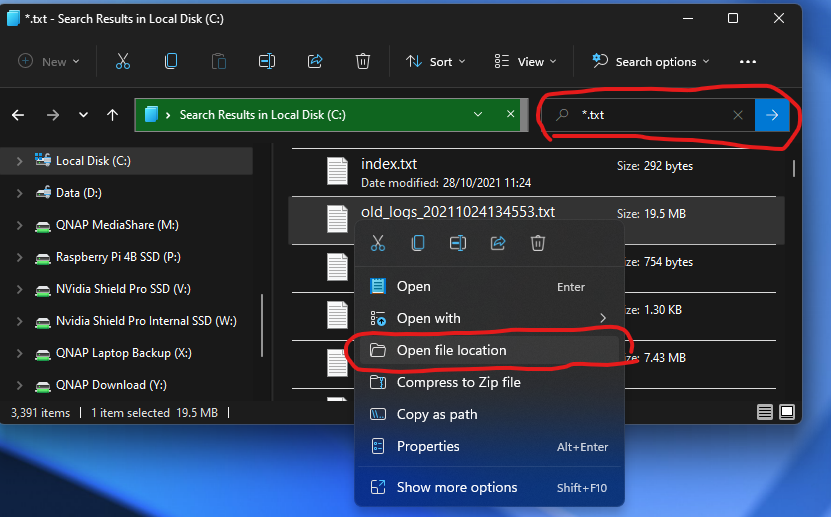
Or alternatively press the search on the taskbar and the location will show on the right hand side for you to click: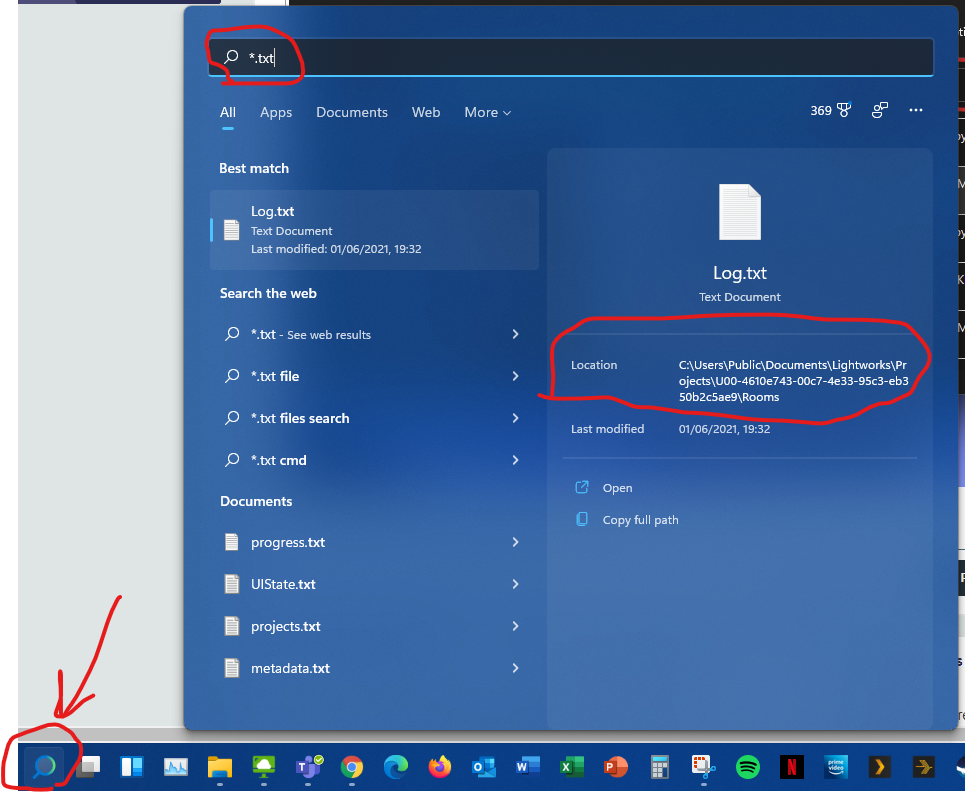
2. Toolbars on the taskbar: Gone in Windows 11 - different concepts now, apps only on the task bar but alternatives are pinning File Explorer to your taskbar and then right click on the File Explorer which shows your quick access folders - add whatever you want to this list in File Explorer quick access section.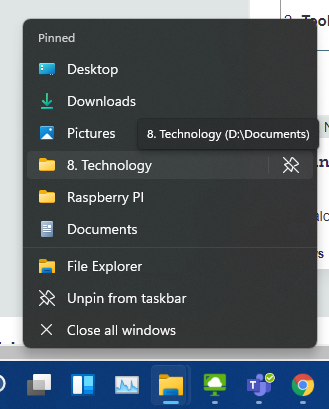
If you want quick access directly to files rather than folders then you can pin them to your jump lists for each application: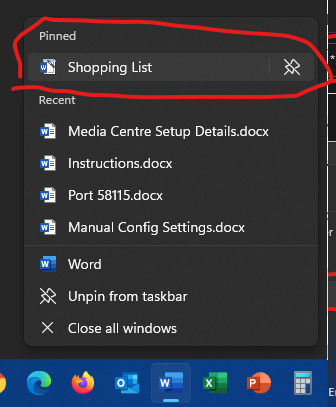
3. A little adaption with the above and you'll soon be working as fast in Windows 11
1 -
Thanks - but I find this insane!
Now, it is difficult, slow and clumsy to find files. I have to click on folders, whereas in the past I just did a search, right clicked, and go to the folder, or just used my toolbar in the taskbar.
I have 5000 files, I need to access them quickly.
I cannot understand Win11's logic.
I have never used Explorer, I just search from the Start menu.
How do I find a file, if I don't want to open it, just the folder its in?
I can find the path, but then I have to enter the path?
There is no right click any more so no access to the folder.
How do I search for a file, then open the folder its in?
Thank you
0 -
Second screenshot in my earlier post is actually one click less than what you did in Win 10, search for the file then just left click on the location part that I circled.t8769 said:
I have never used Explorer, I just search from the Start menu.
How do I find a file, if I don't want to open it, just the folder its in?
I can find the path, but then I have to enter the path?
There is no right click any more so no access to the folder.
How do I search for a file, then open the folder its in?
Should be quicker than Win 10 if you do it that way.
You can also use the folder section to search directly for folder names if you prefer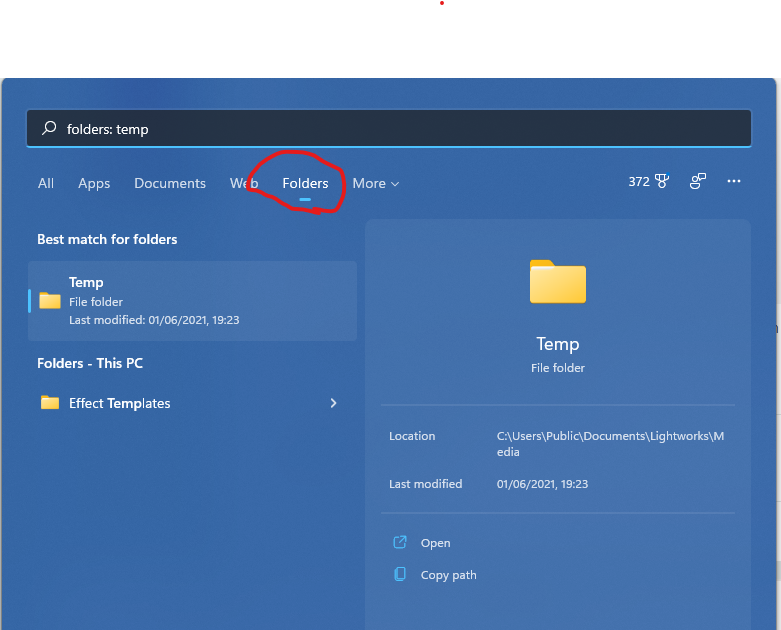
1 -
Thanks
I have never used Explorer, just search for a file from the start menu search.
So I open Explorer, then go to search, then right click on a file to get to the folder - is that right?
This does not work for me. If I go to Explorer, files are not found.
If I search the whole PC it is slow, or I have to chose which folder to search.Is that right?
It seems very slow to me.
I have returned the old Start menu with this https://www.technipages.com/windows-11-how-to-get-the-old-start-menu-back
thanks
0 -
I've always found Windows Search to be very slow and a bit rubbish really.I have used a tool called Everything for quite a few years ago. Once it's completed it's index (about 3 mins) then search for files/folders is incredibly quick and simple and completely free.0
-
OK
I am confused.
I search for a file in Windows search, it comes up in a fraction of a second
Right click and the folder opens.
In explorer I have to
1 Open explorer
2 Choose the folder
3 Go to Search box
4 Search for file
Is this not correct?
0 -
I'm confused now because you say you have never used file explorer but you did use "Open file location" in Win 10 which actually opens file explorer?
Because you said you hadn't used explorer for search, I narrowed down the options in my last post to the search function from the taskbar instead as it is most similiar to your Win 10 way of doing it:
1. Click the magnifying glass on your taskbar
2. Type the name of the file you are looking for
3. On the right hand side of the search results you will see location, just click that you open the folder.
The 1,2,3 steps are highlighted on this screenshot: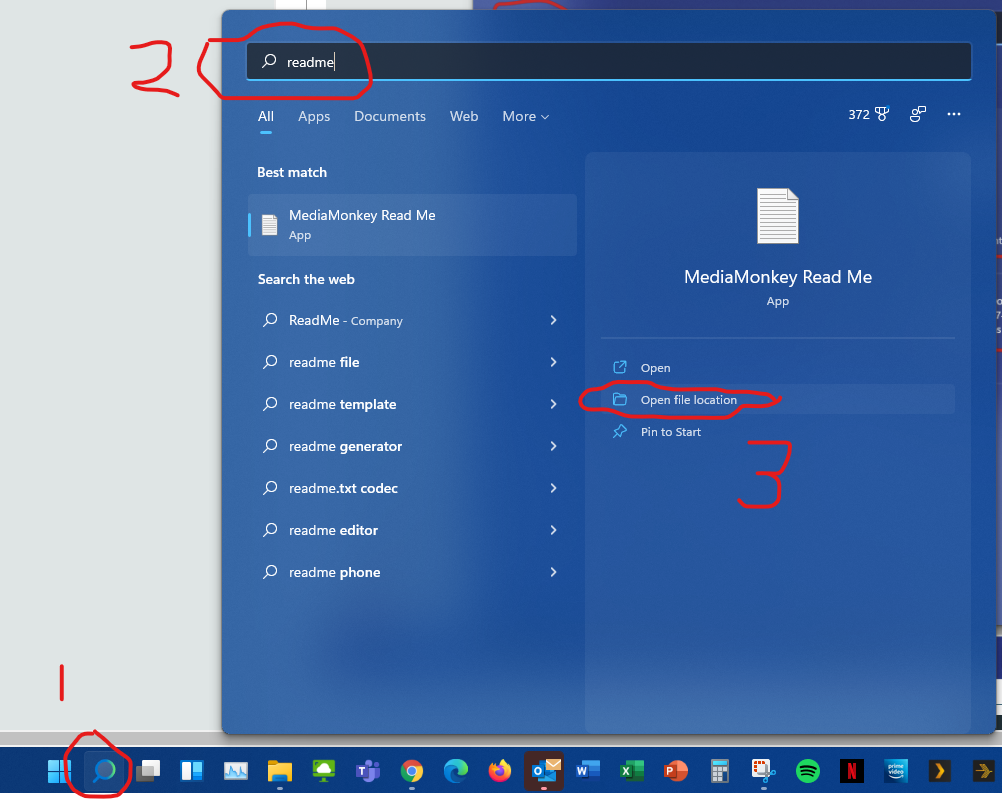
2 -
I don't understand, there is no OPEN FILE LOCATION on my Win11.
Perhaps because I have Home and not the expensive version of Windows?
Very odd.
Do you have Home version?
Thank you
0 -
No, I have Pro version but this function is the same in Home version.t8769 said:I don't understand, there is no OPEN FILE LOCATION on my Win11.
Perhaps because I have Home and not the expensive version of Windows?
Very odd.
Do you have Home version?
Thank you
Probably worth taking a step back here then to understand what is happening.
1. These 5,000 files you regularly search, what are they? eg photos, word docs, spreadsheets, something else?
2. When you say you don't get "open file location", what do you actually have on screen? Screenshot would be super useful.
3. What I never thought to mention earlier is that you can setup shortcuts to folders on your desktop, would that be of more use to you in getting directly to various folders?
4. What is the structure of these 5,000 files in terms of folders / location - roughly anyway?
1



Confirm your email address to Create Threads and Reply

Categories
- All Categories
- 353.5K Banking & Borrowing
- 254.1K Reduce Debt & Boost Income
- 455K Spending & Discounts
- 246.6K Work, Benefits & Business
- 602.9K Mortgages, Homes & Bills
- 178.1K Life & Family
- 260.6K Travel & Transport
- 1.5M Hobbies & Leisure
- 16K Discuss & Feedback
- 37.7K Read-Only Boards