We’d like to remind Forumites to please avoid political debate on the Forum.
This is to keep it a safe and useful space for MoneySaving discussions. Threads that are – or become – political in nature may be removed in line with the Forum’s rules. Thank you for your understanding.
📨 Have you signed up to the Forum's new Email Digest yet? Get a selection of trending threads sent straight to your inbox daily, weekly or monthly!
The Forum now has a brand new text editor, adding a bunch of handy features to use when creating posts. Read more in our how-to guide
What small DFW things will you do w/c 3rd February?
Comments
-
DeletedDebt-free day: 8th May 2015 "Remember that sometimes not getting what you want is a wonderful stroke of luck," Dalai Llama3
-
ditty1234 said:
And I don't like all the emails from the new forum!How to change your notification settings:
Click on your profile picture/silhouette.Click Edit Profile.Click Notification Preferences.(These instructions assume you are using a computer not a mobile phone.)
Debt-free day: 8th May 2015 "Remember that sometimes not getting what you want is a wonderful stroke of luck," Dalai Llama5 -
How to change your signature settings:
Click on your profile picture/silhouette.Click Edit Profile.Click Signature Settings.(These instructions assume you are using a computer not a mobile phone.)
Debt-free day: 8th May 2015 "Remember that sometimes not getting what you want is a wonderful stroke of luck," Dalai Llama4 -
How to delete a post from the Forum:
You can't...or at least if you can...Wee IT Geek can't find a way! 😂 🖥You'd need to shout for a Moderator to do it for you.(These instructions assume you are using a computer not a mobile phone.)
Debt-free day: 8th May 2015 "Remember that sometimes not getting what you want is a wonderful stroke of luck," Dalai Llama5 -
OH has been on the phone all stressed out to tell me that his mum has rung crying, saying there's a leak in the roof (too dangerous to drive over or indeed do anything about it) and that there's also a leak in OUR roof.
i'm not surprised. The rain was biblical half an hour ago. It was forcing under the door in work.LBM 11/06/2010: DFD 30/04/2013Total repaid: £10,490.315 -
How to stop the text in the Forum looking enormous:
On a Mac:Click cmd and the - sign at the same time. Repeat until you are happy with the size.(Instructions are assuming you are accessing through a computer not a phone.)On a Windows PC:Click View at the top of your screen.
Click Zoom.Please note this may change font size of other webpages you look at too.
Debt-free day: 8th May 2015 "Remember that sometimes not getting what you want is a wonderful stroke of luck," Dalai Llama5 -
How to bookmark this page:
To save this page so you can find it quickly in future:Click Bookmark at the top left of the screen.(Instructions are assuming you are accessing through a computer not a phone.)Please note that if you you straight away go into your bookmarks in the top right to see if it has saved you won't see it! 🙈 You have to refresh the page first. There is no Subscription facility now; use bookmarks instead.
Debt-free day: 8th May 2015 "Remember that sometimes not getting what you want is a wonderful stroke of luck," Dalai Llama5 -
How to reset your password:
When MSE moved over to the new Forum format it has required everyone to reset their password. If you can't get in try this.Visit this page: (Link)Follow the instructions.(These instructions assume you are using a computer not a phone.)
Debt-free day: 8th May 2015 "Remember that sometimes not getting what you want is a wonderful stroke of luck," Dalai Llama5 -
How to add colour to your post:
Wee Geek has spoken with Smarter Geek...and...you can get colour by using some HTML code. However, I've heard that the colour doesn't 'last' and gets overwritten. We'll see. Posts at the start of this thread are in colour because they were moved from the old server when colour was still a feature.Write your whole post then decide where you want your colour.Click </> above.Look for the word/sentence/paragraph you want in colour. You now need to type something before and something after this word/sentence/paragraph to make it change colour.Before the word/sentence/paragraph type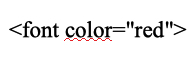 After the word/sentence/paragraph type
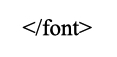 Now click Post Comment.I'm still looking for a less Geeky work around for you.(These instructions assume you are using a computer not a phone.)
Debt-free day: 8th May 2015 "Remember that sometimes not getting what you want is a wonderful stroke of luck," Dalai Llama4 -
PurpleFairy26 said:On my phone it when I click on bookmarks it gives me about a 1cm gap with the subscriptions in and I have to try and scroll within that! Not very successfully....
I did manage to get them all on one page but then I commented on one and couldn’t ‘go back’ :'( I’ll keep trying.How to navigate the Forum on a mobile phone or tablet:
The Forum Elves are still perfecting the mobile phone and tablet platform. MSE is aware that you can't easily view the threads on phones and tablets: (Link)If anyone is using an iPad try holding it in landscape mode rather than portrait mode.On a mobile phone try changing from Desktop View to Mobile View.How to switch back to old green version of the Forum:
No longer possible. ⛔ I've heard you can turn the page green by using the Stylish Add On and playing around with hex if you need green for vision reasons.How to put the posts in the thread in reverse date order so that the newest posts are on page 1:
No longer possible. ⛔
Debt-free day: 8th May 2015 "Remember that sometimes not getting what you want is a wonderful stroke of luck," Dalai Llama5






This discussion has been closed.
Confirm your email address to Create Threads and Reply

Categories
- All Categories
- 354.2K Banking & Borrowing
- 254.3K Reduce Debt & Boost Income
- 455.3K Spending & Discounts
- 247.2K Work, Benefits & Business
- 603.8K Mortgages, Homes & Bills
- 178.4K Life & Family
- 261.3K Travel & Transport
- 1.5M Hobbies & Leisure
- 16.1K Discuss & Feedback
- 37.7K Read-Only Boards