📨 Have you signed up to the Forum's new Email Digest yet? Get a selection of trending threads sent straight to your inbox daily, weekly or monthly!
The Top Easy Access Savings Discussion Area
Comments
-
Like almost all accounts the opening date is, unsurprisingly, the date that you open the accountThe date that you choose to fund it is irrelevant and out of their control1
-
ColdIron said:Like almost all accounts the opening date is, unsurprisingly, the date that you open the accountThe date that you choose to fund it is irrelevant and out of their control
I asked the question because I opened one recently (Skipton I think) where it was the date of funding so was unsure if this was common practice. I was siding with your answer anyway due to the fact their T&Cs didn't state otherwise.
0 -
martinm1 said:It was a pop up in the app. I tried to screenshot but it wouldn't let me. No money has gone out of the account yet. It has a zero balance though.
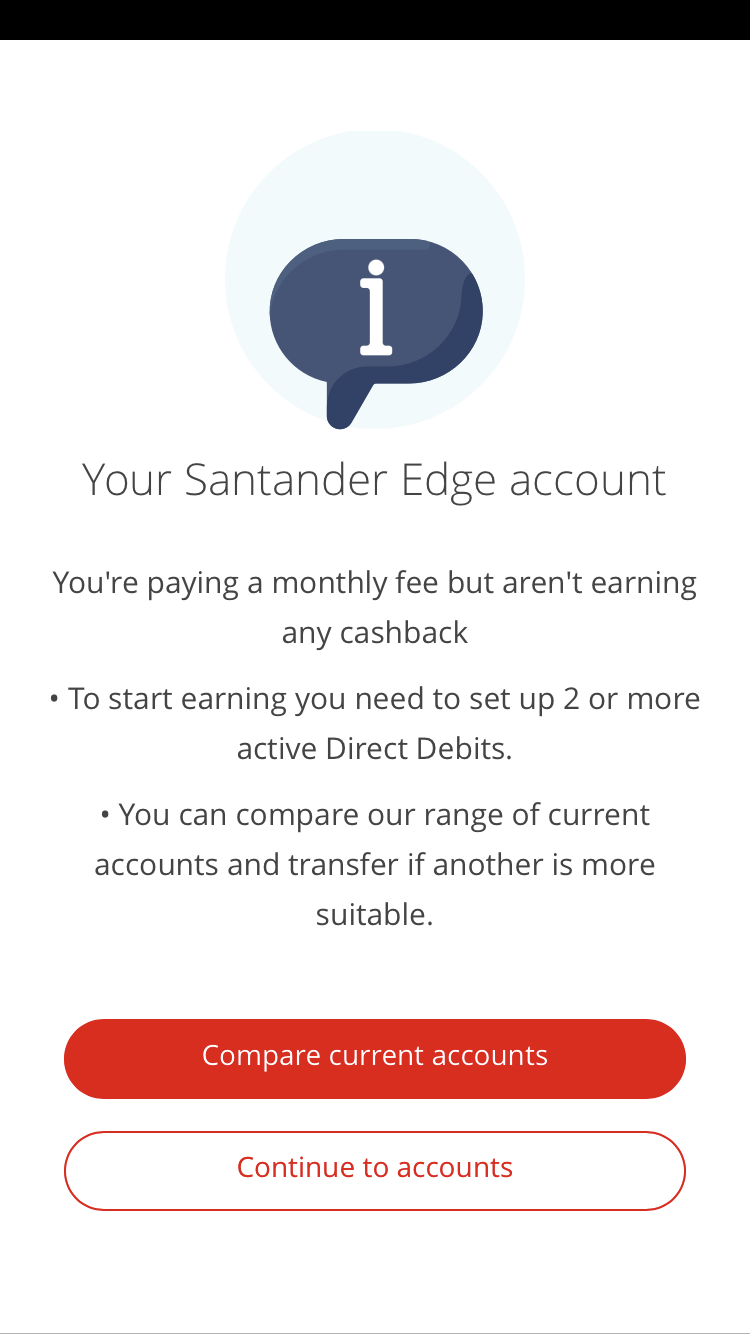 Same as this one I got? I wouldn't worry about it, think they didn't consider the fact that many of us haven't "qualified" to pay the fee, and just sent it out to everyone regardless.0
 -
However, the majority will mature on the anniversary of first funds receipt, regardless of when it was opened.1spiral said:ColdIron said:Like almost all accounts the opening date is, unsurprisingly, the date that you open the accountThe date that you choose to fund it is irrelevant and out of their control
I asked the question because I opened one recently (Skipton I think) where it was the date of funding so was unsure if this was common practice. I was siding with your answer anyway due to the fact their T&Cs didn't state otherwise.0 -
Yes that's the same message how did you screenshot? Also looking through the key facts why would anyone put any money in the edge current to cover fees. If you go overdrawn because of the fee there are no overdraft charges to pay.somsman said:martinm1 said:It was a pop up in the app. I tried to screenshot but it wouldn't let me. No money has gone out of the account yet. It has a zero balance though.Same as this one I got? I wouldn't worry about it, think they didn't consider the fact that many of us haven't "qualified" to pay the fee, and just sent it out to everyone regardless.
I received my edge saver interest today, and no charges on the edge current. So they are sticking to their t&c 0
0 -
Because it’s not clear what would happen to your credit file if you were to go into the unauthorised overdraft. Doesn’t feel like a big deal having £3 in there just in case.martinm1 said:
Also looking through the key facts why would anyone put any money in the edge current to cover fees. If you go overdrawn because of the fee there are no overdraft charges to pay.somsman said:martinm1 said:It was a pop up in the app. I tried to screenshot but it wouldn't let me. No money has gone out of the account yet. It has a zero balance though.Same as this one I got? I wouldn't worry about it, think they didn't consider the fact that many of us haven't "qualified" to pay the fee, and just sent it out to everyone regardless.0 -
Martinm1
I do not know how they did their screenshot, but when I have to prove to estate agents that I have enough money for whatever property we go for, I use MS Excel or Word, Insert- screenshot-screen clipping.
Corduroy pillows are making headlines! Back home in London now after 27years wait! Duvet know it's Christmas, not original, it's a cover.0 -
On my android phone it does a screenshot if I hold the down-volume and power buttons at the same time. Presume most phones have similar.0
-
I think the problem being alluded to is that most bank apps don't allow you to take screenshot within the app, for security purposes - even if your phone is perfectly capable of doing so.inkydolphin said:On my android phone it does a screenshot if I hold the down-volume and power buttons at the same time. Presume most phones have similar.2 -
I've only experienced this with Android. In my experience iOS and iPadOS don't have this restriction.BooJewels said:
I think the problem being alluded to is that most bank apps don't allow you to take screenshot within the app, for security purposes - even if your phone is perfectly capable of doing so.inkydolphin said:On my android phone it does a screenshot if I hold the down-volume and power buttons at the same time. Presume most phones have similar.0
















This discussion has been closed.
Confirm your email address to Create Threads and Reply

Categories
- All Categories
- 355.8K Banking & Borrowing
- 254.9K Reduce Debt & Boost Income
- 456.2K Spending & Discounts
- 248.4K Work, Benefits & Business
- 606K Mortgages, Homes & Bills
- 179K Life & Family
- 263.8K Travel & Transport
- 1.5M Hobbies & Leisure
- 16.2K Discuss & Feedback
- 37.7K Read-Only Boards