We’d like to remind Forumites to please avoid political debate on the Forum.
This is to keep it a safe and useful space for MoneySaving discussions. Threads that are – or become – political in nature may be removed in line with the Forum’s rules. Thank you for your understanding.
📨 Have you signed up to the Forum's new Email Digest yet? Get a selection of trending threads sent straight to your inbox daily, weekly or monthly!
The Forum now has a brand new text editor, adding a bunch of handy features to use when creating posts. Read more in our how-to guide
PC Boots, OS Doesn't Load. Help Required (Update: FIXED)
Comments
-
pending being able to burn a disc, which may never work on your laptop
http://support.microsoft.com/kb/315222
try safe mode with command prompt
if it works, do a chkdsk c: /R
try with enable boot logging, and note what it stops on!!
> . !!!! ----> .0 -
Take the writing speed right down, as suggested.
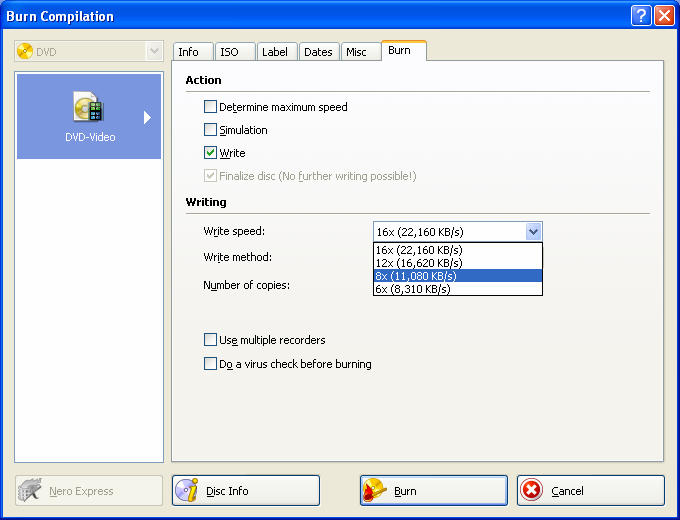
Of course you need to choose to burn an image.
You should really think about a backup and clean install. But if you are really against it, you can run ChkDsk via the Recovery Console. If no good you can attempt a System Restore via the Recovery Console. Though it's not really straightforward.0 -
I am using the CDBurnerXP software, as linked to above.
It burnt OK (well, no indication otherwise and no error messages) ..... in about 7 minutes. Now I've been waiting over 20 minutes for the verify. There are those "green moving bars" that 'wipe' across .... only that seems to have stopped/stalled some time back.
So not sure if it's slow verifying, or if it's all just frozen.
I think it's probably frozen...... might press cancel and try again with a different disc.0 -
I tried a 2nd burn with CDBurnerXP. It completed burn, completed "closing", then went to verify - and after 20 minutes I've decided it's frozen (again), so now cancelled it.
Checked if disc has been written to: there's nothing on it - selecting it from explorer it sees it as a blank disc and asks me what I want to do with it.
Going to uninstall that now, reboot, install Nero and try that0 -
It's not my PC, owner's been away (expected back now in 2 hours)... I thought this would be easy ... I've no idea what important files they have on their PC and couldn't ask them.NiftyDigits wrote: »You should really think about a backup and clean install. But if you are really against it, you can run ChkDsk via the Recovery Console. If no good you can attempt a System Restore via the Recovery Console. Though it's not really straightforward.
No idea what the Recovery Console is, not encountered that before.
Right.... off to uninstall, then install Nero and try another disc0 -
Nero appears to have burnt the files. I didn't choose Verify though (found Nero confusing and didn't spot that until too late).
But there are files on the disc and Nero did say it'd completed successfully.
So .... now I have a boot disk for XP Home...... what now?0 -
What files are on the disc? If you pop it into your HP drive does anything happen?
First thing to try is ChkDsk. Follow instructions from 1.0 -
I hadn't put it into my laptop drive ..... in case "something" happened that I didn't want to happen - as I wasn't sure what it'd do.....NiftyDigits wrote: »What files are on the disc? If you pop it into your HP drive does anything happen?
First thing to try is ChkDsk. Follow instructions from 1.
I've put it into my laptop and this happened:
- it made noises like it was reading/finding the start.
Then nothing.
So I found the drive in Explorer - and it asked me to insert a disc.
The Autoplay dialog box then popped up asking me what I wanted to do:
- Run setup.exe
- Open folder to View the files
Now I am confused. You say to run chkdsk - why? Do you mean try chkdsk on the laptop to check the CD's working? Or do you mean shove the CD into the broken PC and run chkdsk?
Bit confused as to precisely what you're saying here.0 -
To confirm. Current status is:
Laptop = Vista/working, used this to burn an ISO XP Home boot disk
PC = XP Home/the broken PC I am trying to get going again (without losing any user/data files.0 -
I just booted the broken PC with the newly burnt boot-disk CD in the drive and it loaded some files, then asked me if I wanted to install Windows, or Repair. So I chose Repair.
It's now on a black screen with white text saying it is in Recovery Console and asking me which Windows to log onto.
But I've no idea what to type there.... and it's not giving me clues. 0
0





This discussion has been closed.
Confirm your email address to Create Threads and Reply

Categories
- All Categories
- 353.7K Banking & Borrowing
- 254.2K Reduce Debt & Boost Income
- 455.1K Spending & Discounts
- 246.8K Work, Benefits & Business
- 603.3K Mortgages, Homes & Bills
- 178.2K Life & Family
- 260.8K Travel & Transport
- 1.5M Hobbies & Leisure
- 16K Discuss & Feedback
- 37.7K Read-Only Boards