We’d like to remind Forumites to please avoid political debate on the Forum.
This is to keep it a safe and useful space for MoneySaving discussions. Threads that are – or become – political in nature may be removed in line with the Forum’s rules. Thank you for your understanding.
📨 Have you signed up to the Forum's new Email Digest yet? Get a selection of trending threads sent straight to your inbox daily, weekly or monthly!
The Forum now has a brand new text editor, adding a bunch of handy features to use when creating posts. Read more in our how-to guide
PC Boots, OS Doesn't Load. Help Required (Update: FIXED)
Comments
-
You should be able to get a full refund on the discs.0
-
It'd cost me more in fuel to do the return journey. Paid £1 for 5.NiftyDigits wrote: »You should be able to get a full refund on the discs.
Got some from Asda now, will try those in a bit.0 -
Brand new pack of discs. Polaroid CD-R, 52x Speed.
Burnt on ImgBurn at 20x speed.
Similar error as before.
Differences are it says:
Interpretation: Check condition
Interpretation: Write (10) - Sectors 131360-131391
SK Interpretation: Medium Error
ASC/ASCQ Interpretation: Write Error0 -
Polaroid make optical media?

If your HP laptop uses Windows 7, you don't need ImgBurn at all. You can unistall it and just use the Windows 7 native Image Burner.0 -
It's a Vista OS on the laptop.NiftyDigits wrote: »Polaroid make optical media?
If your HP laptop uses Windows 7, you don't need ImgBurn at all. You can unistall it and just use the Windows 7 native Image Burner.0 -
You can try differing burning software, though I doubt it will make a difference.
I used to use this stripped down version of Nero 8. Nero 8 Micro
Uninstall ImgBurn and reboot. Install Nero 8 Micro by using your existing Product Key.0 -
Cheers - I'll do that now.NiftyDigits wrote: »You can try differing burning software, though I doubt it will make a difference.
I used to use this stripped down version of Nero 8. Nero 8 Micro
Uninstall ImgBurn and reboot. Install Nero 8 Micro by using your existing Product Key.0 -
1. Get CDburner xp portable from here http://cdburnerxp.se/en/download
click on the "more downloads options" and click on the portable version 32bit to download.
2 after extracting the portable version. right click and extract all.
windows vista has built in zip support.
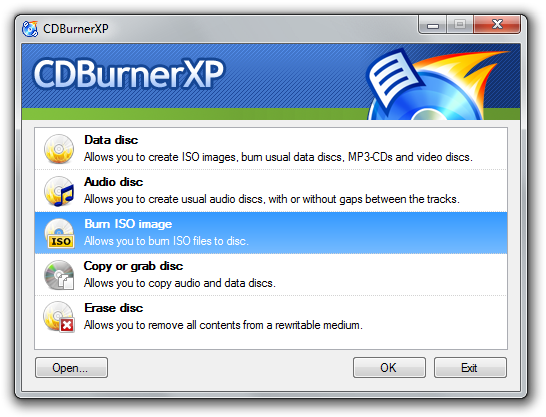
3 run main program, 3rd one down, Burn ISO image
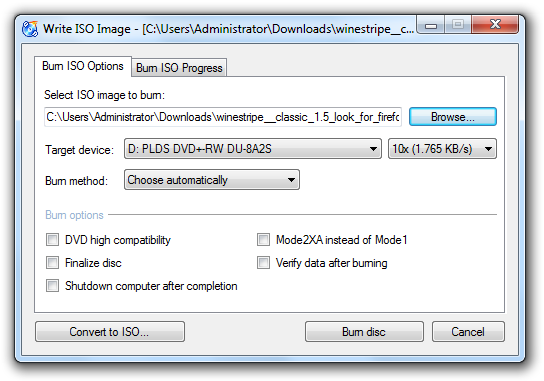
new screen pops up.
Click Browse to the cd image you are trying to burn
just below browse should be a speed setting choose the SLOWEST minimum 4x, make sure Finalize disc, eject disc after burning and verify data after burning are selected, then click BURN DISC.
Never had a coaster using unbranded disc's with this program and its small.
screens you should see
3.1
http://cdburnerxp.se/pages/screenshots/startup.png
3.2
http://cdburnerxp.se/pages/screenshots/burn-iso.png
and if that fails to burn, then its not the cd's, it your burner or the cd image.
most likely the image.0 -
what are you planning to do with this disc - if you use it for reinstall, the data is gone
use a different machine to create the disc. is itunes installed!!
> . !!!! ----> .0 -
Not sure. I don't want the data gone, just the broken PC to work again.what are you planning to do with this disc - if you use it for reinstall, the data is gone
use a different machine to create the disc. is itunes installed
I am using a laptop to create the disc.
No itunes that I am aware of, I don't think the PC owner has itunes at all, anywhere. I know I don't have it. That's all "rich people stuff" 0





This discussion has been closed.
Confirm your email address to Create Threads and Reply

Categories
- All Categories
- 353.7K Banking & Borrowing
- 254.2K Reduce Debt & Boost Income
- 455.1K Spending & Discounts
- 246.8K Work, Benefits & Business
- 603.3K Mortgages, Homes & Bills
- 178.2K Life & Family
- 260.9K Travel & Transport
- 1.5M Hobbies & Leisure
- 16K Discuss & Feedback
- 37.7K Read-Only Boards