We’d like to remind Forumites to please avoid political debate on the Forum.
This is to keep it a safe and useful space for MoneySaving discussions. Threads that are – or become – political in nature may be removed in line with the Forum’s rules. Thank you for your understanding.
📨 Have you signed up to the Forum's new Email Digest yet? Get a selection of trending threads sent straight to your inbox daily, weekly or monthly!
The Forum now has a brand new text editor, adding a bunch of handy features to use when creating posts. Read more in our how-to guide
Blue Screen

mardatha
Posts: 15,612 Forumite
in Techie Stuff
Laptop did it again last night and it said
"Bug Code USB Driver"
- does anybody know what that means ?
"Bug Code USB Driver"
- does anybody know what that means ?
0
Comments
-
OK lets try one more time.... go here http://www.nirsoft.net/utils/blue_screen_view.html or here for the download
http://www.nirsoft.net/utils/blue_screen_view.html#DownloadLinks4.8kWp 12x400W Longhi 9.6 kWh battery Giv-hy 5.0 Inverter, WSW facing Essex . Aint no sunshine ☀️ Octopus gas fixed dec 24 @ 5.74 tracker again+ Octopus Intelligent Flux leccy
CEC Email energyclub@moneysavingexpert.com0 -
Ok have downloaded it, in zip file, for 64 bit. What do I do next? Please bear in mind I'm a wee old lady and whilst I have many talents I know nowt at all about computers or the innards
 Use wee words lol 0
 -
OK In windows Explorer double click on the zip file and the explorer will give the the option to extract the files, and the to view thew extracted files. Then run the exe bluescreenview that will then scan all your minidumps and will allow you to find out more info I will post a link in a mo4.8kWp 12x400W Longhi 9.6 kWh battery Giv-hy 5.0 Inverter, WSW facing Essex . Aint no sunshine ☀️ Octopus gas fixed dec 24 @ 5.74 tracker again+ Octopus Intelligent Flux leccy
CEC Email energyclub@moneysavingexpert.com0 -
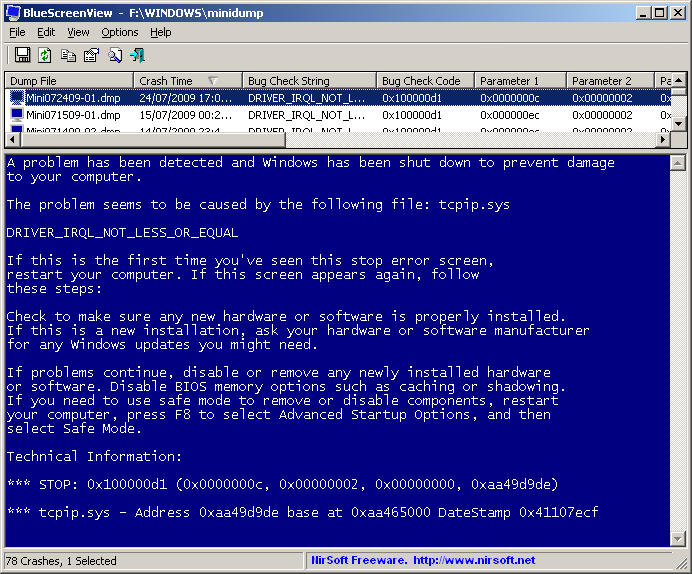
Try and copy the bits in the bluescreen view as shown here The interseting bit for now is the technical info bit eg ****STOP and the codes in your case it may not be say STOP but you may get the idea :cool:
 4.8kWp 12x400W Longhi 9.6 kWh battery Giv-hy 5.0 Inverter, WSW facing Essex . Aint no sunshine ☀️ Octopus gas fixed dec 24 @ 5.74 tracker again+ Octopus Intelligent Flux leccy
CEC Email energyclub@moneysavingexpert.com0 -
I've downloaded and got 3 items, have extracted them. But I can't see an exe file. Compiled HTML, application, and readme are what I see.0
-
Ah ok that's because you hide extensions for known file types, the Application is the .exe4.8kWp 12x400W Longhi 9.6 kWh battery Giv-hy 5.0 Inverter, WSW facing Essex . Aint no sunshine ☀️ Octopus gas fixed dec 24 @ 5.74 tracker again+ Octopus Intelligent Flux leccy
CEC Email energyclub@moneysavingexpert.com0 -
Thought that but didn't want to touch it without checking 0
-
So I open this after the next blue screen, and copy what it says and bring it back here to you?
 0
0 -
Well you could print it but I won't be able to see it , I can't find me binoculars 4.8kWp 12x400W Longhi 9.6 kWh battery Giv-hy 5.0 Inverter, WSW facing Essex . Aint no sunshine ☀️ Octopus gas fixed dec 24 @ 5.74 tracker again+ Octopus Intelligent Flux leccy
CEC Email energyclub@moneysavingexpert.com0 -
ok. Don't go away, don't leave me 0





This discussion has been closed.
Confirm your email address to Create Threads and Reply

Categories
- All Categories
- 353.5K Banking & Borrowing
- 254.1K Reduce Debt & Boost Income
- 455K Spending & Discounts
- 246.6K Work, Benefits & Business
- 602.9K Mortgages, Homes & Bills
- 178K Life & Family
- 260.5K Travel & Transport
- 1.5M Hobbies & Leisure
- 16K Discuss & Feedback
- 37.7K Read-Only Boards