We’d like to remind Forumites to please avoid political debate on the Forum.

This is to keep it a safe and useful space for MoneySaving discussions. Threads that are – or become – political in nature may be removed in line with the Forum’s rules. Thank you for your understanding.

📨 Have you signed up to the Forum's new Email Digest yet? Get a selection of trending threads sent straight to your inbox daily, weekly or monthly!
The Forum now has a brand new text editor, adding a bunch of handy features to use when creating posts. Read more in our how-to guide

Getting internet on a HD TV?

2

Comments

  • onejontwo
    onejontwo Posts: 1,089 Forumite
    Part of the Furniture 500 Posts
    edited 5 October 2011 at 8:09PM
    penrhyn wrote: »
    So whats the bluray player then?
    As above if its got an RJ45 ethernet port on it chances are its internet enabled.

    It's an LG HB405SU
  • custardy
    custardy Posts: 38,365 Forumite
    Part of the Furniture 10,000 Posts Name Dropper Photogenic
    onejontwo wrote: »
    It's an LG HB405SU

    then its ready to go
    http://www.amazon.co.uk/LG-HB405SU-Blu-ray-Cinema-System/dp/B003IHVHRC/ref=sr_1_1?ie=UTF8&qid=1317842737&sr=8-1

    bung an ethernet connetion in and you can stream PC files over
    however you wont be able to browse the net
    you would need to hook the PC directly to the TV or use another 'box' solution

    you will have something like this(from my LG plasma)
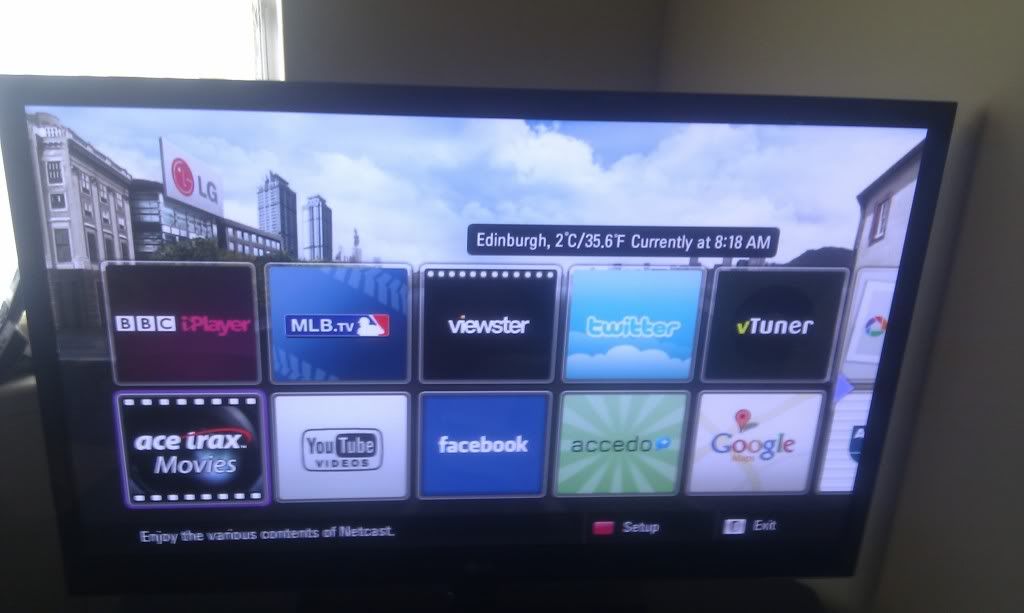
    IMAG0149.jpg
  • onejontwo
    onejontwo Posts: 1,089 Forumite
    Part of the Furniture 500 Posts
    Well if I can get as far as you've got I'll be chuffed! So in fairly simple terms I need to fit an ethernet cable between where and where and is that it ?
  • custardy
    custardy Posts: 38,365 Forumite
    Part of the Furniture 10,000 Posts Name Dropper Photogenic
    onejontwo wrote: »
    Well if I can get as far as you've got I'll be chuffed! So in fairly simple terms I need to fit an ethernet cable between where and where and is that it ?

    easiest way is an ethernet cable from your router to the Bluray player
  • onejontwo
    onejontwo Posts: 1,089 Forumite
    Part of the Furniture 500 Posts
    custardy wrote: »
    easiest way is an ethernet cable from your router to the Bluray player

    Aahh.... Therein lies a problem. The router is upstairs at the bb connection. Any other way without changing all the cabling?
  • custardy
    custardy Posts: 38,365 Forumite
    Part of the Furniture 10,000 Posts Name Dropper Photogenic
    onejontwo wrote: »
    Aahh.... Therein lies a problem. The router is upstairs at the bb connection. Any other way without changing all the cabling?

    wirelss bridge or homeplugs
    though I would take the BR player upstairs and try it 1st to make sure it fits your needs before spending money
  • Buzby
    Buzby Posts: 8,275 Forumite
    Not got Wifi on your router? A dongle to a USB port on the TV/Blu Ray is another solution, and less intrusive than running an RJ45 cable between.
  • custardy
    custardy Posts: 38,365 Forumite
    Part of the Furniture 10,000 Posts Name Dropper Photogenic
    Buzby wrote: »
    Not got Wifi on your router? A dongle to a USB port on the TV/Blu Ray is another solution, and less intrusive than running an RJ45 cable between.

    they usually require manufacturer specific wifi dongles that are not cheap
  • penrhyn
    penrhyn Posts: 15,215 Forumite
    Part of the Furniture Combo Breaker
    I use homeplugs, easy to fit and reliable.
    That gum you like is coming back in style.
  • Buzby wrote: »
    Not got Wifi on your router? A dongle to a USB port on the TV/Blu Ray is another solution, and less intrusive than running an RJ45 cable between.
    A wifi dongle to the bluray in this case might make sense, but to the tv (even if it had a USB port)? If the TV has no firmware for accessing the internet e.g. YouTube and iPlayer applications then surely all the dongle can do at best is provide simple networked file access at best? Or am I missing something?
This discussion has been closed.
Meet your Ambassadors

🚀 Getting Started

Hi new member!

Our Getting Started Guide will help you get the most out of the Forum

Categories

  • All Categories
  • 354.1K Banking & Borrowing
  • 254.3K Reduce Debt & Boost Income
  • 455.3K Spending & Discounts
  • 247.1K Work, Benefits & Business
  • 603.8K Mortgages, Homes & Bills
  • 178.4K Life & Family
  • 261.3K Travel & Transport
  • 1.5M Hobbies & Leisure
  • 16.1K Discuss & Feedback
  • 37.7K Read-Only Boards

Is this how you want to be seen?

We see you are using a default avatar. It takes only a few seconds to pick a picture.




