We’d like to remind Forumites to please avoid political debate on the Forum.
This is to keep it a safe and useful space for MoneySaving discussions. Threads that are – or become – political in nature may be removed in line with the Forum’s rules. Thank you for your understanding.
📨 Have you signed up to the Forum's new Email Digest yet? Get a selection of trending threads sent straight to your inbox daily, weekly or monthly!
42" to 46" LCD tv
Comments
-
Cheers M8
I'll have a wee look now0 -
Sorry to post on my own thread again, just worried that it might be forgotten about. Where do I sit now, do you think? Is my best option to get the audio lead mentioned by jasx? Would even that work?
Or, is it to get a pair of external speakers and have them on either side of the tv, so when using the tv as a PC, there is audio (and when watching tv through the vbox, it's audio comes through the tv)?
I can't even begin to think about the wiring of a cable, as suggested by Richie (good to accept your limits, sometimes, I think!)
I do appreciate everyone's advice, and am feeling a little lost, tbh.
Cheers,
Duncan
:T0 -
So,Does that mean there's no tweaks to be had?
Those soundbars are waaaaay to expensive methinks.
The kosher gear 5:1 from Sony is £499,one of the soundbars is £400 :-(0 -
"" duncan32 ""
- I've downloaded your MOBO manual from :
http://www.foxconnchannel.com/driverdownload/Motherboard/Intel/Socket775/G31MX/manual/Multi%20language/G31MX&46GMX%20Se
- It looks as if it does have a [ Jack sensing output ] S/PDIF output header, but there's no pictorial of the MOBO headers in the *pdf so I've no idea whether they are 2/ 3/ 4 pin. Usually they are 4 pin with only 3 cables attached.
And according to your earlier post your video card type has an S/PDIF in header
So you need to connect a cable from MOBO out to Video in, set it up, and it will work.
- get an S/PDIF patch [ not TOSlink ] cable, connect it [ it should auto sense ] change the audio settings we spoke about a couple of day ago and it should go through HDMi.
- Does your MOBO have a small square output on the back with a plug in it with a little handle on it that you can pull out ? If it does get back to me - you may need to make a BIOS setting change to allow the S/PDIF to go to the video card instead of the back panel of the computer.
see pic#1 here of the cable you need : http://forum.novatech.co.uk/showthread.php?t=8149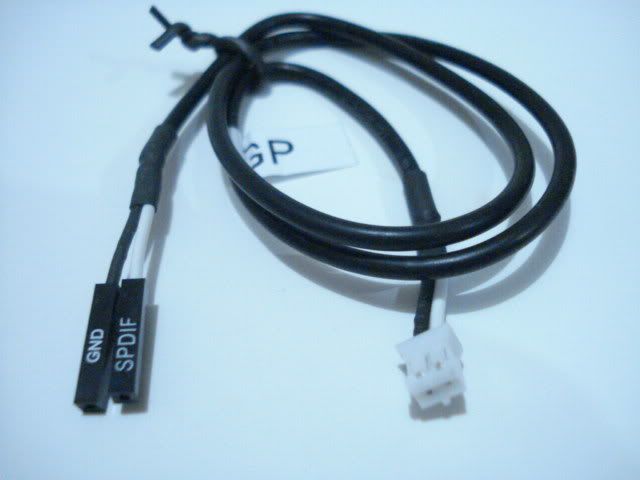 Disclaimer : Everything I write on this forum is my opinion. I try to be an even-handed poster and accept that you at times may not agree with these opinions or how I choose to express them, this is not my problem. The Disabled : If years cannot be added to their lives, at least life can be added to their years - Alf Morris - ℜ0
 -
Wow, what a nice bloke. Thanks for trying to help me.
This probably sounds ridiculous, but the light in my conservatory (where the tv / pc live) is quite dim at this time of night (I would call it subtle lighting!). So, I am going to wait until I get back from work tomorrow, and check it out in daylight.
I must admit to still being slightly confused by some of the stuff you are saying, but will give it all a go, if you don't mind the odd stupid question!
Thanks again for not cutting me adrift!
I'll post back tomorrow evening with my findings.
Duncan
:T0




This discussion has been closed.
Confirm your email address to Create Threads and Reply

Categories
- All Categories
- 355.8K Banking & Borrowing
- 254.9K Reduce Debt & Boost Income
- 456.1K Spending & Discounts
- 248.3K Work, Benefits & Business
- 605.9K Mortgages, Homes & Bills
- 179K Life & Family
- 263.7K Travel & Transport
- 1.5M Hobbies & Leisure
- 16.2K Discuss & Feedback
- 37.7K Read-Only Boards