We’d like to remind Forumites to please avoid political debate on the Forum.
This is to keep it a safe and useful space for MoneySaving discussions. Threads that are – or become – political in nature may be removed in line with the Forum’s rules. Thank you for your understanding.
📨 Have you signed up to the Forum's new Email Digest yet? Get a selection of trending threads sent straight to your inbox daily, weekly or monthly!
The Forum now has a brand new text editor, adding a bunch of handy features to use when creating posts. Read more in our how-to guide
Internet Browsers Crash As Soon As They Load Up
Comments
-
Go into the Control Panel and then the User Accounts section and there's the option 'Turn User Account Control on or Off'. In that section there is a check box next to 'Use User Account Control (UAC) to help protect your computer' and this should be checked.
I've just checked and it's definitely turned on. Thanks for the help.:hello: :hello: :hello:0 -
Malwarebytes has finished scanning and found nothing malicious again:
Malwarebytes' Anti-Malware 1.42
Database version: 3398
Windows 6.0.6002 Service Pack 2
Internet Explorer 8.0.6001.18865
20/12/2009 17:25:05
mbam-log-2009-12-20 (17-25-05).txt
Scan type: Full Scan (C:\|D:\|)
Objects scanned: 282187
Time elapsed: 50 minute(s), 4 second(s)
Memory Processes Infected: 0
Memory Modules Infected: 0
Registry Keys Infected: 0
Registry Values Infected: 0
Registry Data Items Infected: 0
Folders Infected: 0
Files Infected: 0
Memory Processes Infected:
(No malicious items detected)
Memory Modules Infected:
(No malicious items detected)
Registry Keys Infected:
(No malicious items detected)
Registry Values Infected:
(No malicious items detected)
Registry Data Items Infected:
(No malicious items detected)
Folders Infected:
(No malicious items detected)
Files Infected:
(No malicious items detected)
Is Run As... the same as Run as Administrator? I just read on a website that sometimes you need to press shift as you right-click to get Run As Administrator to appear in context menus on Vista so I tried it with HijackThis and Run As... appeared. I don't want to click on it if it could do any damage but if you think that's it then I'll try to run it pressing that. Thanks.:hello: :hello: :hello:0 -
Missing Administrator privileges....:think:0
-
mleonard79 wrote: »I am the administrator - I must be as I can alter things, download things etc and I've only ever created the one user account

:think: If I may, are you logged in as 'Administrator' or as a user with (supposedly) Administrator privileges?0 -
:think: If I may, are you logged in as 'Administrator' or as a user with (supposedly) Administrator privileges?
I'm logged in under my own name as a user who is also the administrator. There does not appear to be a separate Administrator Account - from looking at the user accounts in control panel there are three user accounts:
Michelle, Administrator, Password Protected
ASP.NET Machine Account Standard User Password Protected
Guest Guest Account
The ASP.NET one seems to have been created recently as I don't remember it being around for long. I read online that it is something to do with a windows update and is safe enough.
I'm more baffled than ever by it all!:hello: :hello: :hello:0 -
For Vista Home:
1. Go to your Start menu and right-click on the My Computer icon.
2. Choosing Manage from the list will prompt a User Account Control (UAC).
3. When you are done, the Computer Management console will appear. Expand the Local Users and Groups option with the use of the arrow next to it and choose Users folder.
4. You can now select the Administrator Account and go to the Actions panel to open More Actions.
5. Choose Propertiesto open the Administrator Properties dialog box and uncheck the option labeled Account is Disabled.
6. When done, click OKto confirm changes.
7. The Administrator account should now be present on your log in screen.0 -
For Vista Home:
1. Go to your Start menu and right-click on the My Computer icon.
2. Choosing Manage from the list will prompt a User Account Control (UAC).
3. When you are done, the Computer Management console will appear. Expand the Local Users and Groups option with the use of the arrow next to it and choose Users folder.
4. You can now select the Administrator Account and go to the Actions panel to open More Actions.
5. Choose Propertiesto open the Administrator Properties dialog box and uncheck the option labeled Account is Disabled.
6. When done, click OKto confirm changes.
7. The Administrator account should now be present on your log in screen.
I can bring up the Computer Management Console but there is no Local Users and Groups option as far as I can see. From a Google search it seems this isn't available on Vista Home Premium They don't make it easy. :hello: :hello: :hello:0 -
Alternative 'solution'; I'm afraid I can't verify as I am not using Vista atm :
First you’ll need to open a command prompt in administrator mode by right-clicking and choosing “Run as administrator” (or use the Ctrl+Shift+Enter shortcut from the search box)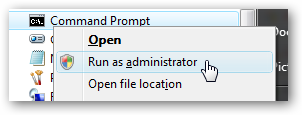
Now type the following command:net user administrator /active:yes
You should see a message that the command completed successfully. Log out, and you’ll now see the Administrator account as a choice. (Note that the screenshots are from Vista, but this works on Windows 7)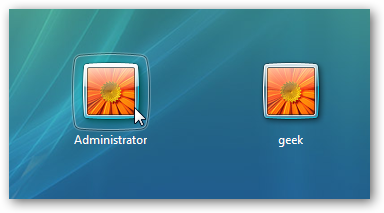
You’ll note that there’s no password for this account, so if you want to leave it enabled you should change the password.0 -
Thanks for the different instructions. I managed to get the administrator account activated and signed into.
When I did, though, a very strange thing happened. All of my desktop items came up and then promptly disappeared. I switched back to my regular user account to check they were still there ok but most of them have disappeared there as well - the ones that are still there are in the same positions they always were but the rest are gone I've looked in change desktop items in case they were hidden but they're not there either. Yet another problem to add to the growing list  :hello: :hello: :hello:0
 -
I decided to try using shift and run as to open HijackThis and it seems to have generated a log file without any errors so it must be run as administrator. Here is the log file:
Logfile of Trend Micro HijackThis v2.0.3 (BETA)
Scan saved at 20:56:24, on 20/12/2009
Platform: Windows Vista SP2 (WinNT 6.00.1906)
MSIE: Internet Explorer v8.00 (8.00.6001.18865)
Boot mode: Normal
Running processes:
C:\Program Files (x86)\Trusteer\Rapport\bin\RapportService.exe
C:\Program Files (x86)\Kontiki\KHost.exe
C:\Users\Michelle\AppData\Local\Google\Update\GoogleUpdate.exe
C:\Program Files (x86)\Common Files\Microsoft Shared\Works Shared\wkcalrem.exe
C:\Users\Michelle\AppData\Roaming\Dropbox\bin\Dropbox.exe
C:\Program Files (x86)\Sensible Vision\Fast Access\FATrayMon.exe
C:\Program Files (x86)\Dell Webcam\Dell Webcam Central\WebcamDell.exe
C:\Program Files (x86)\CyberLink\PowerDVD DX\PDVDDXSrv.exe
C:\Program Files (x86)\Avira\AntiVir Desktop\avgnt.exe
C:\Program Files (x86)\Sensible Vision\Fast Access\FATrayAlert.exe
C:\Program Files (x86)\Java\jre6\bin\jusched.exe
C:\Program Files (x86)\iTunes\iTunesHelper.exe
C:\Program Files (x86)\HP\HP Software Update\hpwuSchd.exe
C:\Program Files (x86)\HP\hpcoretech\hpcmpmgr.exe
C:\Program Files\WIDCOMM\Bluetooth Software\BluetoothHeadsetProxy.exe
C:\Program Files (x86)\TrendMicro\HiJackThis\HiJackThis.exe
R1 - HKCU\Software\Microsoft\Internet Explorer\Main,Default_Page_URL = http://g.uk.msn.com/USCON/2
R1 - HKCU\Software\Microsoft\Internet Explorer\Main,Search Page = http://go.microsoft.com/fwlink/?LinkId=54896
R0 - HKCU\Software\Microsoft\Internet Explorer\Main,Start Page = http://www.google.co.uk/
R1 - HKLM\Software\Microsoft\Internet Explorer\Main,Default_Page_URL = http://go.microsoft.com/fwlink/?LinkId=69157
R1 - HKLM\Software\Microsoft\Internet Explorer\Main,Default_Search_URL = http://go.microsoft.com/fwlink/?LinkId=54896
R1 - HKLM\Software\Microsoft\Internet Explorer\Main,Search Page = http://go.microsoft.com/fwlink/?LinkId=54896
R0 - HKLM\Software\Microsoft\Internet Explorer\Main,Start Page = http://search.myheritage.com
R0 - HKLM\Software\Microsoft\Internet Explorer\Search,SearchAssistant =
R0 - HKLM\Software\Microsoft\Internet Explorer\Search,CustomizeSearch =
R0 - HKLM\Software\Microsoft\Internet Explorer\Main,Local Page = C:\Windows\SysWOW64\blank.htm
R1 - HKCU\Software\Microsoft\Internet Explorer\Main,Window Title = Internet Explorer provided by Dell
R0 - HKCU\Software\Microsoft\Internet Explorer\Toolbar,LinksFolderName =
O1 - Hosts: ::1 localhost
O2 - BHO: AcroIEHelperStub - {18DF081C-E8AD-4283-A596-FA578C2EBDC3} - C:\Program Files (x86)\Common Files\Adobe\Acrobat\ActiveX\AcroIEHelperShim.dll
O2 - BHO: (no name) - {5C255C8A-E604-49b4-9D64-90988571CECB} - (no file)
O2 - BHO: Search Helper - {6EBF7485-159F-4bff-A14F-B9E3AAC4465B} - C:\Program Files (x86)\Microsoft\Search Enhancement Pack\Search Helper\SEPsearchhelperie.dll
O2 - BHO: Windows Live Sign-in Helper - {9030D464-4C02-4ABF-8ECC-5164760863C6} - C:\Program Files (x86)\Common Files\Microsoft Shared\Windows Live\WindowsLiveLogin.dll
O2 - BHO: FAIESSO Helper Object - {A2F122DA-055F-4df7-8F24-7354DBDBA85B} - C:\Program Files (x86)\Sensible Vision\Fast Access\FAIESSO.dll
O2 - BHO: Google Toolbar Notifier BHO - {AF69DE43-7D58-4638-B6FA-CE66B5AD205D} - C:\Program Files (x86)\Google\GoogleToolbarNotifier\5.1.1309.3572\swg.dll
O2 - BHO: Java(tm) Plug-In 2 SSV Helper - {DBC80044-A445-435b-BC74-9C25C1C588A9} - C:\Program Files (x86)\Java\jre6\bin\jp2ssv.dll
O2 - BHO: Windows Live Toolbar Helper - {E15A8DC0-8516-42A1-81EA-DC94EC1ACF10} - C:\Program Files (x86)\Windows Live\Toolbar\wltcore.dll
O3 - Toolbar: &Windows Live Toolbar - {21FA44EF-376D-4D53-9B0F-8A89D3229068} - C:\Program Files (x86)\Windows Live\Toolbar\wltcore.dll
O4 - HKLM\..\Run: [StartCCC] "C:\Program Files (x86)\ATI Technologies\ATI.ACE\Core-Static\CLIStart.exe" MSRun
O4 - HKLM\..\Run: [FATrayAlert] C:\Program Files (x86)\Sensible Vision\Fast Access\FATrayMon.exe
O4 - HKLM\..\Run: [Dell Webcam Central] "C:\Program Files (x86)\Dell Webcam\Dell Webcam Central\WebcamDell.exe" /mode2
O4 - HKLM\..\Run: [PDVDDXSrv] "C:\Program Files (x86)\CyberLink\PowerDVD DX\PDVDDXSrv.exe"
O4 - HKLM\..\Run: [avgnt] "C:\Program Files (x86)\Avira\AntiVir Desktop\avgnt.exe" /min
O4 - HKLM\..\Run: [kdx] "C:\Program Files (x86)\Kontiki\KHost.exe" -all
O4 - HKLM\..\Run: [Adobe Reader Speed Launcher] "C:\Program Files (x86)\Adobe\Reader 9.0\Reader\Reader_sl.exe"
O4 - HKLM\..\Run: [Adobe ARM] "C:\Program Files (x86)\Common Files\Adobe\ARM\1.0\AdobeARM.exe"
O4 - HKLM\..\Run: [SunJavaUpdateSched] "C:\Program Files (x86)\Java\jre6\bin\jusched.exe"
O4 - HKLM\..\Run: [QuickTime Task] "C:\Program Files (x86)\QuickTime\QTTask.exe" -atboottime
O4 - HKLM\..\Run: [iTunesHelper] "C:\Program Files (x86)\iTunes\iTunesHelper.exe"
O4 - HKLM\..\Run: [HP Software Update] "C:\Program Files (x86)\HP\HP Software Update\HPWuSchd.exe"
O4 - HKLM\..\Run: [HP Component Manager] "C:\Program Files (x86)\HP\hpcoretech\hpcmpmgr.exe"
O4 - HKLM\..\Run: [DXDllRegExe] dxdllreg.exe
O4 - HKCU\..\Run: [Sidebar] C:\Program Files\Windows Sidebar\sidebar.exe /autoRun
O4 - HKCU\..\Run: [kdx] C:\Program Files (x86)\Kontiki\KHost.exe -all
O4 - HKCU\..\Run: [Google Update] "C:\Users\Michelle\AppData\Local\Google\Update\GoogleUpdate.exe" /c
O4 - HKUS\S-1-5-19\..\Run: [Sidebar] %ProgramFiles%\Windows Sidebar\Sidebar.exe /detectMem (User 'LOCAL SERVICE')
O4 - HKUS\S-1-5-19\..\Run: [WindowsWelcomeCenter] rundll32.exe oobefldr.dll,ShowWelcomeCenter (User 'LOCAL SERVICE')
O4 - HKUS\S-1-5-20\..\Run: [Sidebar] %ProgramFiles%\Windows Sidebar\Sidebar.exe /detectMem (User 'NETWORK SERVICE')
O4 - .DEFAULT User Startup: Dell Dock First Run.lnk = C:\Program Files\Dell\DellDock\DellDock.exe (User 'Default user')
O4 - Startup: Dell Dock.lnk = C:\Program Files\Dell\DellDock\DellDock.exe
O4 - Startup: Dropbox.lnk = C:\Users\Michelle\AppData\Roaming\Dropbox\bin\Dropbox.exe
O4 - Global Startup: Bluetooth.lnk = ?
O4 - Global Startup: Microsoft Office.lnk = C:\Program Files (x86)\Microsoft Office\Office10\OSA.EXE
O4 - Global Startup: Microsoft Works Calendar Reminders.lnk = ?
O8 - Extra context menu item: Send image to &Bluetooth Device... - C:\Program Files\WIDCOMM\Bluetooth Software\btsendto_ie_ctx.htm
O8 - Extra context menu item: Send page to &Bluetooth Device... - C:\Program Files\WIDCOMM\Bluetooth Software\btsendto_ie.htm
O9 - Extra button: Blog This - {219C3416-8CB2-491a-A3C7-D9FCDDC9D600} - C:\Program Files (x86)\Windows Live\Writer\WriterBrowserExtension.dll
O9 - Extra 'Tools' menuitem: &Blog This in Windows Live Writer - {219C3416-8CB2-491a-A3C7-D9FCDDC9D600} - C:\Program Files (x86)\Windows Live\Writer\WriterBrowserExtension.dll
O9 - Extra button: Send To Bluetooth - {CCA281CA-C863-46ef-9331-5C8D4460577F} - C:\Program Files\WIDCOMM\Bluetooth Software\btsendto_ie.htm
O9 - Extra 'Tools' menuitem: Send to &Bluetooth Device... - {CCA281CA-C863-46ef-9331-5C8D4460577F} - C:\Program Files\WIDCOMM\Bluetooth Software\btsendto_ie.htm
O13 - Gopher Prefix:
O16 - DPF: {49312E18-AA92-4CC2-BB97-55DEA7BCADD6} (WMI Class) - http://support.dell.com/systemprofiler/SysProExe.CAB
O16 - DPF: {4E62C4DE-627D-4604-B157-4B7D6B09F02E} (Egg Money Manager Digital Safe) - https://moneymanager.egg.com/Pinsafe/accounttracking.cab
O16 - DPF: {E2883E8F-472F-4FB0-9522-AC9BF37916A7} - http://platformdl.adobe.com/NOS/getPlusPlus/1.6/gp.cab
O20 - Winlogon Notify: FastAccess - C:\Program Files (x86)\Sensible Vision\Fast Access\FALogNot.dll
O22 - SharedTaskScheduler: Component Categories cache daemon - {8C7461EF-2B13-11d2-BE35-3078302C2030} - C:\Windows\system32\browseui.dll
O23 - Service: Andrea ST Filters Service (AESTFilters) - Unknown owner - C:\Windows\System32\DriverStore\FileRepository\stwrt64.inf_70d6d963\AESTSr64.exe (file missing)
O23 - Service: @%SystemRoot%\system32\Alg.exe,-112 (ALG) - Unknown owner - C:\Windows\System32\alg.exe (file missing)
O23 - Service: Avira AntiVir Scheduler (AntiVirSchedulerService) - Avira GmbH - C:\Program Files (x86)\Avira\AntiVir Desktop\sched.exe
O23 - Service: Avira AntiVir Guard (AntiVirService) - Avira GmbH - C:\Program Files (x86)\Avira\AntiVir Desktop\avguard.exe
O23 - Service: Apple Mobile Device - Apple Inc. - C:\Program Files (x86)\Common Files\Apple\Mobile Device Support\bin\AppleMobileDeviceService.exe
O23 - Service: ASP.NET State Service (aspnet_state) - Unknown owner - C:\Windows\Microsoft.NET\Framework\v2.0.50727\aspnet_state.exe (file missing)
O23 - Service: Ati External Event Utility - Unknown owner - C:\Windows\system32\Ati2evxx.exe (file missing)
O23 - Service: Bonjour Service - Apple Inc. - C:\Program Files (x86)\Bonjour\mDNSResponder.exe
O23 - Service: Bluetooth Service (btwdins) - Broadcom Corporation. - C:\Program Files\WIDCOMM\Bluetooth Software\bin\btwdins.exe
O23 - Service: @dfsrres.dll,-101 (DFSR) - Unknown owner - C:\Windows\system32\DFSR.exe (file missing)
O23 - Service: Dock Login Service (DockLoginService) - Stardock Corporation - C:\Program Files\Dell\DellDock\DockLogin.exe
O23 - Service: FAService - Sensible Vision - C:\Program Files (x86)\Sensible Vision\Fast Access\FAService.exe
O23 - Service: Google Update Service (gupdate1ca0de2b5e7ae70) (gupdate1ca0de2b5e7ae70) - Google Inc. - C:\Program Files (x86)\Google\Update\GoogleUpdate.exe
O23 - Service: Google Software Updater (gusvc) - Google - C:\Program Files (x86)\Google\Common\Google Updater\GoogleUpdaterService.exe
O23 - Service: iPod Service - Apple Inc. - C:\Program Files\iPod\bin\iPodService.exe
O23 - Service: @keyiso.dll,-100 (KeyIso) - Unknown owner - C:\Windows\system32\lsass.exe (file missing)
O23 - Service: KService - Kontiki Inc. - C:\Program Files (x86)\Kontiki\KService.exe
O23 - Service: @comres.dll,-2797 (MSDTC) - Unknown owner - C:\Windows\System32\msdtc.exe (file missing)
O23 - Service: @%SystemRoot%\System32\netlogon.dll,-102 (Netlogon) - Unknown owner - C:\Windows\system32\lsass.exe (file missing)
O23 - Service: @%systemroot%\system32\psbase.dll,-300 (ProtectedStorage) - Unknown owner - C:\Windows\system32\lsass.exe (file missing)
O23 - Service: Rapport Launching Service (RapportLaunService) - Trusteer Ltd. - C:\Program Files (x86)\Trusteer\Rapport\bin\RapportLaunService64.exe
O23 - Service: Rapport Management Service (RapportMgmtService) - Trusteer Ltd. - C:\Program Files (x86)\Trusteer\Rapport\bin\RapportMgmtService.exe
O23 - Service: @%systemroot%\system32\Locator.exe,-2 (RpcLocator) - Unknown owner - C:\Windows\system32\locator.exe (file missing)
O23 - Service: @%SystemRoot%\system32\samsrv.dll,-1 (SamSs) - Unknown owner - C:\Windows\system32\lsass.exe (file missing)
O23 - Service: @%SystemRoot%\system32\SLsvc.exe,-101 (slsvc) - Unknown owner - C:\Windows\system32\SLsvc.exe (file missing)
O23 - Service: @%SystemRoot%\system32\snmptrap.exe,-3 (SNMPTRAP) - Unknown owner - C:\Windows\System32\snmptrap.exe (file missing)
O23 - Service: @%systemroot%\system32\spoolsv.exe,-1 (Spooler) - Unknown owner - C:\Windows\System32\spoolsv.exe (file missing)
O23 - Service: Audio Service (STacSV) - Unknown owner - C:\Windows\System32\DriverStore\FileRepository\stwrt64.inf_70d6d963\STacSV64.exe (file missing)
O23 - Service: stllssvr - MicroVision Development, Inc. - C:\Program Files (x86)\Common Files\SureThing Shared\stllssvr.exe
O23 - Service: @%SystemRoot%\system32\ui0detect.exe,-101 (UI0Detect) - Unknown owner - C:\Windows\system32\UI0Detect.exe (file missing)
O23 - Service: @%SystemRoot%\system32\vds.exe,-100 (vds) - Unknown owner - C:\Windows\System32\vds.exe (file missing)
O23 - Service: @%systemroot%\system32\vssvc.exe,-102 (VSS) - Unknown owner - C:\Windows\system32\vssvc.exe (file missing)
O23 - Service: @%Systemroot%\system32\wbem\wmiapsrv.exe,-110 (wmiApSrv) - Unknown owner - C:\Windows\system32\wbem\WmiApSrv.exe (file missing)
O23 - Service: @%ProgramFiles%\Windows Media Player\wmpnetwk.exe,-101 (WMPNetworkSvc) - Unknown owner - C:\Program Files (x86)\Windows Media Player\wmpnetwk.exe (file missing)
--
End of file - 11971 bytes:hello: :hello: :hello:0



This discussion has been closed.
Confirm your email address to Create Threads and Reply

Categories
- All Categories
- 354.4K Banking & Borrowing
- 254.4K Reduce Debt & Boost Income
- 455.4K Spending & Discounts
- 247.3K Work, Benefits & Business
- 604K Mortgages, Homes & Bills
- 178.4K Life & Family
- 261.5K Travel & Transport
- 1.5M Hobbies & Leisure
- 16K Discuss & Feedback
- 37.7K Read-Only Boards