We’d like to remind Forumites to please avoid political debate on the Forum.
This is to keep it a safe and useful space for MoneySaving discussions. Threads that are – or become – political in nature may be removed in line with the Forum’s rules. Thank you for your understanding.
📨 Have you signed up to the Forum's new Email Digest yet? Get a selection of trending threads sent straight to your inbox daily, weekly or monthly!
The Forum now has a brand new text editor, adding a bunch of handy features to use when creating posts. Read more in our how-to guide
Unmountable boot volume please help!
Comments
-
setup the first option you need
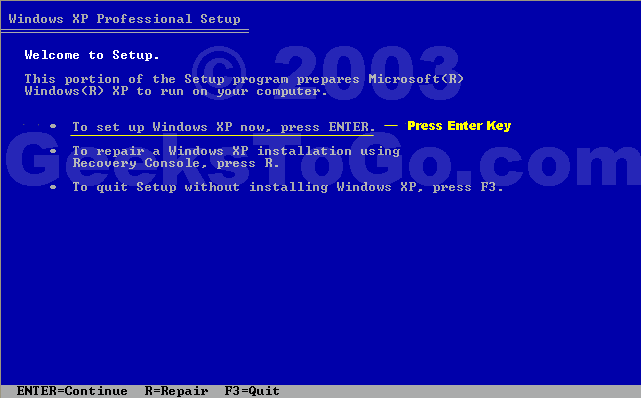
then accept the terms, then you are at this screen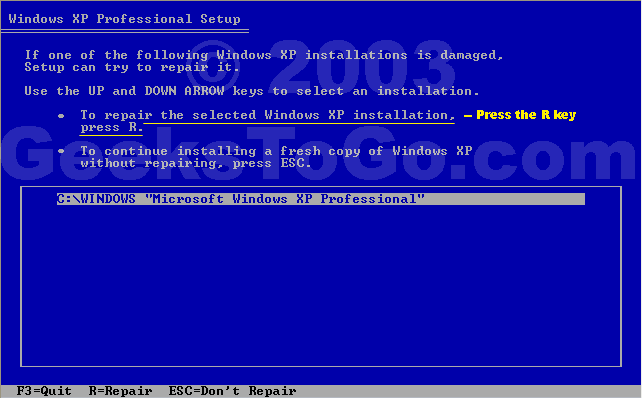
highlight your Xp installation , then press R
Browntoa, I ahve tried this again and for some reason, my keyboard has begun working. Only problem is that the existing partitions don't show any XP installations to repair? any ideas?0 -
sounds fatal !!!!!
an existing Xp partition should show upEx forum ambassador
Long term forum member0 -
K, I've tried a couple of the partitions, but it wanted to format the ones I chose and it looks like i'll lose any data saved on them if I do this. I think I'll take it to some sort of PC place tomorrow to try and retrieve my data from my hard drive, then ring Dell and send the stupid thing back.
Why has this happened, does anyone know what causes these problems?0 -
Why has this happened, does anyone know what causes these problems?
Hard disks fail like any mechanical device. I can be caused by knocks and bumps, e.g. laptops hard disks often fail more frequently than desktop hard disks. But generally hard disk fail for technical reasons, sometimes minor defects on the disk caused through poor manufacturing. You always get a few baddens in a batch.
There's generally an acceptance for failed hard disks, there's no use trying to point the finger. If it's under warranty then you're ok anyway.
Good Luck!- Google is your friend, use it :rolleyes:0 -
thankyou to everyone who has replied to this thread, I really appreciate you all trying to help. I'll jump back on here after I've sorted it all out to let you know the outcome. Unfortunately I doubt it will now be fixed for next sunday, which is a very important day for me - it's Glastonbury ticket day! Looks like I'll ahve to use this dodgy laptop to try for my tickets!
hey ho...0 -
recovery console
chkdsk c: /p /r (spaces are important)
also Dells usually have a hard disk diagnostic, press F12 on boot.
The error sounds logical (magnetic), rather than physical to me, can happen at any time of you don't shutdown the pc properly.
ps they do repair stuff out of warranty, so you might be glad you bought a Dell in the end
Ever get the feeling you are wasting your time? :rolleyes:0 -
Hi everyone,
Well I've just gotten off the phone to dell and my hard drive is goosed. The lady talked me through taking it out and is sending me a new one tomorrow, which I should be able to fit myself. I'm taking the old one to a pc shop today to try to retrieve the data.
As frustrated as i was yesterday, i'm actually quite chuffed at the fact I've learned quite a lot!
thanks again to everyone who tried their best to help me yesterday xx0 -
do it yourself, it's cheaper.Ever get the feeling you are wasting your time? :rolleyes:0








This discussion has been closed.
Confirm your email address to Create Threads and Reply

Categories
- All Categories
- 353.5K Banking & Borrowing
- 254.2K Reduce Debt & Boost Income
- 455K Spending & Discounts
- 246.6K Work, Benefits & Business
- 602.9K Mortgages, Homes & Bills
- 178.1K Life & Family
- 260.6K Travel & Transport
- 1.5M Hobbies & Leisure
- 16K Discuss & Feedback
- 37.7K Read-Only Boards