We’d like to remind Forumites to please avoid political debate on the Forum.
This is to keep it a safe and useful space for MoneySaving discussions. Threads that are – or become – political in nature may be removed in line with the Forum’s rules. Thank you for your understanding.
📨 Have you signed up to the Forum's new Email Digest yet? Get a selection of trending threads sent straight to your inbox daily, weekly or monthly!
The Forum now has a brand new text editor, adding a bunch of handy features to use when creating posts. Read more in our how-to guide
Unmountable boot volume please help!
Comments
-
setup the first option you need
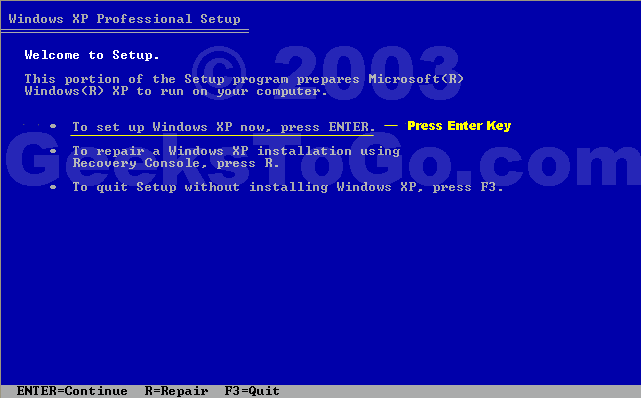
then accept the terms, then you are at this screen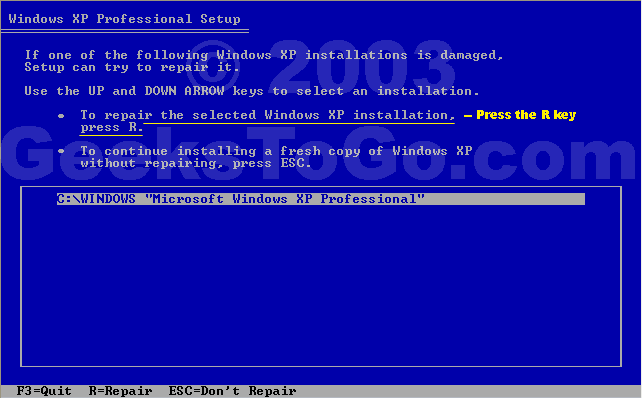
highlight your Xp installation , then press R
That first box up top? I have that up right now but it is not accepting anything I type in? It's as if the keyboard isn't working? (I know it actually IS as I'm using it to type on here via a laptop!)
Thoughts?0 -
has it got a USB keyboard ??
you need a real old style plug in one, or sometimes there is an adapter in the box it came in Ex forum ambassador
Long term forum member0 -
has it got a USB keyboard ??
you need a real old style plug in one, or sometimes there is an adapter in the box it came in
I've rooted an old keyboard out of the attic,one that has a serial port connector - brought it downstairs to my pc only to find the pc has no serial port in the back?!
nightmare!0 -
Hmm, I'm wondering if the repairs/replacements that Dell made in january might be part of the reason why I can't fix this error. They installed a new motherboard and CPU - could this be why the disc I'm using doesn't seem to be working? Should I try my sister's XP recovery disc? And if so, will it accept my xp media product key?0
-
its definately the usb thing, had the same problem myself
the back of the Dell will have a green socket at the back for itEx forum ambassador
Long term forum member0 -
its definately the usb thing, had the same problem myself
the back of the Dell will have a green socket at the back for it
i know I sound like i'm arguing but I'm really not - there is no green serial slot at the back of my pc?! It's a Dell Dimension C521 by the way - don't know if that makes any difference? There is no hole on the pc at all, that fits a serial port keyboard?
Totally stumped!0 -
just checked the Spec, this Dell comes with a USB keyboard and no PS2
trying to work out how !!Ex forum ambassador
Long term forum member0 -
on dell it goes on about boot with the Cd
go into recovery console
then type fixbootEx forum ambassador
Long term forum member0 -
The green plugs are PS/2 style connectors. As far as I know pretty much all current PC's have these. If you have a very old keyboard (over 10 years old) it might have an AT (DIN) type connector, which are much larger round plugs.
Pic of PS/2 connector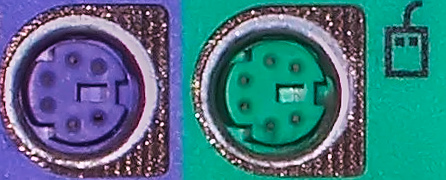
Also I don't know about your Dell specifically but many computers have an option in the BIOS to allow USB keyboards to be controlled by BIOS or Operating System - you would want to choose BIOS.
EDIT to get into the BIOS usually you have a message to press a key (often Delete) to enter setup when you first turn the PC on.0 -
I very much doubt you're going to be able to fix this yourself.
I repair a lot of PCs and 9 times out of 10 this BSoD means that the hard disk is failing or has failed.
You're going to need to replace the hard disk. You can do this yourself but if the machine is under warranty then get Dell to do it, after all this is a money saving forum.
You best chance of getting data off the disk is to add it to another PC as a slave disk. Then you can try accessing it. If the disk doesnt show up then you'll either need to use some kind of data recovery tool or seek 3rd party help.
If you want to keep your data DO NOT send the disk to Dell, they will most probably scrap it and you'll never see it again. I've not heard of Dell doing data recovery under warranty or even as a seperate service.
To reiterate, get the HDD looked at by a 3rd party before sending the Base Unit back to dell if you have data on there you want to keep.
Russ- Google is your friend, use it :rolleyes:0








This discussion has been closed.
Confirm your email address to Create Threads and Reply

Categories
- All Categories
- 353.5K Banking & Borrowing
- 254.2K Reduce Debt & Boost Income
- 455K Spending & Discounts
- 246.6K Work, Benefits & Business
- 602.9K Mortgages, Homes & Bills
- 178.1K Life & Family
- 260.6K Travel & Transport
- 1.5M Hobbies & Leisure
- 16K Discuss & Feedback
- 37.7K Read-Only Boards