We’d like to remind Forumites to please avoid political debate on the Forum.
This is to keep it a safe and useful space for MoneySaving discussions. Threads that are – or become – political in nature may be removed in line with the Forum’s rules. Thank you for your understanding.
📨 Have you signed up to the Forum's new Email Digest yet? Get a selection of trending threads sent straight to your inbox daily, weekly or monthly!
The Forum now has a brand new text editor, adding a bunch of handy features to use when creating posts. Read more in our how-to guide
Unmountable boot volume please help!

angelfire
Posts: 870 Forumite



in Techie Stuff
Hi everyone,
Yesterday my Dell desktop went funny- at first the screen went off and the whole thing needed to be switched off at the mais and rebooted, after that it worked okay.
Then my daughter went on it last night and this morning when I've come to switch it on, i've got the blue screen of death.
I've researched the topic on here and on google already and have tried the first suggestion, which seems to be to boot from cd and use the XP recovery disc that came with the pc. I ahve tried this, but when I enter chkdsk/f or chkdsk/r it comes up with an error?
At no point did it ask me for any administrator password, which seems to be what it should do, going off previous threads in the subject on here.
Has anyone anything they can suggest?
It may also be worth mentioning that the PC had to go into Dell for repair a couple of months ago - it had a new CPU and M/B fitted...
I'm hoping to be able to fix it myself really, as a call to Dell will cost a packet, you can't understand a word they say when you do get through and if they tell me to send it to them it'll be over a week til I get it back and I need it between now and then...
Can anyone help me please?
Yesterday my Dell desktop went funny- at first the screen went off and the whole thing needed to be switched off at the mais and rebooted, after that it worked okay.
Then my daughter went on it last night and this morning when I've come to switch it on, i've got the blue screen of death.
I've researched the topic on here and on google already and have tried the first suggestion, which seems to be to boot from cd and use the XP recovery disc that came with the pc. I ahve tried this, but when I enter chkdsk/f or chkdsk/r it comes up with an error?
At no point did it ask me for any administrator password, which seems to be what it should do, going off previous threads in the subject on here.
Has anyone anything they can suggest?
It may also be worth mentioning that the PC had to go into Dell for repair a couple of months ago - it had a new CPU and M/B fitted...
I'm hoping to be able to fix it myself really, as a call to Dell will cost a packet, you can't understand a word they say when you do get through and if they tell me to send it to them it'll be over a week til I get it back and I need it between now and then...
Can anyone help me please?
0
Comments
-
Assuming its windows xp
http://www.tech-recipes.com/rx/2605/fixing_the_dreaded_unmountable_boot_volume_error0 -
Hi, thanks for that but I ahve tried folowing the instructions, i've booted from the CD drive and it's come to a blue page with three choices, the first is to set up XP, the second to repair and the third option is to quit - neither of which work? I've trieed pressing all keys and it's just frozen. It's done this twice?
any suggestions?0 -
What version of Windows XP is the recovery cd for? (It should say on it Windows XP Professional XP1 or something like that.) I suspect that you may have installed a later service pack than that on the recovery cd which may be why it's not responding. Can you ask around friends and family to see which version recovery cd they have and try a later one, if possible.
It may also be a problem with the hard drive itself, but I'd persevere with trying to repair Windows.
Also, the recovery console can take a minute or two to respond - is there definitely no hard disk activity?Debt at highest: £6,290.72 (14.2.1999)
Debt free success date: 14.8.2006 :j0 -
Hello,
I have had the same unmountable boot volume error with machines I have been working on and both times it was hard disk failure. You have to look to replacing your hard drive and re-installing the operating system. I hope that you previously backed-up your files!
Good luck!!!0 -
msmicawber wrote: »What version of Windows XP is the recovery cd for? (It should say on it Windows XP Professional XP1 or something like that.) I suspect that you may have installed a later service pack than that on the recovery cd which may be why it's not responding. Can you ask around friends and family to see which version recovery cd they have and try a later one, if possible.
It may also be a problem with the hard drive itself, but I'd persevere with trying to repair Windows.
Also, the recovery console can take a minute or two to respond - is there definitely no hard disk activity?
Hiya,
The disc I'm trying to use is one of three that came with the Dell machine itself. It says on it "Operating System Already installed on your computer, Reinstallation DVD, MS Windows XP Media center version 2005 with update rollup 2"
Am I even using the right disc?
Please god don't tell me I've lost all my data? The pc is only fourteen months old, as I said earlier, it's already had a new CPU and M/B. This is the last time I ever buy from Dell.0 -
try a repair install, you will not lose any data
http://www.geekstogo.com/forum/How-to-repair-Windows-XP-t138.htmlEx forum ambassador
Long term forum member0 -
try a repair install, you will not lose any data
http://www.geekstogo.com/forum/How-to-repair-Windows-XP-t138.html
Thanks Browntoa, but can you confirm I'm using the correct disk as mentioned above please?
I have no other?0 -
There's always the option of putting the hard drive
in another XP pc as a secondary drive.
XP usually susses the drive is "dirty" and fixes the problem itself.0 -
Hello again all. I've followed the steps on the page Browntoa suggested and once again have gotten stuck on the blue screen where I'm supposed to choose set up XOP, repai XP, or quit set up. it does absolutely nothing?
Dell technical support isn't open until tomorrow so I'm completely stumped.
Can anyone offer anymore advice?
What is the problem and couled it be due to Dell messing about with my PC whe they took it in for repair a few months ago?
This is hopeless 0
0 -
setup the first option you need
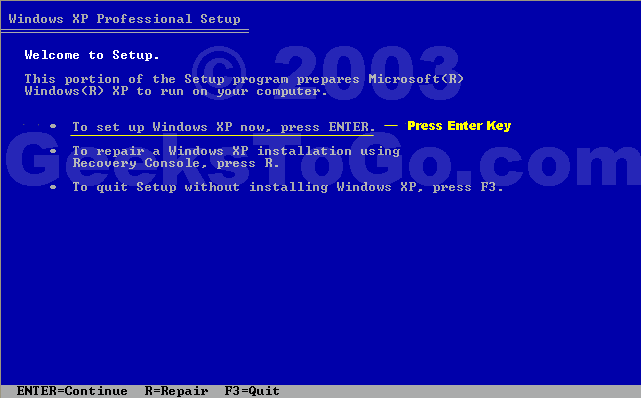
then accept the terms, then you are at this screen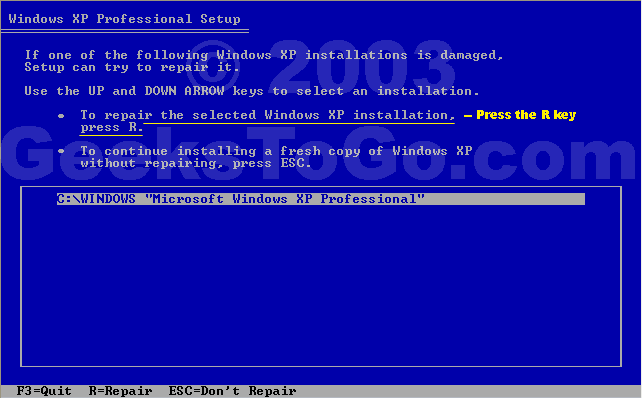
highlight your Xp installation , then press REx forum ambassador
Long term forum member0








This discussion has been closed.
Confirm your email address to Create Threads and Reply

Categories
- All Categories
- 353.5K Banking & Borrowing
- 254.1K Reduce Debt & Boost Income
- 455K Spending & Discounts
- 246.6K Work, Benefits & Business
- 602.9K Mortgages, Homes & Bills
- 178.1K Life & Family
- 260.6K Travel & Transport
- 1.5M Hobbies & Leisure
- 16K Discuss & Feedback
- 37.7K Read-Only Boards