We’d like to remind Forumites to please avoid political debate on the Forum.
This is to keep it a safe and useful space for MoneySaving discussions. Threads that are – or become – political in nature may be removed in line with the Forum’s rules. Thank you for your understanding.
Logging in without passwords or administrator
Comments
-
I gave them the PIN and password which allowed access to the computer itself. They also wanted my Google password which would have gained access to many of my accounts, so I refused this, and I'm gradually going through my accounts checking I can log in. MSE was one of the hardest to log on due to their own difficulties of reissuing passwords earlier in the week, so I only got back on yesterday.
Security was a major worry for me, and the reason why I was reluctant to give them the computer in the first place. Being in a grotty corner of a small industrial estate worried me more, however, it turns out they have been operating for 30 years and have only moved there recently from the High St. They answered my call on Bank holiday Monday, I brought the computer in at 8am on Tuesday, and it was ready for collection by 3pm Wednesday.
0 -
I've been in the trade for near on 30 years now, so I can try to help if you wish.
It sounds to me like you were logging in with a Microsoft (MS) account, not a local account into your Windows 11 install. All MS accounts must have a password, this is enforced directly by MS and can not be bypassed. A PIN is a security layer that is added on top of a password, it can be used just like a password if you wish with numbers and letters, or you could opt for facial, fingerprint security if you have those devices on your machine (webcam/fingerprint reader)
So you removed the PIN, then yes it would drop back to asking for a MS password, and no you cant remove that as its tied into an online MS account. Imagine it this way, you would be going to Microsoft's website, clicking login, you put in your Microsoft account email, and it would let you in, zero password… this is where I think the misunderstanding comes from (I am guessing this so please don't take offense). You are trying to remove a password tied to your machine, but it is still an online account and that's impossible.
All Windows 11 machines have Online and Local account abilities, your main account is most likely a MS account (online) with local Administrator permissions, and you have a seperate Local account that also has Administrator permissions.
The question is, what are you trying to achieve? without knowing your goals I can't offer more concrete advice.1 -
ladruid, thanks but it's all done now, I hope. Just follow the thread.
A local firm have reinstalled windows and removed the PIN and password (sort of). That is, it sometimes still asks for them, but it can be clicked through without typing any characters.
0 -
No worries, glad your happy with your current setup. :D
That's all we can ask from our equipment!0 -
All MS accounts must have a password, this is enforced directly by MS and can not be bypassed.
Not strictly true, MS accounts don't need a password (my main account doesn't have one), you can use the usual alternatives (Windows Hello, passkeys, Authenticator app etc). MS say that new consumer accounts are passwordless by default - not tried this).
1 -
You are partly correct and incorrect at the same time. All MS accounts require a password to setup, you can test this yourself by doing a fresh install of Windows 11 without using a bypassnro method, or going to Microsoft's website and creating an account, both require a password, this is a fundamental fact. Yes, you can remove the password later by changing to a "passwordless" account after you have setup other authentication methods like Hello, Authenticator or passkeys, but that does not negate the password requirement before this point. And you can be in a world of hurt on a passwordless account if you happen to lose your primary 2FA method without the proper procedures in place to recover/change them.
0 -
I agree that I am partially correct, not sure about the incorrect bit.
I took your challenge and created a brand-new Microsoft account - it required a password.
Then did the same thing via a link in a Microsoft article about passwordless accounts - this new account did NOT require a password.
So I assert again, it is possible to create a MS account without a password, what I can't do is give you the precise link I used (I didn't capture the address - I was on a stand-alone device). It does seem that the changed screens/procedures to support this are in mid-rollout and are not yet universal, hence the experience may differ depending on your route to the page.
1 -
It is now possible to create and use a Microsoft account for Windows 11 without a traditional password, but the setup path is not yet completely uniform; depending on the exact device, region, rollout state, or account-creation route, some peeps may still see the older password-first workflow.
2 -
Thank you for clarifying that a new account required a password (without using some specific device/link/region).
The only Microsoft support article I found explained you needed to convert an existing account into passwordless after you linked it to another authentication method, e.g. Authenticator or Hello.
Here is the Microsoft support page :- How to go passwordless with your Microsoft account
Although, (for me) their main account creation page has changed recently (it does mention optional passwordless):- Microsoft Account
If you use this page, you can link an existing email, they send you a code to login, in essence a 2FA login code without a password, is this the method you found?
If this wasn't the page, it's a shame you did not capture the link as I would have loved to investigate and test the page you found to expand my knowledge base. Hopefully you can find it again and post it.
It did make me chuckle when I asked Microsoft's own AI if it can be done:-
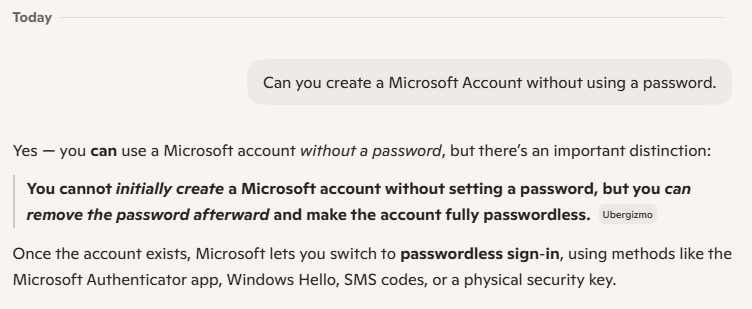
It appears this is another case of MS's left hand not knowing what the right hand is doing, their systems are not uniform across everything yet, the systems are in transition/flux, and Microsoft's own AI needs to catch up!
0 -
Although, (for me) their main account creation page has changed recently (it does mention optional passwordless):- Microsoft Account
If you use this page, you can link an existing email, they send you a code to login, in essence a 2FA login code without a password, is this the method you found?
If this wasn't the page, it's a shame you did not capture the link as I would have loved to investigate and test the page you found to expand my knowledge base. Hopefully you can find it again and post it.
I think that we are probably talking about the same account create page, it asks for an existing email address (I used the gmail address of the Google account that is only used on the phone I was using. There was no MS account on this phone.
I've tried this route on a Windows laptop signed into MS and the existing MS account gets in the way (perhaps not surprisingly).
Does beg the question of what would happen if you enter an existing Hotmail/Outlook email, hopefully it diverts to an existing account login.
Presumably this account create path can't give rise to a new MS email account.
0












Confirm your email address to Create Threads and Reply

Categories
- All Categories
- 355.8K Banking & Borrowing
- 254.9K Reduce Debt & Boost Income
- 456.1K Spending & Discounts
- 248.3K Work, Benefits & Business
- 605.9K Mortgages, Homes & Bills
- 179K Life & Family
- 263.7K Travel & Transport
- 1.5M Hobbies & Leisure
- 16.2K Discuss & Feedback
- 37.7K Read-Only Boards