We’d like to remind Forumites to please avoid political debate on the Forum.
This is to keep it a safe and useful space for MoneySaving discussions. Threads that are – or become – political in nature may be removed in line with the Forum’s rules. Thank you for your understanding.
Smarty SIM - on '3' - very poor download speeds.




Trying to set up a temporary 4G router for daughter as she stays in a relative's house for an undetermined period. Got a cheap BT mini-Halo 4G router, and she bought a data-loaded SIM from Smarty.
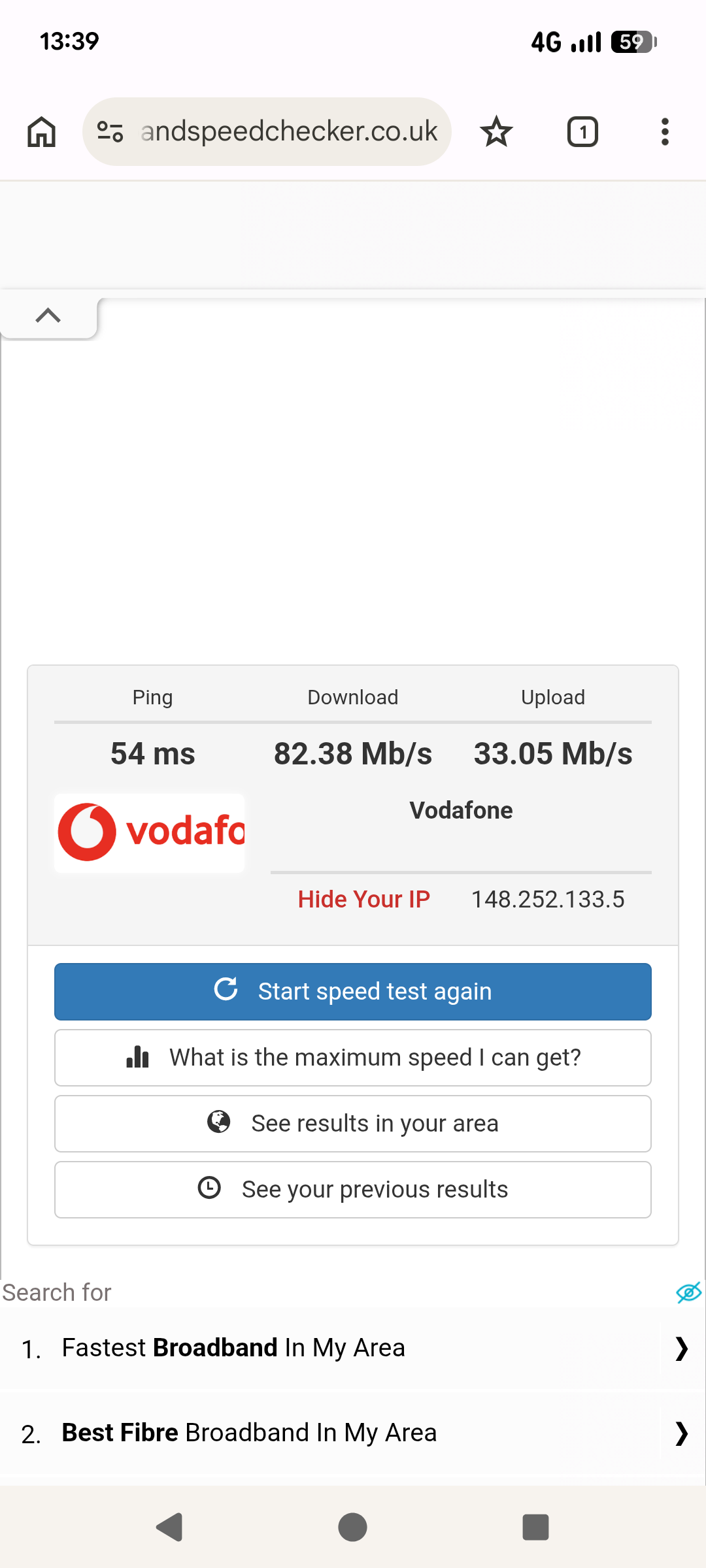
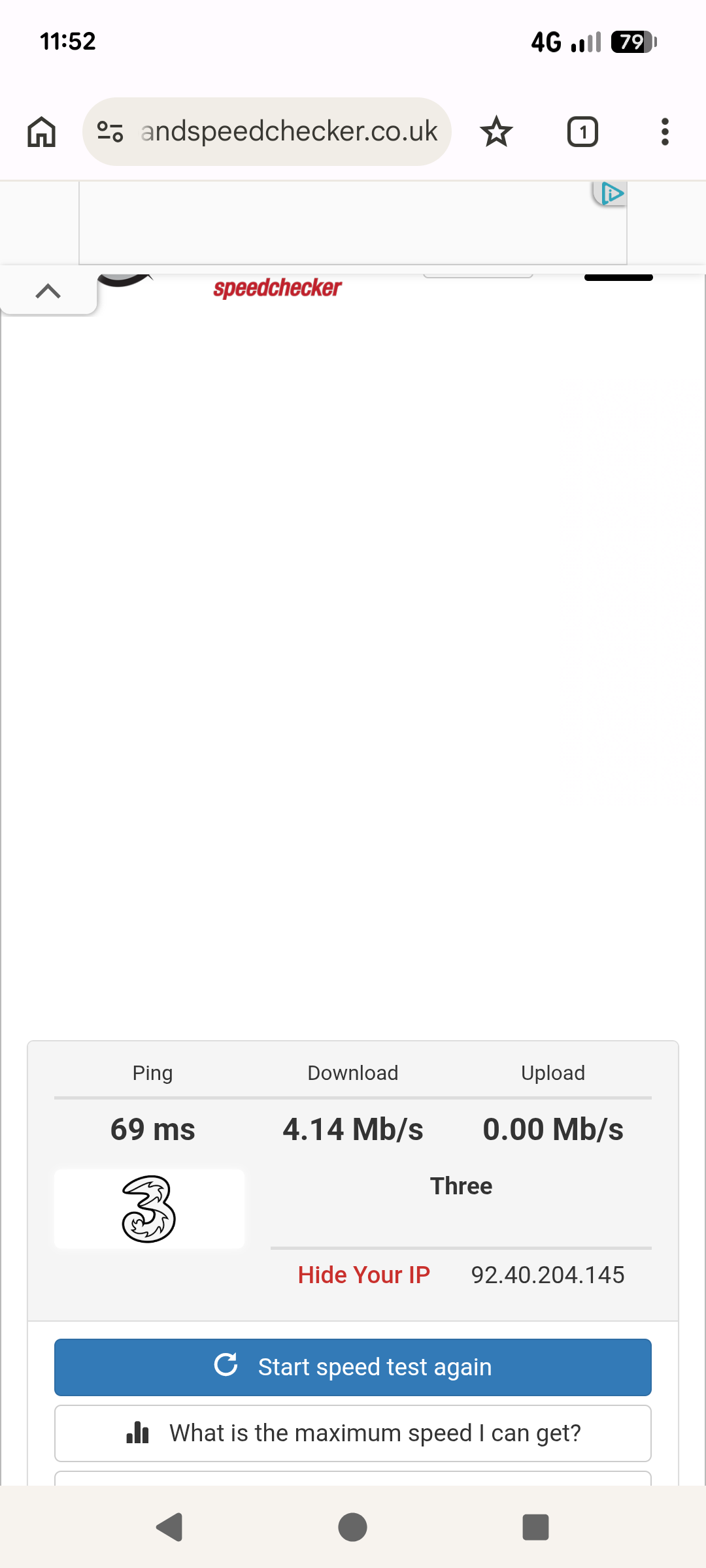
Download speeds were in the order of 2.5Mbps, which was useless for pretty much everything. I assumed it was an issue with the wee router, but tried her SIM in my own phone. Lawdie, it's painful. Speeds as low as <1Mbps, and typically around 2.5-4 Mbps. My own Lebara SIM - Vodafone - returns 50-80+Mbps.
At one stage, when testing it outside for the best signal, the noticed 5G popped briefly up on the screen whilst downing a speed test - my phone nearly burst into flames as it returned 364Mbps, before reverting to 4G and sub-4Mbps rates.
I guess my Q is, having bought this SIM only last Thursday, if no improvement can be offered, is she within her rights to cancel the order (I think it's on a rolling monthly basis, but not sure as she's away at the mo'…)
Oh, signal strength bars are similar for both networks and tested in two locations - home, and where she's staying. The whole area is reckoned to have 'excellent' coverage.
Ta for any thoughts.
Comments
-
https://help.smarty.co.uk/en/articles/4262399-14-day-money-back-guarantee
1 -
Thank you :-)
0 -
Are you sure that the SIM is connecting to a 3 mast ?
I'm in a relatively weak signal area for all networks, but I notice my phone now occasionally connects to a Vodafone mast since the merger started between Voda and 3 - when it does I can't even get a speedtest to complete. I use Cellmapper to identify the mast my phone connects to.
1 -
Interesting, but all I can say is that the speedtests display the network, whether that means it's 'using' another, I don't know.
This was taken on my Pixel 6, swapping SIMs, Lebara (Voda) vs Smarty (3).
 0
0 -
Is there any way you can adjust the settings on the BT mini router to see if that may speed things up?
Are the speed tests from a mobile or connecting to the router with Smarty SIM inside router?
I am with smarty and near to a 5g mast and speeds are very fast but I use 4g mostly but I remembered that I had to do something with my Poco mobile settings to get fast 4g. Speeds
I don't remember what but have you tried contacting Smarty help as I found them very good in that department.
1 -
These readings are taken with my Pixel, and the SIM seemed to adjust the settings automatically.
The speeds with the BR router are in the same ratio, but both are lower still - around 2.5Mbps for the Smarty, and 40-odd with the Lebara. So it 'suggests' that the BT router is adapting to the two SIM cards the same way.
I did try logging in to the BT router, but it required me to set up a BT account, which I could not be bothered doing.
Smarty did confirm that there was 'congestion' on their service in my area, so I'm putting it down to that.
We don't have 5G here, but during one test, outside, '5G' appeared at the top of my phone, and it registered 385Mbps :-) Only lasted a few seconds, tho'…
Anyhoo, I have bought a T-Link MR100, which should be easier to work with, and should determine whether 4G broadband is a goer in the area.
Do you know if I went direct to BT, or 3 or, Vodafone, or EE for their SIM, I would by-pass the piggybacking that the associated networks use - the Smarties, Lebaras, Voxis etc? I know it'll cost more, but if it works it'll be better than trying to set up a land BB service for what could be just 6 months.
Ta.
0 -
The piggy back operator's should not be slower than the main mobile companies but I can't confirm if it does happen.
To be clear the smarty SIM is in the BT router and when connected to router from your mobile on wi-fi you are using the wi-fi and not your Lebara mobile data.
As for router settings and setting up a BT account are you sure the router is unlocked and free to use other network s?
0 -
Interesting re piggy-back rates. I was under the impression that the main networks sold off part of their 'bandwidth' or whatever it's called, and the cheapos could then try and squeeze as many customers in to that allowance that they could. But it's not like this?
The examples I showed were all using the two SIMS in my Pixel. It was just an example, but when the same cards were put in the BT router, it was clear the Voda still far outperformed the 3.
I conclude it's unlocked as it 'works' with both Voda and 3, whereas the BT network is EE. Ie, it just wouldn't work at all if locked?
0 -
I saw ML money show a few weeks back and he mentioned that all mnvo should be the same speeds as the main mobile network operators when he was on about cheaper prices.
Have you tried to get access to the router by 192.168.1.1 or whatever it uses to see what the router settings are showing. I know you said you needed a BT account but is that to get router access?
One more thing have you got the APN settings from smarty to use on the SIM/router?
I think these are needed for the router but you will need access to the router.
1 -
Here's a link from smarty community site about SIM card and router settings.
The router is not a BT one the settings should be the same IF you can gain access to the router settings.
Just an idea.
1



Confirm your email address to Create Threads and Reply

Categories
- All Categories
- 355.7K Banking & Borrowing
- 254.9K Reduce Debt & Boost Income
- 456.1K Spending & Discounts
- 248.3K Work, Benefits & Business
- 605.8K Mortgages, Homes & Bills
- 179K Life & Family
- 263.6K Travel & Transport
- 1.5M Hobbies & Leisure
- 16.2K Discuss & Feedback
- 37.7K Read-Only Boards