We’d like to remind Forumites to please avoid political debate on the Forum.
This is to keep it a safe and useful space for MoneySaving discussions. Threads that are – or become – political in nature may be removed in line with the Forum’s rules. Thank you for your understanding.
Microsoft OneDrive is baffling me...and driving me nuts





I needed an option to back up my photos and files - there's quite a lot - and after looking on the MSE website, decided Microsoft 365 with OneDrive was the best option.
I'm regretting it.
Yesterday, when I wasn't signed into OneDrive, it wouldn't let me access my files that I THOUGHT were saved on my computer. Turns out they aren't now.
I wanted something that would allow me to continue saving on my laptop's hard drive but would back the files up to the cloud in case there was a problem. It appears that even when I think I'm saving to my laptop's hard drive, it is really saving to the cloud. That isn't what I thought I was signing up for.
Wondering about cancelling and going for a different option. It's not long - a week maybe? - since I signed up for this. Will I be entitled to a refund? The Microsoft website isn't particularly clear on this.
The older I get, the more baffling all this tech stuff becomes so please be kind!
Comments
-
Firstly I should confess that I despise OneDrive with a passion, we are obliged to use it at work and it is responsible for 95% of all IT issues I experience. It’s slow, unintuitive, buggy and simply does what it feels like sometimes.
Prior to that I used Dropbox for my work PC (And still do at home), and this has provided me with years of faultless service.
The issue you are facing is that OneDrive will generally store most files on the cloud only by default with the justification of keeping space free on your PC, then when you double click on the file it will pull the whole file from the cloud to to use it (because of course this is Microsoft who are a cloud company so they just assume you are connected to the Internet 24/7)!
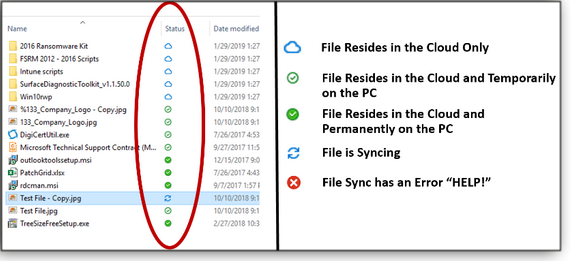
To get round this you need to actively select the files or folders that you want to be permanently duplicated on your computer and force OneDrive to always keep a local copy onto your PC (which it will then keep synchronised with the version in the cloud).The easiest way to do this is in windows file explorer. Select the files and/or folder(s) you want to always be available on your PC, right click, and select “Always keep on this device” from the right click menu.
The Status icon should then tell you how the file is currently stored / synced:
 • The rich buy assets.
• The poor only have expenses.
• The middle class buy liabilities they think are assets.10 -
That is super helpful, thank you.
I despise it too now!
All my files disappeared off my own laptop without me realising that would happen - that just seems bonkers. I thought it was backing them up to the cloud, not MOVING them!
Still wondering if I should try and cancel and get my money back - if I'm eligible.
The other weird thing that happened is that I backed up all my photos off my phone to OneDrive, assuming this would make them visible on my laptop too. I thought it would create a folder of them but it hasn't.0 -
Separate removable drive.
1 TB external drive sub £50 on Amazon (other suppliers avaiable)
Life in the slow lane3 -
That is a completely different concept to using a cloud service.
Both options have advantages and disadvantages to the point that there is a good arguement for doing both!
3 -
I used to work in“Business Continuity and Disaster Recovery” so I’m probably paranoid about data loss.
My back-up regime is old fashioned, but well proven and is similar to what we used to advise clients to do.
I back-up to 2 external hard drives. One is kept at home and the other I give to a friend who lives a few miles away.
I do a back-up then swap the drives over whenever I meet my friend. That way if one hard drive fails, gets damaged or gets stolen or there’s a fire or flood, there’s always the other drive that’s kept miles away to fall back on.
1 -
Fair play to you for making the effort to figure it out. I was putting the 5 user version on and files were popping up on other people's computer.
Rather than go to the bother of figuring out the intricacies of Onedrive, i simply deleted off all the pcs. Pure laziness.
To this day, it still pops up somehow on the odd computer.0 -
Be extremely careful what you do next, make the wrong move and oneDrive could delete all your files currently in "the cloud" with no way of retrieving them…
2 -
OneDrive can be useful, especially if you use MS Office. In my case Office is installed on my home PC and my laptop, I do not use "365". Office files are saved to OneDrive by default and are readily accessed from either the laptop or PC, this saves me transferring files by memory stick, etc. I also have one program that automatically saves data to both the PC and OneDrive when the program is closed. My files/folders are not all backed up to OneDrive. My limited use of OneDrive doesn't cost anything as the required storage is minimal.
In terms of backup, I use Proton Drive for selected files and also all the images from my iPhone (these are uploaded whenever I open Proton Drive on the phone, I do not store them at Apple). Proton offer greater security and privacy than either Apple., Google or Microsoft. My whole PC and laptop are regularly backed up to an external USB hard drive, in the case of the PC it is weekly, and monthly in the case of the laptop. For the whole machine backup I use Acronis True Image (around £68 per year for 3 PCs).
Acronis has saved my bacon on a couple of occasions, once when the SSD drive in my PC failed… took 30 mins to swap the old drive for a new one and restore the system (yes that quick), on the second occasion a Windows update would not complete and I mistakenly downloaded the update manually and forced an update, the laptop "froze" and wouldn't run the operating system at all… restored the whole system from backup.
https://www.acronis.com/en/products/true-image/
Proton Drive is free for 5GB, 200GB is around £40 per year.
https://proton.me/drive2 -
I've ordered one! thank you!
1 -
If it makes you feel any better I used to consider myself very computer literate but on meeting OneDrive I'm not so sure - it completely does my head in!
0








Confirm your email address to Create Threads and Reply

Categories
- All Categories
- 354.7K Banking & Borrowing
- 254.5K Reduce Debt & Boost Income
- 455.5K Spending & Discounts
- 247.5K Work, Benefits & Business
- 604.4K Mortgages, Homes & Bills
- 178.6K Life & Family
- 262K Travel & Transport
- 1.5M Hobbies & Leisure
- 16.1K Discuss & Feedback
- 37.7K Read-Only Boards