We’d like to remind Forumites to please avoid political debate on the Forum.
This is to keep it a safe and useful space for MoneySaving discussions. Threads that are – or become – political in nature may be removed in line with the Forum’s rules. Thank you for your understanding.
📨 Have you signed up to the Forum's new Email Digest yet? Get a selection of trending threads sent straight to your inbox daily, weekly or monthly!
Windows 11 love it or hate it?
Comments
-
Thank you for reading it as I wasn't going to click on that nonsense.
For the record, I find Win11 is absolutely fine and a definite upgrade on Win10.
1 -
Please note there has been a mountain of misinformation about Lenovo and Linux which has been trending recently.
The main headline seems to be that Linux is replacing Windows as the default OS on Lenovo computers, or that Lenovo is actively encouraging a transition by reducing the price of computers that ship with Linux.
The reality is that Windows is still very much the default OS, any suggestion otherwise is total fabrication. There are instances where Lenovo offers Linux as an alternative option (though this may just be in the US) and they have increased support on a wide range of devices, particularly ThinkPad but, despite the recent flurry of clickbait articles about this, it has been the case for several years now.
The reason that Lenovo charges less for Linux as the OS is not because they are pro-Linux or anti-Windows, but simply because they are not paying the Windows license fee and they are passing on the saving to the customer. Many manufacturers do not pass on this saving.
It's not hard to check this, for example: https://www.lenovo.com/us/en/configurator/cto/index.html?bundleId=21S6CTO1WWUS1 yet it doesn't stop sensationalist 'news' outlets and content creators posting articles with AI-generated thumbnails of Bill Gates pulling an angry face or crying with red down arrows.
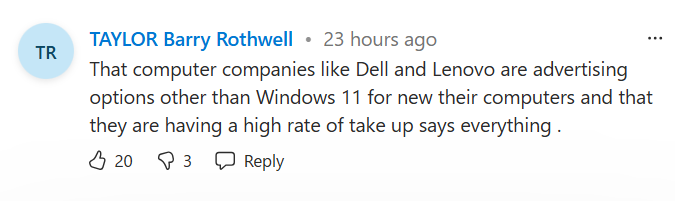
As an aside, how you've worded your message (and using quotation marks) suggests that's what MattMattMattUK said? I'm not clear whether you are quoting that from someone, or if that's your personal view?
Regardless, do you have any data to backup "they [Lenovo] are having a high rate of take up" of computers shipped with Linux? I tried looking but couldn't find a source for this.Know what you don't3 -
Perfectly happy with it, does everything I want with no problems.
I don't understand how Copilot is being forced onto anyone. I have a Copilot laptop and even then I only see it when I want to see it.
Drinking Rum before 10am makes you
A PIRATE
Not an Alcoholic...!0 -
"As an aside, how you've worded your message (and using quotation marks) suggests that's what MattMattMattUK said? I'm not clear whether you are quoting that from someone, or if that's your personal view?"
I am quoting a person who commented on my link.
"A nation's greatness is measured by how it treats its weakest members." ~ Mahatma Gandhi
Ride hard or stay home :iloveyou:0 -
Just to give some examples off the top of my head - copilot comes preinstalled, the last two laptops I purchased last year even had a copilot key on the keyboard (replacing the context key), since I'm on my work laptop now I can see right clicking something brings up 'Ask Microsoft 365 Copilot' (which looks to be a different program to co-pilot)? Edge appears to have a button for 'Chat' in the top right corner which is an integrated form of Copilot. If I'm in Word or Excel, I have a button on the main home ribbon for copilot, same for the main menu on Teams.
If you think I'm being pedantic, there is even copilot buttons in Notepad and Paint!
But to be honest, it's not just what's live, it's what's in the pipeline. There was the 'Windows Recall' disaster which is an AI feature for copilot PC's that constantly captured your screen and stored your data in plain text, all while being enabled by default. I mean even the 'improved' recall still records everything you do, but it's opt in instead of opt out. Then there's other things in the pipeline (a few examples in the articles I linked on page 1) which include AI integration into search functions/ file explorer, and the whole agentic aspiration.Now you might say that you don't have to use the copilot features integrated into every app, but many are frustrated that the bloatware is being forced in fresh installations to begin with. Couple that with the fact that looking at memory usage, at least on my laptop now, Co-pilot (365 version, whatever the difference is) is passively consuming about half a gb of RAM. It's a lot considering entry level PC's only have ~8GB of RAM and could explain why todays PC's feel slower than computers a few years ago to someone who is not tweaking their startup processes.
For the record, I am very happy with W11 (as I said in my first post) - as I mentioned this view is really if I was forced to give a critic on it. The fact copilot is being integrated into W11 has no real effect on me.
Know what you don't1 -
Oh sorry, I don't see that post.
Know what you don't1 -
While you can hate an OS (Windows 8 anyone?) it's a bit of a stretch to think you could love one, unless you happen to have a lot of shares in the company that owns it and a large amount of money makes you very happy.
For myself I find little difference other that some quite minor layout changes between Windows 10 and 11, and I've been happy with both. I think some people who are highly technical and use an OS at a more intricate level than most of us ever would have experienced some issues, but for a general user I don't believe there is anything to be concerned about with 11.
1 -
yes I have a Copilot laptop with the dedicated key, but only use it when I want to. The chat button in edge can be turned off.
Right click just gives 'Ask Copilot' as one of the choices (I don't use 365) I don't even notice it to be honest.
You could just uninstall the app or be a bit more thorough if you wanted it gone I guess.
Drinking Rum before 10am makes you
A PIRATE
Not an Alcoholic...!0 -
I must have disabled Co-Pilot when I upgraded to Win11 (or on launch perhaps) as the only sign I can find of it is in startup apps (disabled) and app history (no usage). I've only just realised what the colourful little icon is on Photos for instance :)
0














Confirm your email address to Create Threads and Reply

Categories
- All Categories
- 355.8K Banking & Borrowing
- 254.9K Reduce Debt & Boost Income
- 456.2K Spending & Discounts
- 248.3K Work, Benefits & Business
- 606K Mortgages, Homes & Bills
- 179K Life & Family
- 263.8K Travel & Transport
- 1.5M Hobbies & Leisure
- 16.2K Discuss & Feedback
- 37.7K Read-Only Boards