We’d like to remind Forumites to please avoid political debate on the Forum.
This is to keep it a safe and useful space for MoneySaving discussions. Threads that are – or become – political in nature may be removed in line with the Forum’s rules. Thank you for your understanding.
📨 Have you signed up to the Forum's new Email Digest yet? Get a selection of trending threads sent straight to your inbox daily, weekly or monthly!
Eufy340 doorbell is it compatible with my wi-fi?



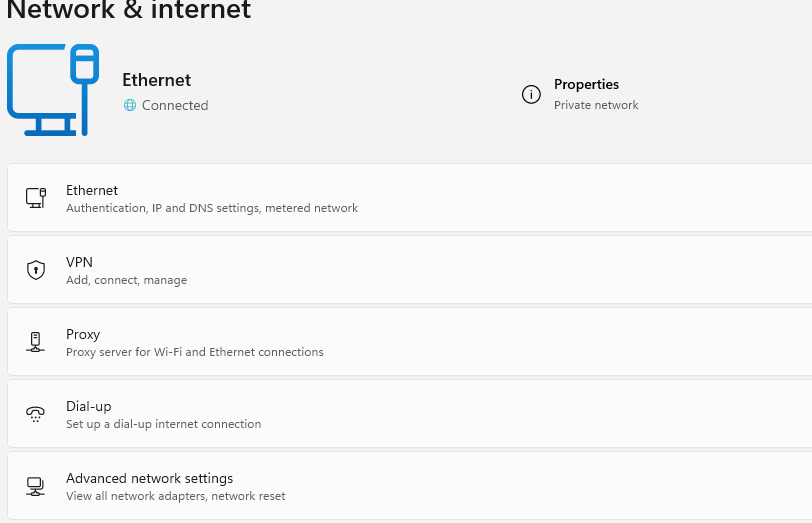
I am thinking of buying this but it only works with 2.4GHz and I can't for the life of me find out what my wi-fi is. I have looked at loads of tech help advice articles but I am none the wiser. They are telling me to check on either my hub or my desktop PC in settings then network and internet for Windows 11. Nowhere in here does it state whether my wi-fi is 2.4GHz or 5GHz.
Another question I have is does my phone need to be 2.4GHz as mine is 5GHz and can both me and my partner look to see who is at the door using either of our phones?
I don't want to buy a subscription based doorbell for storage.
We're clueless with this tech stuff so any help would be appreciated.
Comments
-
It will almost certainly work.
In Windows 11 you find Wi-fi speed in Settings → Network and Internet → WiFi → <name of Wifi network> properties.
0 -
All modern routers are dual band, 2.4 and 5 GHz although the two bands may transmit the same network name, (SSID)
if you go into the W11 network page then it WILL show which band you are currently connected to, the same applies for Android phones.
You phone is likely to be dual band too but defaults to the faster 5 GHz band if available.
However if the SSIDs are the same then it can get confusing.
If you log into your router(hub) you will be able to see the settings for all the bands, give them different names and things may become clearer.1 -
I'm not sure separate SSID's are necessary, sounds like an extra complication? I have Eufy stuff, my mesh network is set to 2.4 and 5ghz, the eufy just connects to the only one it can, the 2.4 band.
I'd say the starting point would be to log into the router, normally just type 192.168.0.1 into a web browser (of a PC thats connected to the router) and check the settings to see if 2.4 is turned on
and to answer the other question, yes more than one person can get the Eufy app and pair to the homebase
0 -
That's because you are connected by an ETHERNET CABLE and not WiFi.
5 -
Ah! I learn something new every day thanks. So if I am connected via an ethernet cable and not WiFi how do I establish if the doorbell will work? Still very confused sorry.
1 -
Best way turn off 5GHz on router, connect bell then reinstate the 5Ghz oh and give it a static IP address.
4.8kWp 12x400W Longhi 9.6 kWh battery Giv-hy 5.0 Inverter, WSW facing Essex . Aint no sunshine ☀️ Octopus gas fixed 5.07 + Octopus Intelligent Flux leccy
CEC Email energyclub@moneysavingexpert.com0 -
Ooh that's way beyond my understanding debitcardmayhem! I never thought I would have to go to these lengths to buy a suitable doorbell. I may have to bite the bullet and just get a Ring one but I didn't really want to as I need to store footage and don't want a subscription adding the cost.
0 -
Good luck then with ring , EUFY kit is better imho, I have two of their cameras and other bits. It's not really difficult and may not even be necessary.
4.8kWp 12x400W Longhi 9.6 kWh battery Giv-hy 5.0 Inverter, WSW facing Essex . Aint no sunshine ☀️ Octopus gas fixed 5.07 + Octopus Intelligent Flux leccy
CEC Email energyclub@moneysavingexpert.com0 -
I know. From what I've read EUFY is better that's why I would have preferred that one.
0







Confirm your email address to Create Threads and Reply

Categories
- All Categories
- 355.8K Banking & Borrowing
- 254.9K Reduce Debt & Boost Income
- 456.2K Spending & Discounts
- 248.3K Work, Benefits & Business
- 606K Mortgages, Homes & Bills
- 179K Life & Family
- 263.8K Travel & Transport
- 1.5M Hobbies & Leisure
- 16.2K Discuss & Feedback
- 37.7K Read-Only Boards