We’d like to remind Forumites to please avoid political debate on the Forum.
This is to keep it a safe and useful space for MoneySaving discussions. Threads that are – or become – political in nature may be removed in line with the Forum’s rules. Thank you for your understanding.
📨 Have you signed up to the Forum's new Email Digest yet? Get a selection of trending threads sent straight to your inbox daily, weekly or monthly!
Nationwide app biometrics
Comments
-
Yes true the watches do have the cardio functionality but unless the phone can handle the most recent versions and be modern enough to determine if someone using the device is alive has to be a heat thermo technology built-in.flaneurs_lobster said:
The ones implemented on mobile consumer devices? The posher phones make this claim for their face scanners although actual evidence of empirical testing is hard to come by.TimeLord1 said:Can biometrics detect if you're alive or deceased, anyone? I think, as I understand it, it comes down to blood flow. 🤔
My smartwatch detects blood flow and there's a way to use it's proximity to unlock my phone and laptop, not sure if one function is incumbent on the other.0 -
Woodstok2000 said:
It may be that your account is too new, as this option has been available in the app for a long time.Sea_Shell said:
It's telling me this option is not currently available, but is being rolled out (can't do a screenshot)born_again said:
It's in settings once you are in app.Sea_Shell said:Having recently switched, I understand that biometrics are available, rather than card reader, but not for a little while.
Anyone know how long before that option will appear on the app?
They do not need to set anything up, it's up to you to do it.
That's why I was asking if anyone knew how long, after opening, this will become available to be enabled?
You do need to set it up separately to the app access controls. Instructions here:
https://www.nationwide.co.uk/help/your-details/using-biometrics/
When is "too new" old enough?
A month?How's it going, AKA, Nutwatch? - 12 month spends to date = 3.24% of current retirement "pot" (as at end December 2025)0 -
The Nationwide App is very security sensitive maybe worth looking at you setting options to enable or disable options. I used to have issues verifying payments. I believe I changed settings on certain options. It works well with Google Wallet.
And no it will not allow screenshots you have to use a separate device to take a image of the page.0 -
The OP question is getting rid of a card reader using account biometrics, not the device biometrics.nuffznuff said:I've been using biometrics on Nationwide for a few months, along with NatWest and WhatsApp.
Biometrics are set up on your device. After that, they're used for all apps that require and have been set to accept them.
Let's Be Careful Out There2 -
I've had the option of setting it up for I think a couple of months.Sea_Shell said:
It's telling me this option is not currently available, but is being rolled out (can't do a screenshot)born_again said:
It's in settings once you are in app.Sea_Shell said:Having recently switched, I understand that biometrics are available, rather than card reader, but not for a little while.
Anyone know how long before that option will appear on the app?
They do not need to set anything up, it's up to you to do it.
That's why I was asking if anyone knew how long, after opening, this will become available to be enabled?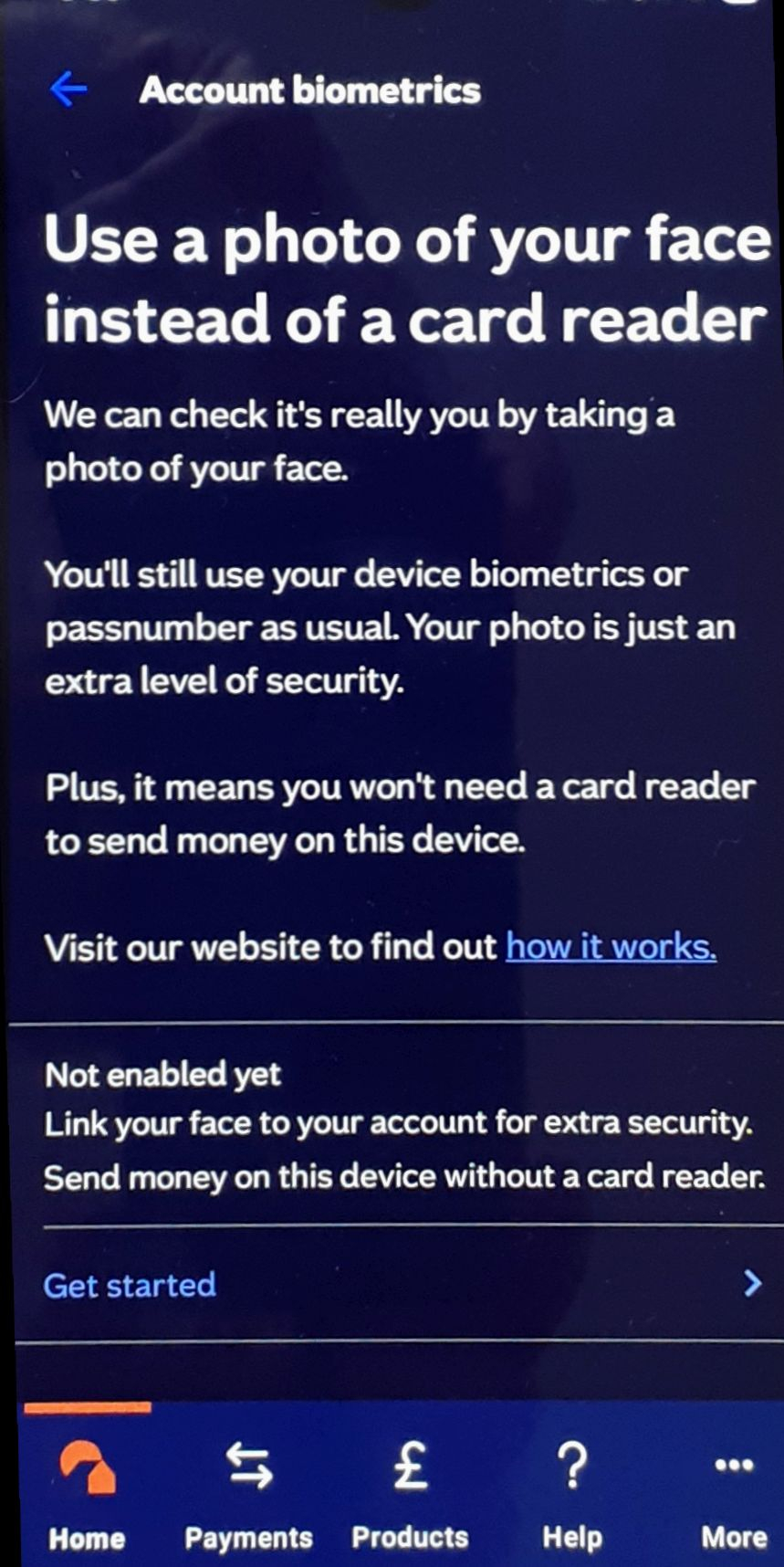
Let's Be Careful Out There0 -
When did you last update the app?Sea_Shell said:
It's telling me this option is not currently available, but is being rolled out (can't do a screenshot)born_again said:
It's in settings once you are in app.Sea_Shell said:Having recently switched, I understand that biometrics are available, rather than card reader, but not for a little while.
Anyone know how long before that option will appear on the app?
They do not need to set anything up, it's up to you to do it.
That's why I was asking if anyone knew how long, after opening, this will become available to be enabled?
As only applied for a account a couple of months ago & it was part of the set up process. So always have used biometrics.Life in the slow lane0 -
This is the bit that says I can't do that yet.HillStreetBlues said:
I've had the option of setting it up for I think a couple of months.Sea_Shell said:
It's telling me this option is not currently available, but is being rolled out (can't do a screenshot)born_again said:
It's in settings once you are in app.Sea_Shell said:Having recently switched, I understand that biometrics are available, rather than card reader, but not for a little while.
Anyone know how long before that option will appear on the app?
They do not need to set anything up, it's up to you to do it.
That's why I was asking if anyone knew how long, after opening, this will become available to be enabled?
I only downloaded the app about a fortnight ago.
How's it going, AKA, Nutwatch? - 12 month spends to date = 3.24% of current retirement "pot" (as at end December 2025)0 -
I wasn't able to activate account biometrics because I had disabled my debit cards. The minute I enabled them again, I could active biometrics.I also had an issue with FaceID login which never worked. After re-installing the app, it is now working fine.0
-
Ah, that's why I can't set this up.friolento said:I wasn't able to activate account biometrics because I had disabled my debit cards. The minute I enabled them again, I could active biometrics.I also had an issue with FaceID login which never worked. After re-installing the app, it is now working fine.
Wouldn't it be nice if they said this before you've dug out the card reader and entered all the numbers.
Wouldn't it be nice if they said this at the end rather than "this functionality isn't working just now",2 -
Debit cards not disabled.
The card reader worked fine, just impractical longer term.How's it going, AKA, Nutwatch? - 12 month spends to date = 3.24% of current retirement "pot" (as at end December 2025)0















Confirm your email address to Create Threads and Reply

Categories
- All Categories
- 355.7K Banking & Borrowing
- 254.9K Reduce Debt & Boost Income
- 456.1K Spending & Discounts
- 248.3K Work, Benefits & Business
- 605.8K Mortgages, Homes & Bills
- 179K Life & Family
- 263.6K Travel & Transport
- 1.5M Hobbies & Leisure
- 16.2K Discuss & Feedback
- 37.7K Read-Only Boards