We’d like to remind Forumites to please avoid political debate on the Forum.
This is to keep it a safe and useful space for MoneySaving discussions. Threads that are – or become – political in nature may be removed in line with the Forum’s rules. Thank you for your understanding.
📨 Have you signed up to the Forum's new Email Digest yet? Get a selection of trending threads sent straight to your inbox daily, weekly or monthly!
Nationwide card reader - rubbish
Comments
-
Have you received a replacement card and acknowledged receipt (by using it)?andygb said:GeoffTF said:
I expect that it works for you because you insert the right card and type the correct PIN. I expect that the OP made a mistake, and Nationwide is checking that the right card has been inserted.Chief_of_Staffy said:It doesn't for me, but the OP said it does for them, hence my question.
I didn't make a mistake, I used the card number, which is the one I am currently using and yes, it does expire at the end of this month. If the card reader is not letting me use a card which has not yet expired, then I think that is a s**t system.1 -
OK then, please explain why you have to enter the last four digits of your card number and others do not. If you have not make a mistake, please explain why the card reader timed out. What does Nationwide say when you ring them?andygb said:I have one debit card and one credit card and I only use the debit card in the card reader. On my second and third attempts at using the card reader and the correct last four digits, the card reader timed out both times.I didn't make a mistake, I used the card number, which is the one I am currently using and yes, it does expire at the end of this month. If the card reader is not letting me use a card which has not yet expired, then I think that is a s**t system.0 -
GeoffTF said:
OK then, please explain why you have to enter the last four digits of your card number and others do not. If you did not make a mistake, please explain why the card reader timed out. What does Nationwide say when you ring them?andygb said:I have one debit card and one credit card and I only use the debit card in the card reader. On my second and third attempts at using the card reader and the correct last four digits, the card reader timed out both times.I didn't make a mistake, I used the card number, which is the one I am currently using and yes, it does expire at the end of this month. If the card reader is not letting me use a card which has not yet expired, then I think that is a s**t system.For clarity, are we talking about using the card reader for online banking, or for the app?0 -
I always get asked for the last four digits...but I have had multiple cards for multiple accounts with nationwide for over a decade some sole some joint....I understood if you used a different card it would generate a different number (otherwise someone could use an unrelated nationwide account to generate an authorisation number). I always use the same card (or its replacement) so am often making payments from a different account, but i can't use my OH's card to authorise a payment.GeoffTF said:It would appear that if you do everything correctly, you will not be asked for the last four digits of the card. If, however, you insert the wrong card or type the wrong PIN, perhaps it then asks for the last four digits. If the last four digits do not match your card, it can then tell you that you have inserted the wrong card. I expect that lots of people do that.1 -
It you go to setup a new payee and it asks you to verify using a card reader it should give you a list of card numbers you can use. If your credit card number is there then you can use it to login to online banking so you have two cards and nationwide need you to tell them which one you are using to generate a pass code each time. Next time you login try using your credit card, if it's registered then that's why you're being asked which card you're using.andygb said:GeoffTF said:It would appear that if you do everything correctly, you will not be asked for the last four digits of the card. If, however, you insert the wrong card or type the wrong PIN, perhaps it then asks for the last four digits. If the last four digits do not match your card, it can then tell you that you have inserted the wrong card. I expect that lots of people do that.
I have one debit card and one credit card and I only use the debit card in the card reader. On my second and third attempts at using the card reader and the correct last four digits, the card reader timed out both times.1 -
savergrant said:
It you go to setup a new payee and it asks you to verify using a card reader it should give you a list of card numbers you can use. If your credit card number is there then you can use it to login to online banking so you have two cards and nationwide need you to tell them which one you are using to generate a pass code each time. Next time you login try using your credit card, if it's registered then that's why you're being asked.andygb said:GeoffTF said:It would appear that if you do everything correctly, you will not be asked for the last four digits of the card. If, however, you insert the wrong card or type the wrong PIN, perhaps it then asks for the last four digits. If the last four digits do not match your card, it can then tell you that you have inserted the wrong card. I expect that lots of people do that.
I have one debit card and one credit card and I only use the debit card in the card reader. On my second and third attempts at using the card reader and the correct last four digits, the card reader timed out both times.I have a Nationwide credit card, but the online banking login screen I get is very specific in asking for "Last 4 digits from debit card".I get that every time I log in, and I'm doing everything 'correctly'.2 -
I had a Nationwide credit card long before I had a current account and debit card, but using a card reader to log in online wasn't an option until I got the c/a and debit card. I'm always asked for the card last 4 digits when logging in with the card reader, but at the start of the process, before putting the card in the reader. The OP was apparently asked for the card last 4 digits after being instructed to put the card in the reader.Section62 said:savergrant said:
It you go to setup a new payee and it asks you to verify using a card reader it should give you a list of card numbers you can use. If your credit card number is there then you can use it to login to online banking so you have two cards and nationwide need you to tell them which one you are using to generate a pass code each time. Next time you login try using your credit card, if it's registered then that's why you're being asked.andygb said:GeoffTF said:It would appear that if you do everything correctly, you will not be asked for the last four digits of the card. If, however, you insert the wrong card or type the wrong PIN, perhaps it then asks for the last four digits. If the last four digits do not match your card, it can then tell you that you have inserted the wrong card. I expect that lots of people do that.
I have one debit card and one credit card and I only use the debit card in the card reader. On my second and third attempts at using the card reader and the correct last four digits, the card reader timed out both times.I have a Nationwide credit card, but the online banking login screen I get is very specific in asking for "Last 4 digits from debit card".I get that every time I log in, and I'm doing everything 'correctly'.Eco Miser
Saving money for well over half a century3 -
That is exactly the point. The OP complained that he could not read the last four digits with his card in the card reader. Being asked for the last four digits before having to put the card in the reader should not be an issue.Eco_Miser said:The OP was apparently asked for the card last 4 digits after being instructed to put the card in the reader.0 -
Actually so do I. Last four digits of nationwide debit card (I have several but only use one)Section62 said:savergrant said:
It you go to setup a new payee and it asks you to verify using a card reader it should give you a list of card numbers you can use. If your credit card number is there then you can use it to login to online banking so you have two cards and nationwide need you to tell them which one you are using to generate a pass code each time. Next time you login try using your credit card, if it's registered then that's why you're being asked.andygb said:GeoffTF said:It would appear that if you do everything correctly, you will not be asked for the last four digits of the card. If, however, you insert the wrong card or type the wrong PIN, perhaps it then asks for the last four digits. If the last four digits do not match your card, it can then tell you that you have inserted the wrong card. I expect that lots of people do that.
I have one debit card and one credit card and I only use the debit card in the card reader. On my second and third attempts at using the card reader and the correct last four digits, the card reader timed out both times.I have a Nationwide credit card, but the online banking login screen I get is very specific in asking for "Last 4 digits from debit card".I get that every time I log in, and I'm doing everything 'correctly'.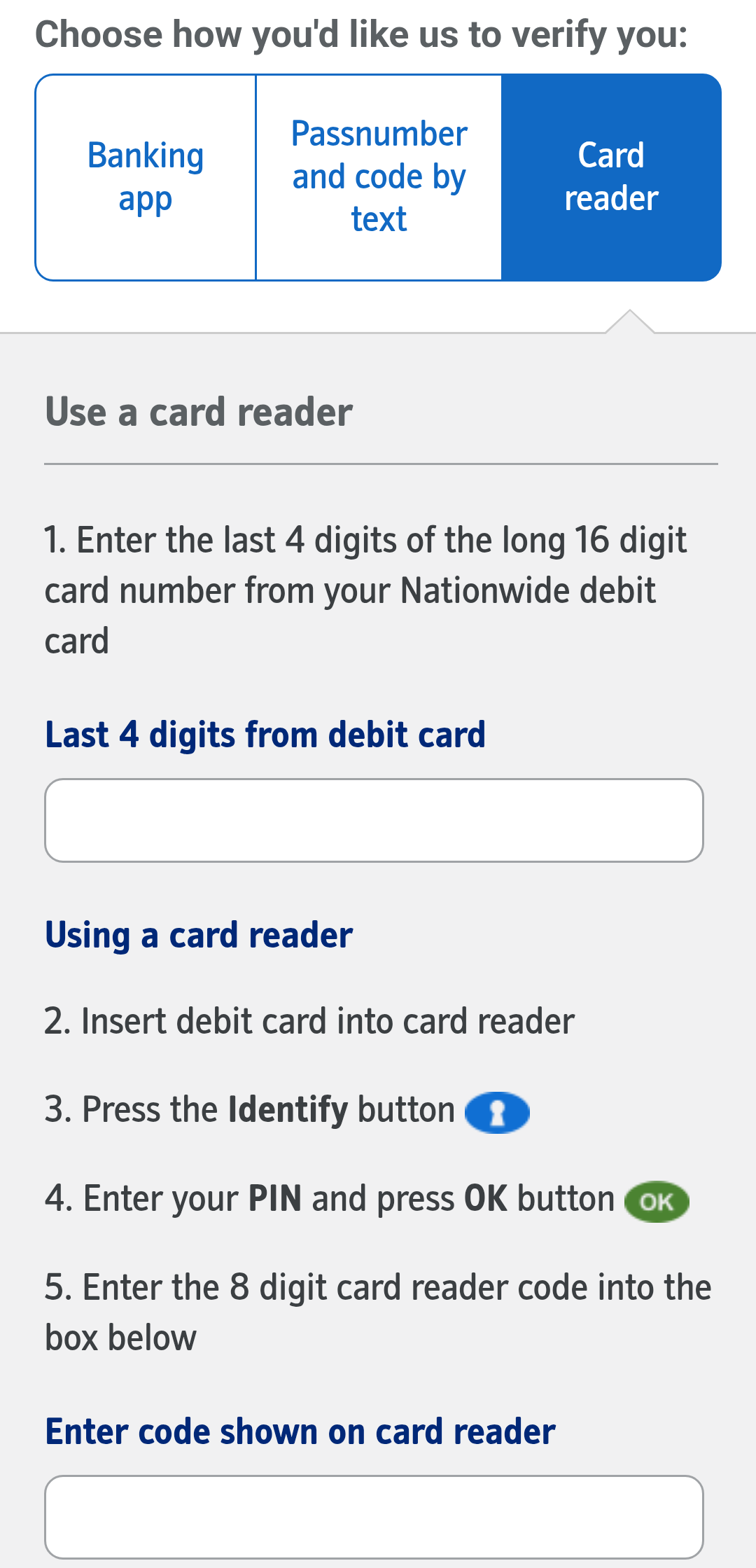 0
0 -
Quite. It asks you for the last four digits then tells you to insert the card.GeoffTF said:
That is exactly the point. The OP complained that he could not read the last four digits with his card in the card reader. Being asked for the last four digits before having to put the card in the reader should not be an issue.Eco_Miser said:The OP was apparently asked for the card last 4 digits after being instructed to put the card in the reader.0









Confirm your email address to Create Threads and Reply

Categories
- All Categories
- 355.7K Banking & Borrowing
- 254.9K Reduce Debt & Boost Income
- 456.1K Spending & Discounts
- 248.3K Work, Benefits & Business
- 605.8K Mortgages, Homes & Bills
- 179K Life & Family
- 263.6K Travel & Transport
- 1.5M Hobbies & Leisure
- 16.2K Discuss & Feedback
- 37.7K Read-Only Boards