We’d like to remind Forumites to please avoid political debate on the Forum.
This is to keep it a safe and useful space for MoneySaving discussions. Threads that are – or become – political in nature may be removed in line with the Forum’s rules. Thank you for your understanding.
📨 Have you signed up to the Forum's new Email Digest yet? Get a selection of trending threads sent straight to your inbox daily, weekly or monthly!
Nationwide card reader - rubbish
Comments
-
Sadly many people these days unthinkingly accept the narrative that the more tech you use the easier your life, despite the evidence to the contrary. These tend to be the same people who simper their thanks when they're told the latest imposition on their freedoms are 'for their own good'.Middle_of_the_Road said:
You're overlooking people who don't or can't use a smartphone for whatever reason. Just because a technology exists, doesn't mean everyone should be compelled to adopt it.Exodi said:
Except you can do it in the app without needing the card reader....Rob5342 said:Nationwide are hopelessly old fashioned, progress is something they take very little interest in. Most other banks let you do it very easily in the app without needing a card reader.
Nationwide were bombarding me nearly two years ago with notices that you could replace the card reader with biometrics if you did a short one off verification process. Did it in 2 minutes and never used the card reader since.
Of course there are some that might flat out refuse to provide a selfie or whatever is required of the verification process. Just like people who refuse to provide ID to their banks or get a Tesco Clubcard. Either these people are kingpins, or overestimate their own importance.
While the OP managed to make a complete pigs ear of it, when I did use the card reader a couple of years ago, it only took a minute or two and certainly didn't ruin my day.
I'd rather a company had strict security processes (especially for setting up a new payee) than not.
90% of the time, my window cleaner does my windows while I'm at work. The evidence is a payment request slip through the door, catching him on the cameras (oh and clean windows!).Eyeful said:
As it was such a low amount, why did you not just pay cash?.andygb said:I tried to use my Nationwide card reader to pay my window cleaner £15.00.
Unless you're someone that seldom leaves the house or you plan on leaving a secret envelope of cash outside, it's not realistic to expect you can pay them in cash.5 -
MattMattMattUK said:
Nationwide have been pushing this hard for at least two years now, they actually removed some functionality from the app recently to force people to switch (one used to be able to pay an existing payee without the card reader, but they changed it to being required for every payment).wmb194 said:
Assuming you have a smartphone, if you look in your NW app's settings there's an option to remove the card reader and then it'll use device biometrics instead.andygb said:I tried to use my Nationwide card reader to pay my window cleaner £15.00. Easy you may think? No, an absolute shower of the proverbial. I had to create a new payee, put in their details and amount then insert my card in the reader. I followed the prompts and got through to the part with the code, put that in and it asked me to confirm the last four digits of the card, which of course, I didn't know, so had to take out the card, write down the last four digits and start again. I got through to selecting the card number and it timed out. Did it again and it timed out.Is this really progress?All for £15.
https://www.nationwide.co.uk/help/your-details/using-biometrics/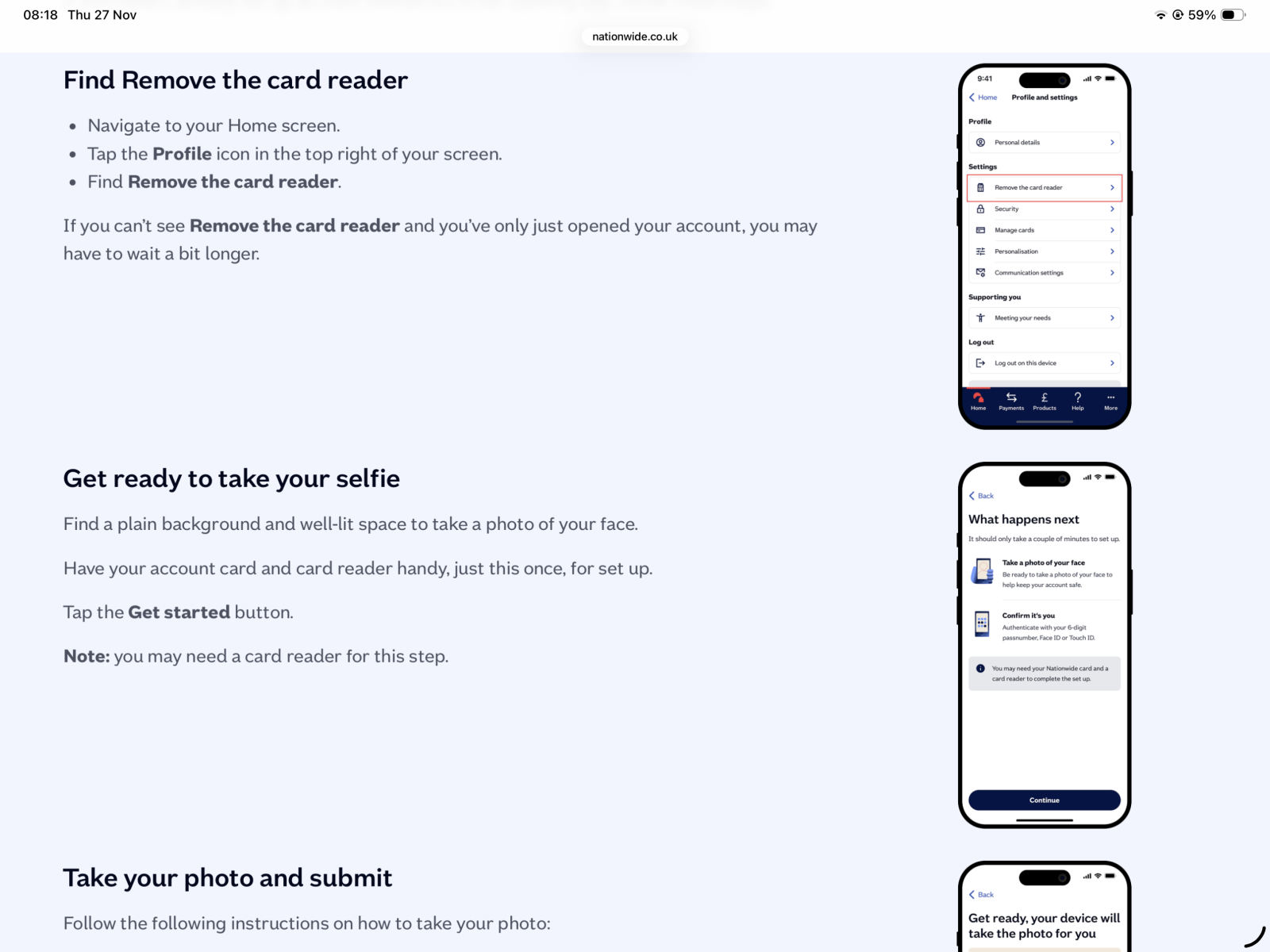
Nationwide with the 2 extremes, either a physical card reader even other dinosaurs like First Direct essentially made obsolete a few years ago or have to hand over selfies and fingerprints. As annoying as the reader is if Nationwide force selfies they will lose a not insignificant customer base.
1 -
Isn't it two options (rather than "extremes") for internet banking plus the aforementioned Telephone Banking or writing a cheque or going into a branch (or a Post Office if it's just getting cash).hoc said:
Nationwide with the 2 extremes, either a physical card reader even other dinosaurs like First Direct essentially made obsolete a few years ago or have to hand over selfies and fingerprints. As annoying as the reader is if Nationwide force selfies they will lose a not insignificant customer base.
NatWest/RBS use a "selfie" for setting up a new payee and other authorisations. They have over 10M users of their app, not hurting their customer base much it seems?1 -
I was moving 10,000 from Nationwide to my regular account on my laptop only a couple of days ago.
I had to use the card reader and it took seconds no trouble at all, no last 4 digits either.2 -
Their telephone banking is pointless
You can't transfer money from one of your Nationwide accounts to another of your Nationwide accounts!
I.e. current account to savings account
Fair enough, not doing transfers to external payees - but between Nationwide accounts?
Crazy
So telephone banking pretty much let's you check your balance and that's about it
Waste of time setting it all up....2 -
A few answers from me, but firstly, thanks for all the comments. Neither my wife or I use our smartphones for banking. Both of us struggle to use the phone effectively, because of lack of conductivity, plus the fact that I suffer from essential tremors, so I cannot text. I hadn't heard of the biometrics, which actually sound useful, except that I presume they can only be used on a phone.I still use cash, but have had numerous hospital appointments over the past couple of years and frequently miss the window cleaner. To be perfectly honest, I think it ridiculous that you need to use a card reader (which keeps timing out) for a £15 transaction.5
-
Have you considered "First Direct Bank" and their telephone banking option. It is very good.
All you need is a telephone, no card reader needed.1 -
Tablets e.g., iPads can also run these apps and can use biometrics. The larger screens make them easier to use as well.andygb said:A few answers from me, but firstly, thanks for all the comments. Neither my wife or I use our smartphones for banking. Both of us struggle to use the phone effectively, because of lack of conductivity, plus the fact that I suffer from essential tremors, so I cannot text. I hadn't heard of the biometrics, which actually sound useful, except that I presume they can only be used on a phone.I still use cash, but have had numerous hospital appointments over the past couple of years and frequently miss the window cleaner. To be perfectly honest, I think it ridiculous that you need to use a card reader (which keeps timing out) for a £15 transaction.
Another solution would be to use a bank like Lloyds/Halifax/BoS which, when setting up new payments, doesn't use a card reader but instead either uses biometrics in the app if you use that or if using browser based online banking calls your telephone to ask you to enter a code via your phone keypad that it displays in the browser.1 -
Nationwide uses the fingerprint authentication on your phone. It is optional. You can use a PIN instead (or online banking). The choice is between a selfie and the card reader. The card reader is the more secure option. It is possible to get a larger card reader if you have eyesight and/or dexterity problems.hoc said:Nationwide with the 2 extremes, either a physical card reader even other dinosaurs like First Direct essentially made obsolete a few years ago or have to hand over selfies and fingerprints.2 -
I'm sure that those who use their card readers regularly will already have adopted this simple solution: write the four digits on the card where you can see them! Just write the numbers on the part of the card that's visible when the card is inserted in the reader in big bold digits and that's the problem solved.savergrant said:
Nationwide offer...in fact heavily promote their app...however i prefer the card reader as it means someone needs my physical card and my pin and not just my phone to authorise a new payee.Rob5342 said:Nationwide are hopelessly old fashioned, progress is something they take very little interest in. Most other banks let you do it very easily in the app without needing a card reader.
True on modern cards you can't see the last four digits when it's inserted (the card number is on the back pointing the other way) but you know it's going to ask you so look before you insert. Worst case scenario leave that bit until last and fill everything else in then take the card out.
2














Confirm your email address to Create Threads and Reply

Categories
- All Categories
- 355.7K Banking & Borrowing
- 254.9K Reduce Debt & Boost Income
- 456.1K Spending & Discounts
- 248.3K Work, Benefits & Business
- 605.8K Mortgages, Homes & Bills
- 179K Life & Family
- 263.6K Travel & Transport
- 1.5M Hobbies & Leisure
- 16.2K Discuss & Feedback
- 37.7K Read-Only Boards