We’d like to remind Forumites to please avoid political debate on the Forum.
This is to keep it a safe and useful space for MoneySaving discussions. Threads that are – or become – political in nature may be removed in line with the Forum’s rules. Thank you for your understanding.
Rich Editor - Help Guide
Comments
-
Mentions
Mentions are a quick and easy way to notify other users about certain comments and posts that may interest them.
Depending on the mentioned user’s notification settings, they’ll either:
- see a pop-up directly in the community
- or receive an email telling them that they’ve been mentioned with a link to the content.
To mention someone, simply type “@” and then start typing the user’s name. As you type, a list of suggested users will display; continue typing to narrow down this list.
- Mentions are sorted with case sensitivity, and accents are included to allow for more precise matching. All characters except for "@ are supported .

—
Join the MSE Forum
Get the Free MoneySavingExpert Money Tips E-mail
To report inappropriate posts: click the report button
Flag a news story: news@moneysavingexpert.com0 -
Quotes: Editing Quotes and Partial Quoting
When you Quote with the new Editor, the quote is made into a block you can't edit. Like this one:
To selectively quote a post, you will need to manually copy the text into your reply.
- You can create a quote area by selecting ¶, then clicking ❝.
- You can split the quote by positioning your cursor where you want the break, then changing the ❝ back to ¶.
This will split the quote into separate sections.
Tip: You can create the quote section before pasting in the text, or highlight the text afterwards to convert it into a quote.
Tip: To quickly turn text into a quote, use the Markdown shortcut: type a
>followed by a space, then your text.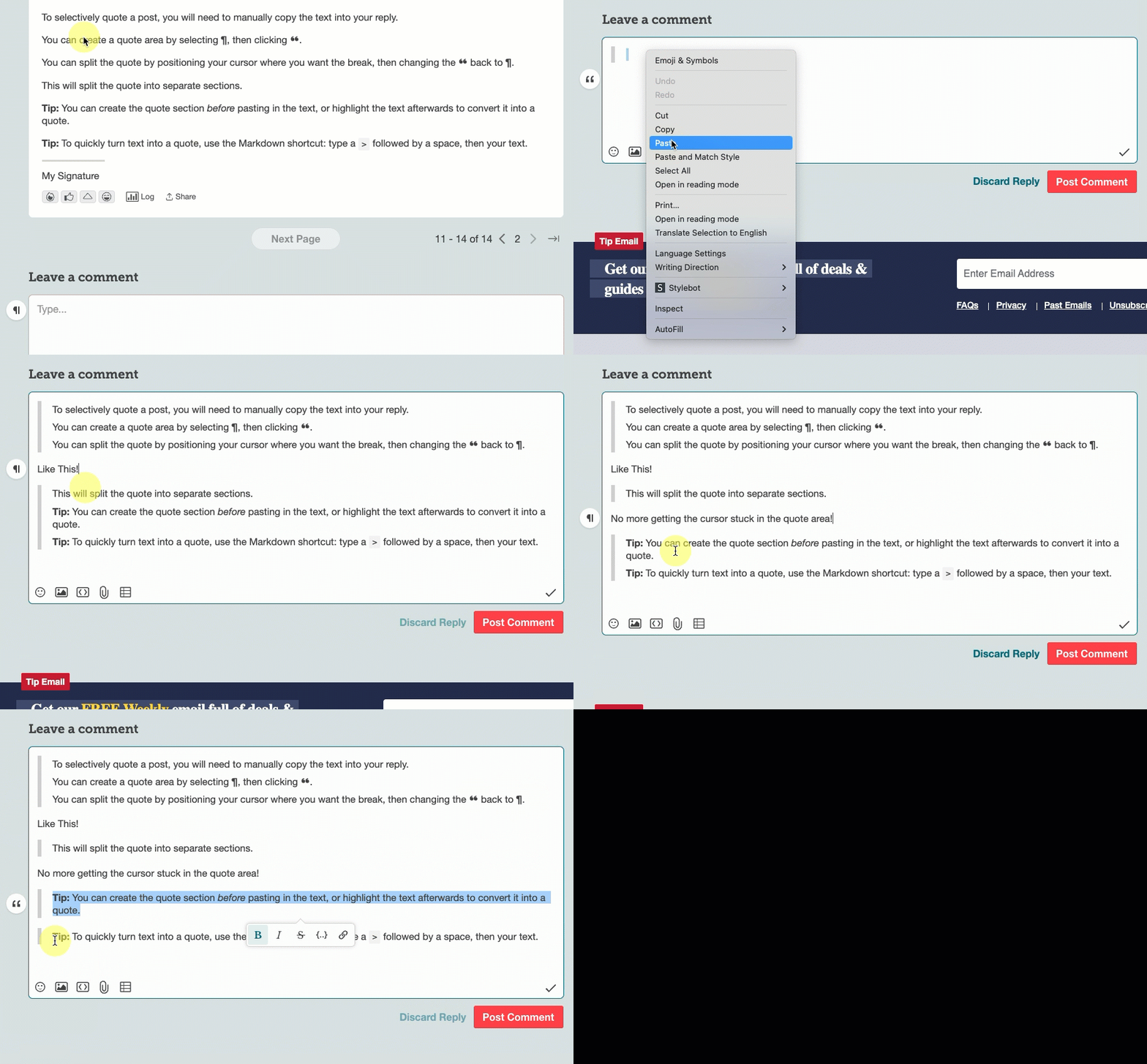 Join the MSE Forum
Get the Free MoneySavingExpert Money Tips E-mail
To report inappropriate posts: click the report button
Flag a news story: news@moneysavingexpert.com0 -
Linking to a Post
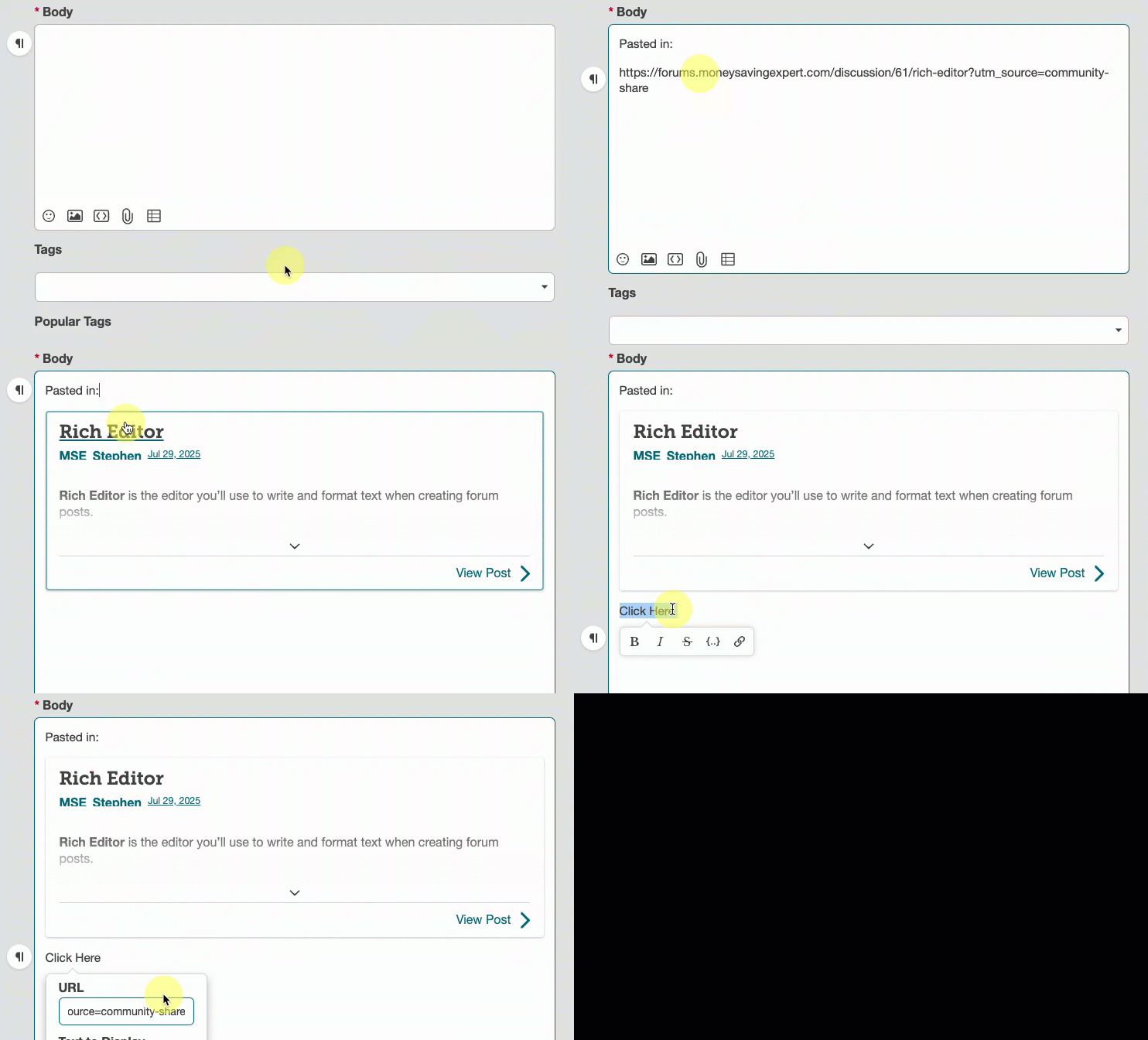
If you paste a link to a post into the editor, it will automatically be turned into a quote.
If you prefer the link to remain a link, simply write some text first and then use the option to turn it into a link:
 Join the MSE Forum
Get the Free MoneySavingExpert Money Tips E-mail
To report inappropriate posts: click the report button
Flag a news story: news@moneysavingexpert.com1





Confirm your email address to Create Threads and Reply

Categories
- All Categories
- 355.7K Banking & Borrowing
- 254.9K Reduce Debt & Boost Income
- 456.1K Spending & Discounts
- 248.3K Work, Benefits & Business
- 605.8K Mortgages, Homes & Bills
- 179K Life & Family
- 263.6K Travel & Transport
- 1.5M Hobbies & Leisure
- 16.2K Discuss & Feedback
- 37.7K Read-Only Boards