We’d like to remind Forumites to please avoid political debate on the Forum.
This is to keep it a safe and useful space for MoneySaving discussions. Threads that are – or become – political in nature may be removed in line with the Forum’s rules. Thank you for your understanding.
📨 Have you signed up to the Forum's new Email Digest yet? Get a selection of trending threads sent straight to your inbox daily, weekly or monthly!
The Forum now has a brand new text editor, adding a bunch of handy features to use when creating posts. Read more in our how-to guide
Zopa - can transfer or withdraw whole £ only?
Comments
-
Thanks. Is that a setting within the app? I dont have any generic Android options available at the point the keypad is shown. Unlike when the default virtual keyboard is in use, like now, when there's a settings option down next to the space bar.
I wonder if this is a version thing, newly updated app on old Android (my device only supports up to 7.0)
Although it does beg the question, even if it could be over-ridden, why ever provide a keypad without the decimal point?0 -
No, it has nothing to do with the Zopa app. Keyboards are added and selected via your system settings. That's a rather ancient version of Android, coming up to 4 years without security patches. I wouldn't have been using the default system keyboard back in the mid-2010s as it was rubbish back then, so I'm sure you can change it.Qyburn said:Thanks. Is that a setting within the app? I dont have any generic Android options available at the point the keypad is shown. Unlike when the default virtual keyboard is in use, like now, when there's a settings option down next to the space bar.
I wonder if this is a version thing, newly updated app on old Android (my device only supports up to 7.0)
Although it does beg the question, even if it could be over-ridden, why ever provide a keypad without the decimal point?
0 -
If you have the right connector or adapter for your device you should be able to attach an external, physical keyboard if you have one or you could remote control your Android device from a PC and use a keyboard that way.0
-
...or just round it down to the nearest quid.wmb194 said:If you have the right connector or adapter for your device you should be able to attach an external, physical keyboard if you have one or you could remote control your Android device from a PC and use a keyboard that way.1 -
I'm not sure that can be the case in this instance. The system settings only allow adjustments to a full qwerty keyboard, there are no options referring to a numeric keypad. Also the fact that Zopa, Lloyds and TSB apps show three different keypads.masonic said:
No, it has nothing to do with the Zopa app. Keyboards are added and selected via your system settings.0 -
Qyburn said:
I'm not sure that can be the case in this instance. The system settings only allow adjustments to a full qwerty keyboard, there are no options referring to a numeric keypad. Also the fact that Zopa, Lloyds and TSB apps show three different keypads.masonic said:
No, it has nothing to do with the Zopa app. Keyboards are added and selected via your system settings.That's not true. The system keyboard has several representations that can be switched between. There is indeed a numeric keypad that comes as part of the system or any user-installable alternative keyboard. Even very early versions of Android (before Nougat) supported this (once upon a time a significant use of such devices was to make phonecalls, where a full qwerty keyboard would be unwieldy). Apps can specify to show only the numeric keypad of the system keyboard and that is precisely what Zopa is doing.As I've already stated, Lloyds and TSB have their own app keyboard, and Zopa uses the system keyboard. This is why all three are different. I've proven through screenshots that Zopa uses whatever keyboard you choose through the Android system. If you refuse to believe this, and are not interested in the several workarounds people have suggested in this thread, I think this thread has reached the end of its usefulness and I'm out.1 -
Qyburn said:Hi,
Zopa seems to only allow transfers, withdrawals or payments in whole pounds. Have I missed something?It appears that:Zopa allows withdrawals of amounts including pennies and there will be a decimal point on the app keyboard.Zopa allows transfers between pots of whole pounds only, so there's no decimal point.Now go back and look at the two screenshots posted earler - and note that the headings are different.0 -
I’ve transferred amounts that include pence between accounts, so not just whole pounds transfers are possible1
-
Here is a new 'Pennies' pot I created to check this (NB: I'm using the system keyboard, this time in dark mode, my app does not have its own keyboard):Vortigern said:Qyburn said:Hi,
Zopa seems to only allow transfers, withdrawals or payments in whole pounds. Have I missed something?It appears that:Zopa allows withdrawals of amounts including pennies and there will be a decimal point on the app keyboard.Zopa allows transfers between pots of whole pounds only, so there's no decimal point.Now go back and look at the two screenshots posted earler - and note that the headings are different.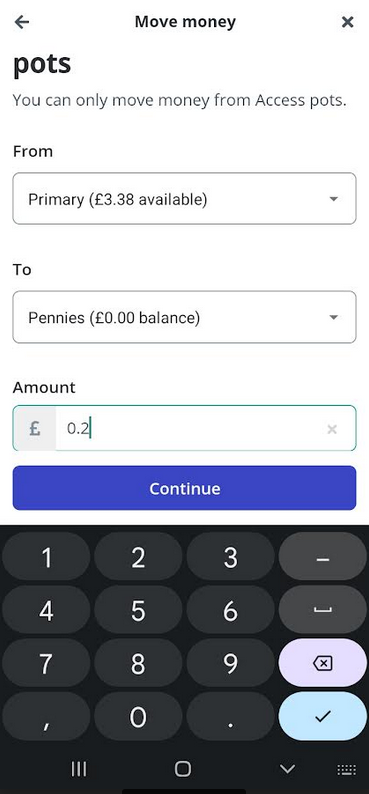 1
1 -
My app comes up exactly the same for transfer or withdrawals, no decimal point. In the same way Masonic gets the decimal for both. Based on comments earlier if I can persuade Android to include the decimal, then that should work.Zopa allows withdrawals of amounts including pennies and there will be a decimal point on the app keyboard.Zopa allows transfers between pots of whole pounds only, so there's no decimal point.Now go back and look at the two screenshots posted earler - and note that the headings are different.
0












Confirm your email address to Create Threads and Reply

Categories
- All Categories
- 354.2K Banking & Borrowing
- 254.3K Reduce Debt & Boost Income
- 455.3K Spending & Discounts
- 247.1K Work, Benefits & Business
- 603.8K Mortgages, Homes & Bills
- 178.4K Life & Family
- 261.3K Travel & Transport
- 1.5M Hobbies & Leisure
- 16.1K Discuss & Feedback
- 37.7K Read-Only Boards