We’d like to remind Forumites to please avoid political debate on the Forum.
This is to keep it a safe and useful space for MoneySaving discussions. Threads that are – or become – political in nature may be removed in line with the Forum’s rules. Thank you for your understanding.
📨 Have you signed up to the Forum's new Email Digest yet? Get a selection of trending threads sent straight to your inbox daily, weekly or monthly!
The Forum now has a brand new text editor, adding a bunch of handy features to use when creating posts. Read more in our how-to guide
How to open chip instant saving?

thegentleway
Posts: 1,101 Forumite




Prob being a bit dense but I can’t see anywhere on the app how to open the 3% account. I already have an old easy access account at 1.1%
No one has ever become poor by giving
0
Comments
-
Try clicking on the savings button, then Other savings accounts.
That should open a new screen with different accounts to swipe through.0 -
There’s only option for other saving accounts: 2.15% 90 day notice!k_man said:Try clicking on the savings button, then Other savings accounts.
That should open a new screen with different accounts to swipe through.No one has ever become poor by giving0 -
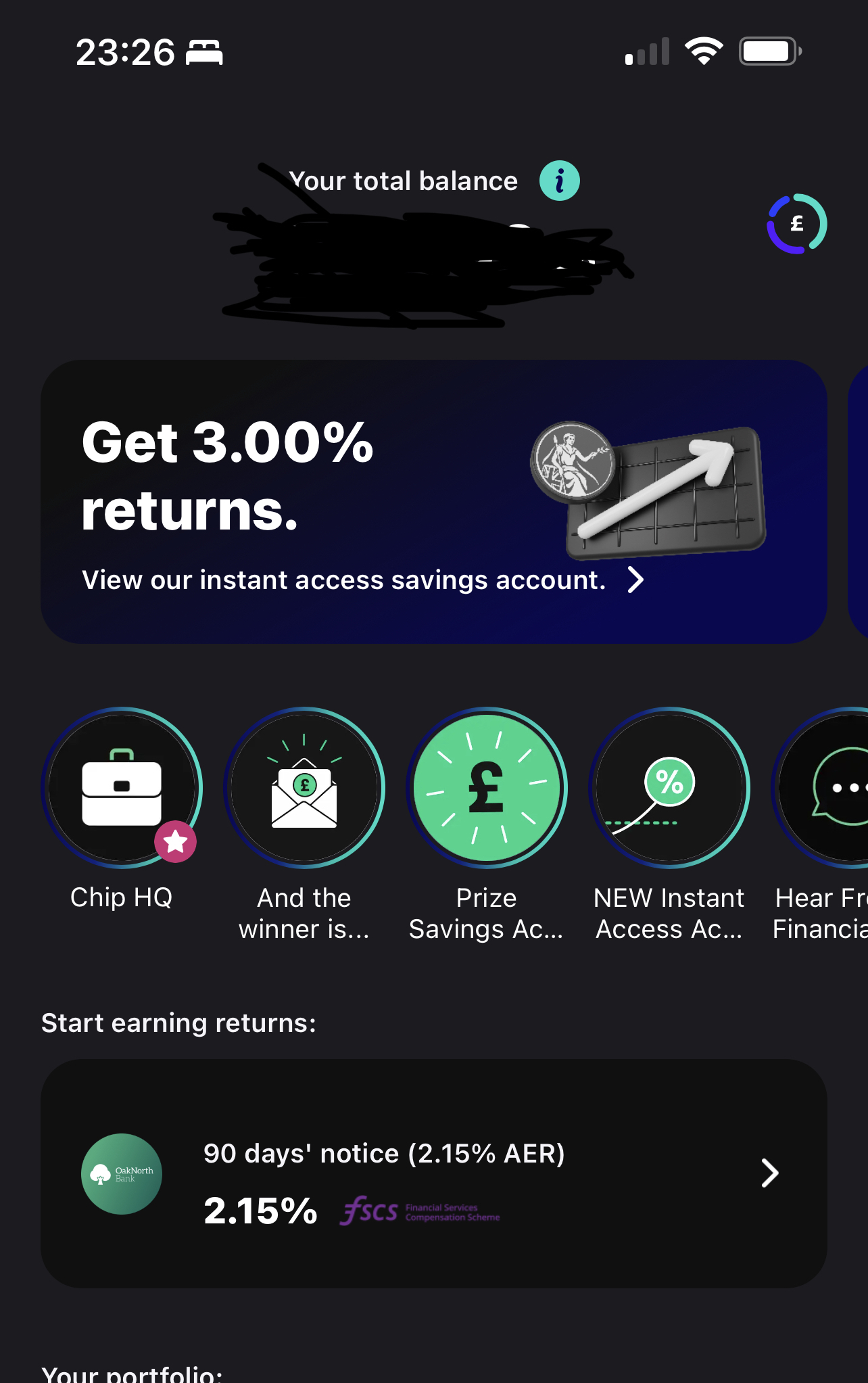
I can see it on the home page of my app right now. May be they had taken it offline, try again. Have you got the latest version of the app? Might be worth re-installing the app if you still can’t see it
0 -
Yeah my home page looks like that as well. When you click on that first bit it just gives you loads of marketing, no option to actually open the account!No one has ever become poor by giving0
-
Oh right. I thought the reason I can’t open one is because I already got the account. Have you tried to send them a message to ask? Profile - contact us.0
-
Just a short addition to this, if you use topcashback there's a £20 offer, terms obviously (min £5k is the first point), but worth a look just in case0
-
Just checking, have you linked your bank account?thegentleway said:Yeah my home page looks like that as well. When you click on that first bit it just gives you loads of marketing, no option to actually open the account!
That looks like it may now be a requirement for the full range of savings accounts.0 -
No need to link bank account for the 3% instant access account (or the 0% Prize Savings Account). It seems to be a requirement for their other savings accounts.k_man said:
Just checking, have you linked your bank account?thegentleway said:Yeah my home page looks like that as well. When you click on that first bit it just gives you loads of marketing, no option to actually open the account!
That looks like it may now be a requirement for the full range of savings accounts.1 -
You got to have a linked bank account, and only one, to use with the 3% saver. Otherwise you can't make any deposits.Though I am pretty sure I only added the linked account during the opening of the 3% saver.flaneurs_lobster said:
No need to link bank account for the 3% instant access account (or the 0% Prize Savings Account). It seems to be a requirement for their other savings accounts.k_man said:
Just checking, have you linked your bank account?thegentleway said:Yeah my home page looks like that as well. When you click on that first bit it just gives you loads of marketing, no option to actually open the account!
That looks like it may now be a requirement for the full range of savings accounts.
They also seem to set up their auto-saving on that linked account. I only realised that they did this when they notified me they'd take £x.xx from my linked account later in the day. Oh no, you won't, CHIP! I quickly turned that option off.1 -
I've got cash in the 3% IA saver funded with a debit card, my bank account is definitely not linked. Chip do make it quite hard to dodge the linking/current account robbing by defaulting this stuff to "on" but it can be done.Band7 said:
You got to have a linked bank account, and only one, to use with the 3% saver. Otherwise you can't make any deposits.Though I am pretty sure I only added the linked account during the opening of the 3% saver.flaneurs_lobster said:
No need to link bank account for the 3% instant access account (or the 0% Prize Savings Account). It seems to be a requirement for their other savings accounts.k_man said:
Just checking, have you linked your bank account?thegentleway said:Yeah my home page looks like that as well. When you click on that first bit it just gives you loads of marketing, no option to actually open the account!
That looks like it may now be a requirement for the full range of savings accounts.
They also seem to set up their auto-saving on that linked account. I only realised that they did this when they notified me they'd take £x.xx from my linked account later in the day. Oh no, you won't, CHIP! I quickly turned that option off.0







Confirm your email address to Create Threads and Reply

Categories
- All Categories
- 354.8K Banking & Borrowing
- 254.5K Reduce Debt & Boost Income
- 455.6K Spending & Discounts
- 247.6K Work, Benefits & Business
- 604.5K Mortgages, Homes & Bills
- 178.6K Life & Family
- 262.1K Travel & Transport
- 1.5M Hobbies & Leisure
- 16.1K Discuss & Feedback
- 37.7K Read-Only Boards