We’d like to remind Forumites to please avoid political debate on the Forum.
This is to keep it a safe and useful space for MoneySaving discussions. Threads that are – or become – political in nature may be removed in line with the Forum’s rules. Thank you for your understanding.
📨 Have you signed up to the Forum's new Email Digest yet? Get a selection of trending threads sent straight to your inbox daily, weekly or monthly!
Re Daughter Spilt Wine Brand New Laptop
Comments
-
I claimed when I broke my TV screen, £1000 paid out and my renewal went down £20. Pointless having insurance if you are afraid of claiming....PoGee said:Thank you for replies everyone. The fan turns freely when moved by hand. The laptop makes no sound whatsoever when plugged in and start button pressed. Re insurance, it's the increase in future premiums that's putting me off. It was just after this laptop issue that I realised Id chucked out some jewellery by mistake. When I put that 'claim' in a price comparison site, premium went up by around £70 so for that increase for next 4-5 years doesn't allow for much of a saving. I'll try both ways - taking battery out completely and putting back in, to charge from mains. But think it's a lost cause.
(I've decided not to claim for jewellery either.)Drinking Rum before 10am makes you
A PIRATE
Not an Alcoholic...!1 -
You haven't really got anywhere near where the wine will be, assuming it was spilt on the keyboard side.
You need to strip it all down properly to see where the wine has gone, most of it will be in the keyboard but some will also be on the top side of that motherboard which you can't see yet, some may be in the ribbon connectors etc, you really need to explore deeper otherwise you are wasting your time.
Get yourself all the tools and supplies you need for the job if you are going to tackle this yourself and get it totally stripped down. You will need some lint free wipes / buds, isopropyl alcohol, contact cleaner and a can of air duster. Good idea to have some thermal paste to re-apply to the CPU/GPU when you reassemble. Magnifying glass may also help.
Once you have found the wine, clean it all off carefully with the alcohol, clean any contacts etc and dry thoroughly. You will probably need a replacement keyboard but before you spend any money you should be able to get it to boot without the keyboard to see if your clean up has worked.
Depending on what you see once you have dismantled it, you may be able to see what components have taken the brunt of the wine and decide what to do from there, hard to know until you've got it all apart. Remove any components from the motherboard that may be hiding wine underneath them.
If that doesn't work, then at least you know you have done all you can to get it going.
This is what a proper teardown will look like, until you get this far you won't know what is going on, but at least you will know how to change the motherboard if that is the problem: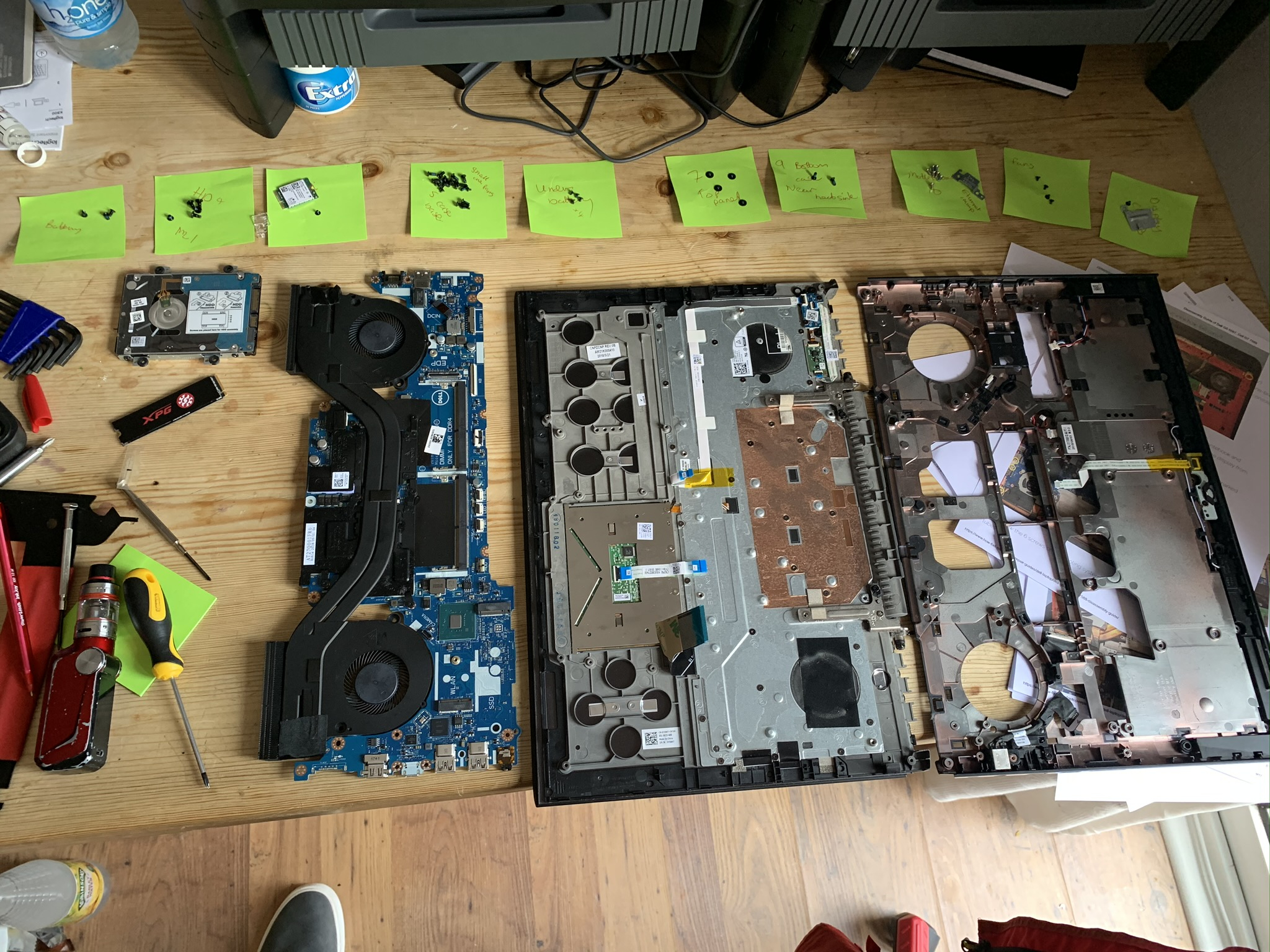
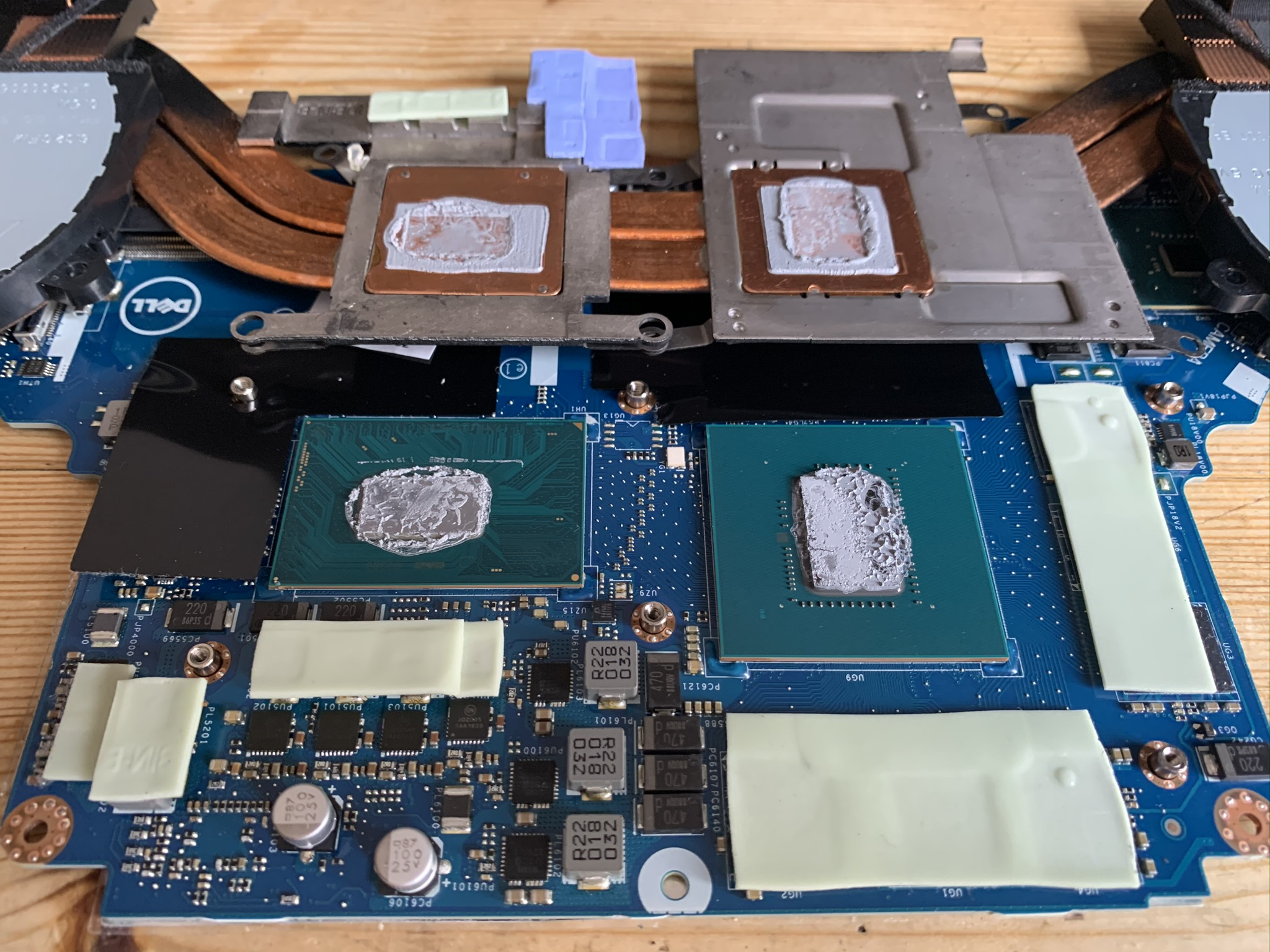
2 -
Contact a local computer repair firm and ask how much they will charge for initial diagnosis. If you take the laptop apart any further when not knowing what you are doing, it will be beyond repair.
2 -
I'm definitely up for a challenge so next time the house is empty, I'll be giving this a go.[Deleted User] said:You haven't really got anywhere near where the wine will be, assuming it was spilt on the keyboard side.
You need to strip it all down properly to see where the wine has gone, most of it will be in the keyboard but some will also be on the top side of that motherboard which you can't see yet, some may be in the ribbon connectors etc, you really need to explore deeper otherwise you are wasting your time.
Get yourself all the tools and supplies you need for the job if you are going to tackle this yourself and get it totally stripped down. You will need some lint free wipes / buds, isopropyl alcohol, contact cleaner and a can of air duster. Good idea to have some thermal paste to re-apply to the CPU/GPU when you reassemble. Magnifying glass may also help.
Once you have found the wine, clean it all off carefully with the alcohol, clean any contacts etc and dry thoroughly. You will probably need a replacement keyboard but before you spend any money you should be able to get it to boot without the keyboard to see if your clean up has worked.
Depending on what you see once you have dismantled it, you may be able to see what components have taken the brunt of the wine and decide what to do from there, hard to know until you've got it all apart. Remove any components from the motherboard that may be hiding wine underneath them.
If that doesn't work, then at least you know you have done all you can to get it going.
This is what a proper teardown will look like, until you get this far you won't know what is going on, but at least you will know how to change the motherboard if that is the problem:0 -
Laptop was from a well known shop that only does manufacturer faults. Daughter took out their care plan but no joy. It happened during a night she wanted to watch a film with me (I am lucky my kids still happy to sit with me), but we had a couple of words as we sat down so I said I was going to sleep. Cue daughter with wine glass in one hand and laptop in other....bumped the propped glass with her elbow, as she settled in her bed.bodsj said:if you zoom in on your last picture, locate the word "typeC1". Just above that to the right you will see liquid damage to the components that have shorted. This will require main board replacement. Accidental damage claim is the way to go (check warranty to see if this includes it). 0
0 -
Daughter saying to leave it - she has receipts. The jewellery - no receipts just photos of ex wearing his wedding ring. Won't be able to prove that he left it behind.RumRat said:
I claimed when I broke my TV screen, £1000 paid out and my renewal went down £20. Pointless having insurance if you are afraid of claiming....PoGee said:Thank you for replies everyone. The fan turns freely when moved by hand. The laptop makes no sound whatsoever when plugged in and start button pressed. Re insurance, it's the increase in future premiums that's putting me off. It was just after this laptop issue that I realised Id chucked out some jewellery by mistake. When I put that 'claim' in a price comparison site, premium went up by around £70 so for that increase for next 4-5 years doesn't allow for much of a saving. I'll try both ways - taking battery out completely and putting back in, to charge from mains. But think it's a lost cause.
(I've decided not to claim for jewellery either.)0 -
Thanks GDB2222 - that's good advice. I will be dismantling the laptop within the next few days.GDB2222 said:
Those might possibly be salts, where liquid has dried out. Just possibly. There's nothing much to lose from brushing with an old toothbrush - unless, of course, the OP is going to make an insurance claim, in which case don't touch it at all. In any case, there's likely to be just as much damage on the other side of the motherboard, which can't be seen until it is removed from the case.bodsj said:if you zoom in on your last picture, locate the word "typeC1". Just above that to the right you will see liquid damage to the components that have shorted. This will require main board replacement. Accidental damage claim is the way to go (check warranty to see if this includes it).
If I were attempting to resurrect this, and definitely not making an insurance claim, I would remove the motherboard and leave it to soak in distilled water for several hours. Then brush off any remaining deposits and leave it to air dry. Same for any other components with similar obvious liquid damage.0 -
GDB2222 said:
If I were attempting to resurrect this, and definitely not making an insurance claim, I would remove the motherboard and leave it to soak in distilled water for several hours. Then brush off any remaining deposits and leave it to air dry. Same for any other components with similar obvious liquid damage.
I'd be cautious with the soaking in distilled water approach in terms of getting it dry again. Some components and connectors will trap water that won't air dry effectively - eg ram chip connectors etc.Thanks GDB2222 - that's good advice. I will be dismantling the laptop within the next few days.
If you look at the photos of my dismantled laptop above there are components such as the CPU and GPU that will trap water underneath them if they are soaked and also some heat spreading stick pads that will absorb water.
You will definitely need new thermal paste as well if you go down the soaking it approach.
I suggested iso-propyl alcohol because it evaporates more easily and is a more powerful solvent than water for removing contaminants but I'd still suggest a can of air blast as well to help.
Personally I'd inspect the damage before deciding on the exact approach though.
2 -
I agree that you definitely need it to be dry. If in doubt, go for the alcohol.No reliance should be placed on the above! Absolutely none, do you hear?2
-
Just to repeat, this is very much a last attempt, before throwing it away or buying a new motherboard.No reliance should be placed on the above! Absolutely none, do you hear?1





![[Deleted User]](https://us-noi.v-cdn.net/6031891/uploads/defaultavatar/nFA7H6UNOO0N5.jpg)





Confirm your email address to Create Threads and Reply

Categories
- All Categories
- 355.3K Banking & Borrowing
- 254.7K Reduce Debt & Boost Income
- 455.9K Spending & Discounts
- 248K Work, Benefits & Business
- 605.2K Mortgages, Homes & Bills
- 178.9K Life & Family
- 263K Travel & Transport
- 1.5M Hobbies & Leisure
- 16.1K Discuss & Feedback
- 37.7K Read-Only Boards