We’d like to remind Forumites to please avoid political debate on the Forum.
This is to keep it a safe and useful space for MoneySaving discussions. Threads that are – or become – political in nature may be removed in line with the Forum’s rules. Thank you for your understanding.
📨 Have you signed up to the Forum's new Email Digest yet? Get a selection of trending threads sent straight to your inbox daily, weekly or monthly!
The Forum now has a brand new text editor, adding a bunch of handy features to use when creating posts. Read more in our how-to guide
Microsoft Windows Surface RT 32 - Retrieve Lost Password?
Comments
-
I suppose it could be worth arguing that since you were given it in 2013, used it for three years and you haven't used it since 2016, you clearly aren't bothered about the photos, otherwise you would have tried to get them off by now?
0 -
I tried this a couple of months ago on surface rt and it didn't give me the option to Keep my files.ann_droid said:ERrrrrrrrrrrrrr
You’ll now be prompted with two options. “Keep my files” and “Remove everything“.0 -
one would hope it doesn't otherwise the security of the device if someone finds it and wamts to access your data is zero.1
-
But not being bothered, and knowing they are there, is a v different kettle of fish from not being bothered and knowing they are gone. How often does one think, well I’m not bothered if eg my sunglasses are there or not, just because I don’t want them through the winter?Neil_Jones said:I suppose it could be worth arguing that since you were given it in 2013, used it for three years and you haven't used it since 2016, you clearly aren't bothered about the photos, otherwise you would have tried to get them off by now?1 -
The "Keep my files" option requires a password for it to work so won't be any use for the OP. It asks you to select a user account on the next step and then enter your password for that account.ann_droid said:ERrrrrrrrrrrrrr
You’ll now be prompted with two options. “Keep my files” and “Remove everything“. In this case, I click “Keep my files” as I want to keep the personal files intact. No matter whichever option you pick, all of your system settings will return to their defaults and apps will be uninstalled.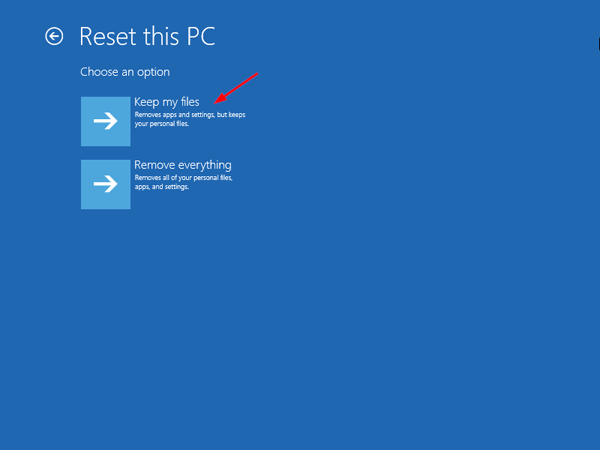
I don't guarantee you won't lose anything, but how much access do you currently have?
The "Remove everything" option doesn't need the password but won't help the OP because that will delete the photos.
0 -
studyingitalian said:
But not being bothered, and knowing they are there, is a v different kettle of fish from not being bothered and knowing they are gone.Neil_Jones said:I suppose it could be worth arguing that since you were given it in 2013, used it for three years and you haven't used it since 2016, you clearly aren't bothered about the photos, otherwise you would have tried to get them off by now?And this is why we make backups, because if you'd backed the photos up you wouldn't have to worry about them when your forget the password to the tablet 0
0 -
Indeed Neil. But sometimes we make mistakes….1
-
I would be interested to know the answer if you do decide to reset it ie do you get the option to keep your files?
If you don't get the option, then if you decide to proceed and get to the desktop you may be able to use file recovery software to recover the files provided that the reset process does not overwrite them or indeed provided part of the reset process does not involve wipe free space on the drive or the drive wasn't bitlocker encrypted etc
The photos may still be there but just not viewable and something like recuva may be able to recover them0 -
Thanks for another good suggestion. I will update here next week. That’s because I’m still wondering if the password will strike me. I used to sign myself in on autopilot and I still can’t quite believe I have irretrievably forgotten the password!pbartlett said:I would be interested to know the answer if you do decide to reset it ie do you get the option to keep your files?
If you don't get the option, then if you decide to proceed and get to the desktop you may be able to use file recovery software to recover the files provided that the reset process does not overwrite them or indeed provided part of the reset process does not involve wipe free space on the drive or the drive wasn't bitlocker encrypted etc
The photos may still be there but just not viewable and something like recuva may be able to recover them0 -
Have you tried to enter any passwords? I had this problem on a spare HP laptop. After about 3 attempts it asked me to answer 3 security questions.
0









Confirm your email address to Create Threads and Reply

Categories
- All Categories
- 353.5K Banking & Borrowing
- 254.2K Reduce Debt & Boost Income
- 455.1K Spending & Discounts
- 246.6K Work, Benefits & Business
- 603K Mortgages, Homes & Bills
- 178.1K Life & Family
- 260.6K Travel & Transport
- 1.5M Hobbies & Leisure
- 16K Discuss & Feedback
- 37.7K Read-Only Boards