We’d like to remind Forumites to please avoid political debate on the Forum.
This is to keep it a safe and useful space for MoneySaving discussions. Threads that are – or become – political in nature may be removed in line with the Forum’s rules. Thank you for your understanding.
📨 Have you signed up to the Forum's new Email Digest yet? Get a selection of trending threads sent straight to your inbox daily, weekly or monthly!
The Forum now has a brand new text editor, adding a bunch of handy features to use when creating posts. Read more in our how-to guide
Backed into a corner with Virgin media and desperate to leave
Comments
-
This link shows you what is available and seems to show for some areas an install date of FTTC or FTTP if there is an install date pencilled in.CharlotteElizabeth92 said:zx81 - unfortunately it can take hours to get it back up and running so very annoying when working (I'm a student nurse and my husband is a teacher) or we settle down to watch tv and can't. I'm think I'm just finding it hard to pay a company a monthly direct debit and not want to be with them or receive the service I think I should.
MattMattMattUK - No I haven't I called them around a year ago and if I remember right they said within the next 5 years. Is there somewhere online I can check this? or contact them to ask if they can hurry it up ... they would get a lot of new providers signing up as everyone in my area is fed up with Virgin
https://www.openreach.com/fibre-broadband
You can also look at Community Fibre Partnerships which in some areas are installing fibre far quicker than OpenReach. Not all are listed on there.
https://www.openreach.com/fibre-broadband/community-fibre-partnerships
This company seem to be rolling out fibre in Poole so you can check with your postcode on there as well.
https://www.cityfibre.com/residential/
0 -
I think virgin media are too expensive. New customers get better deals than existing customers so im thinking of leaving.0
-
See the VM threads .
0 -
Some great suggestion above, if you are prepared to roll your sleeves up and spend a bit of time pinning down where the problem lies you can get much better help from Virgin Media, like most companies the helpdesk just follow a script and end the call when it appears to be working fine now without getting to the root cause.
1. Virgin Media Community forums are a lot more helpful with any such issues but be prepared to provide a lot more information than "it goes off 3 times a week" to get somebody to help you.
https://community.virginmedia.com/t5/custom/page/page-id/CommunityHubForums
2. Gather some more information for the forum before you post.- Which hub / router version are you on and if it is the hub 3, which colour, apparently the white ones are refurbs and can be unreliable.
- What speed package you are on and what the speed test results are via ethernet connection
- When you say the internet disconnects - is it just the wifi or do wired devices via ethernet also lose internet access?
- What lights and colour come on the hub when it disconnects?
- Go into the hub admin page on 192.168.0.1 and click check router status, take copies of all the data in those screens in there (Status / Downstream / Upstream / Network Log - there is a lot of useful info in there and the guys on the VM forum can spot problems from the data - eg the quality / power / noise ratios of the broadband connection.
4. Consider using the online Think Broadband quality monitor which can show some aspects of the quality of your connection which is useful leverage when contacting virgin media on the forums. Keeps a log of your disconnects for you.
https://www.thinkbroadband.com/broadband/monitoring/quality
Eg this below - yellow spikes showing when the connection is less responsive and you may feel lagging, red lines when disconnected: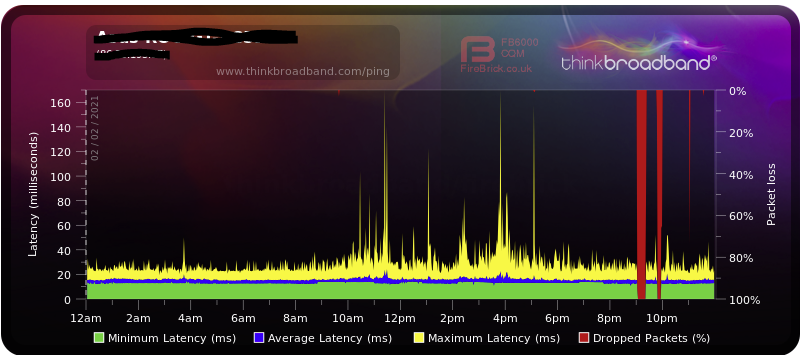
4 -
CharlotteElizabeth92 said:
we are defiantly paying for more service than we receive.
I think 'definitely' may be the word you're looking for. I wondered why you were defiantly paying more if you didn't need to!CharlotteElizabeth92 said:this is defiantly helpful 0
0 -
tallmansix: good to see someone using the great tools at ThinkBroadbandAnother thing to check is the quality of your RJ45 cables - if they are less than cat6 then get some good quality cat6e at leastanother good utility is 'Netmeter' that will show your 'actual' speed over time, not just vaguely..ThinkBroadband also does some large files to download to check
0 -
Which supplier do your neighbours / other teachers / students / college / business in your area;use?
Breast Cancer Now 100 miles October 2022 100/100miles
D- Day 80km June 2024 80/80km (10.06.24 all done)
Diabetic UK 1 million steps July 2024 to complete by end Sept 2024. 1,001,066/ 1,000,000 (20.09.24)
Breast Cancer Now 100 miles 1st May 2025 (18.05.25)
Diabetic UK 1 million steps July 2025 to complete by end Sept 2025. 1,006,489 / 1,000,000 (10.09.25)
Breast Cancer Now 100 miles 1st October 2025 100/100 (12.10.25 all done)
Tommy 10,000 steps challenge. 1st Nov 25 for 30 days .Sun, Sea0 -
Given that cat5e is good for gigabit in the lengths encountered in a domestic setting, I'm not convinced of the necessity of cat6/6e.illiad said:Another thing to check is the quality of your RJ45 cables - if they are less than cat6 then get some good quality cat6e at least
My whole house is wired using cat5e with multiple sockets in every room routing back to patch panels in a data cabinet in the boiler cupboard. I di all the work myself and it all runs a 1Gbps, no problem.Proud member of the wokerati, though I don't eat tofu.Home is where my books are.Solar PV 5.2kWp system, SE facing, >1% shading, installed March 2019.Mortgage free July 20231 -
and WHO said 'cat5e is good for gigabit' ?? people who want to sell their 'back stock'?? Its only a few £..show me your speedtest and I'll believe..0
-
The Cat5e spec says it good enough for gigabits0











Confirm your email address to Create Threads and Reply

Categories
- All Categories
- 354.6K Banking & Borrowing
- 254.5K Reduce Debt & Boost Income
- 455.5K Spending & Discounts
- 247.5K Work, Benefits & Business
- 604.3K Mortgages, Homes & Bills
- 178.5K Life & Family
- 261.9K Travel & Transport
- 1.5M Hobbies & Leisure
- 16.1K Discuss & Feedback
- 37.7K Read-Only Boards