We’d like to remind Forumites to please avoid political debate on the Forum.
This is to keep it a safe and useful space for MoneySaving discussions. Threads that are – or become – political in nature may be removed in line with the Forum’s rules. Thank you for your understanding.
📨 Have you signed up to the Forum's new Email Digest yet? Get a selection of trending threads sent straight to your inbox daily, weekly or monthly!
The Forum now has a brand new text editor, adding a bunch of handy features to use when creating posts. Read more in our how-to guide
Spam emails received every day, sent to obsolete email address
Comments
-
Thanks for all the further replies, I am trying to get my head around this! As I said, I am a bit out of my depth with anything that isn't simple.
I have now tried to set up a "Rule" so that if any mail is addressed to "fredbloggs"@hotmail.co.uk it is automatically deleted.
I will report back in a couple of days!Used to be Bogof_Babe. It did need updating!0 -
It would really be better if you found out why you were downloading these messages initially, especially as the aren't addressed to you!
 2
2 -
It would be easier to set Outlook to stop receiving mail to that address in the first place.
0 -
Great suggestions but sadly I don't have the first idea how to go about them
 . Why is Outlook even involved, as the emails are addressed to a hotmail address? Is there some link up? See, told you I am clueless.
Only four when I logged in this morning, and no further ones since, so perhaps my Rule has kicked in. Don't know, will give it a few days and see what happens.Used to be Bogof_Babe. It did need updating!0 -
Outlook is purely a program that downloads e-mail from any address from any provider that you ask it to. In the settings it lists all the different e-mail addresses you have told it to look at, it doesn't pick addresses at random. Simply delete that address, as detailed in my earlier posts, and it will stop downloading them. Far easier than setting rules.
1 -
Right then, I open my mail (I'm on a Macbook using Safari, if that's relevant), click on where it says Mail at the top and select Accounts. It comes up with a list, being iCloud, live.co.uk, Twitter, Gmail and Facebook - the last two marked "inactive".
On the right hand side the list is: iCloud, Exchange, Google, Twitter, Facebook, LinkedIn, Yahoo!, AOL, Flickr, Vimeo. followed by the option to "add another account".
None of this appears to give me an option to delete a particular address, as it doesn't show any actual addresses. Should I be looking at something completely different?
Good news is still no further Junk since early this morning so my workaround may have solved the problem.Used to be Bogof_Babe. It did need updating!0 -
Tools - Accounts - select e-mail address to delete - press the minus box
0 -
Where do I find Tools?
 Used to be Bogof_Babe. It did need updating!0
 -
molerat said:Tools - Accounts - select e-mail address to delete - press the minus box
@molerat is getting Outlook mixed up with Outlook ..... You are using the web based version.Bogof_OAP said:Where do I find Tools?
@hotmail.com @live .com and @outlook.com are all email addresses from the Microsoft stableJ_B said:As I said above, there are two sorts of 'Outlook', just to make things easy!!!Outlook - a stand-alone program/app that is part of MS Office along with Word, Excel etcOutlook - a website based version of the above, but different.There you go, it really is that simple!!! EDIT - maybe try this .....Do you see a cog in the top right of the main mail page?Click on it and scroll down to 'all outlook settings' - a new box opens up on topOn the left is a 'button' marked 'email' click on it then click on 'Synch Email' then look for 'manage your connected accounts' in the middle of the screen.Do you have any other email addresses in there that aren't yours????If so, delete themAny use?
2 -
Already been there a couple of times and OP must have been almost in there to set rules.
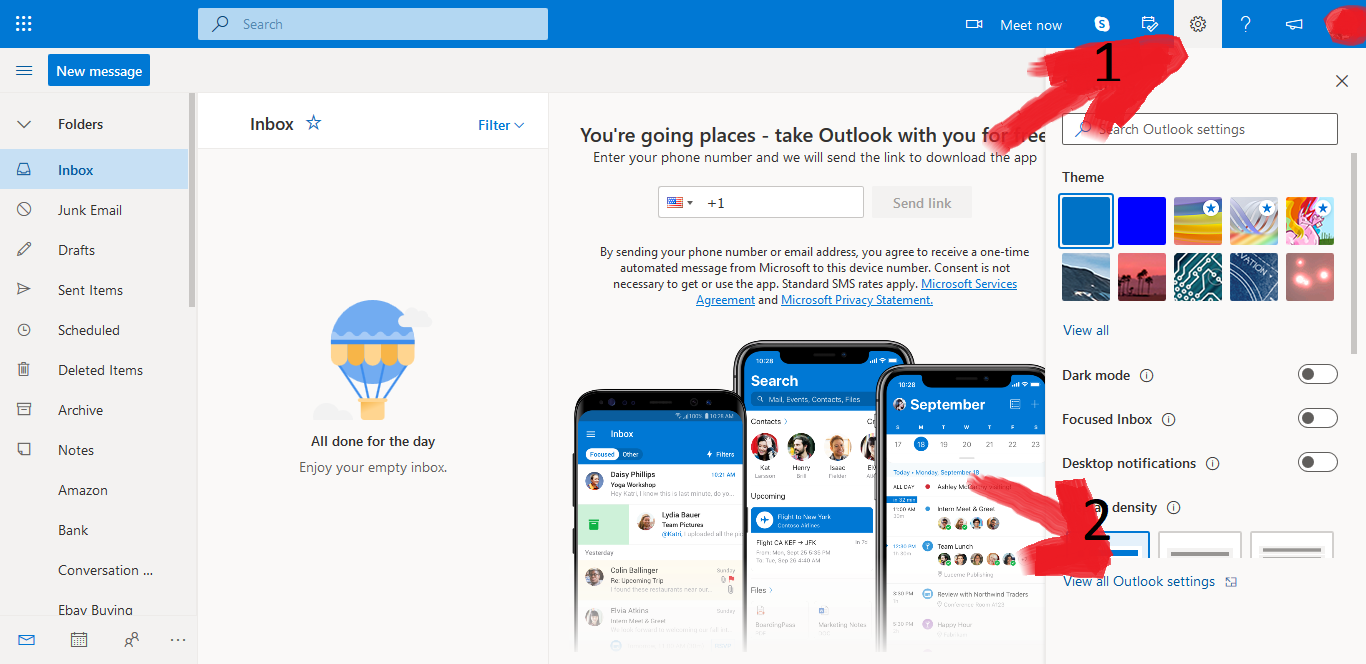
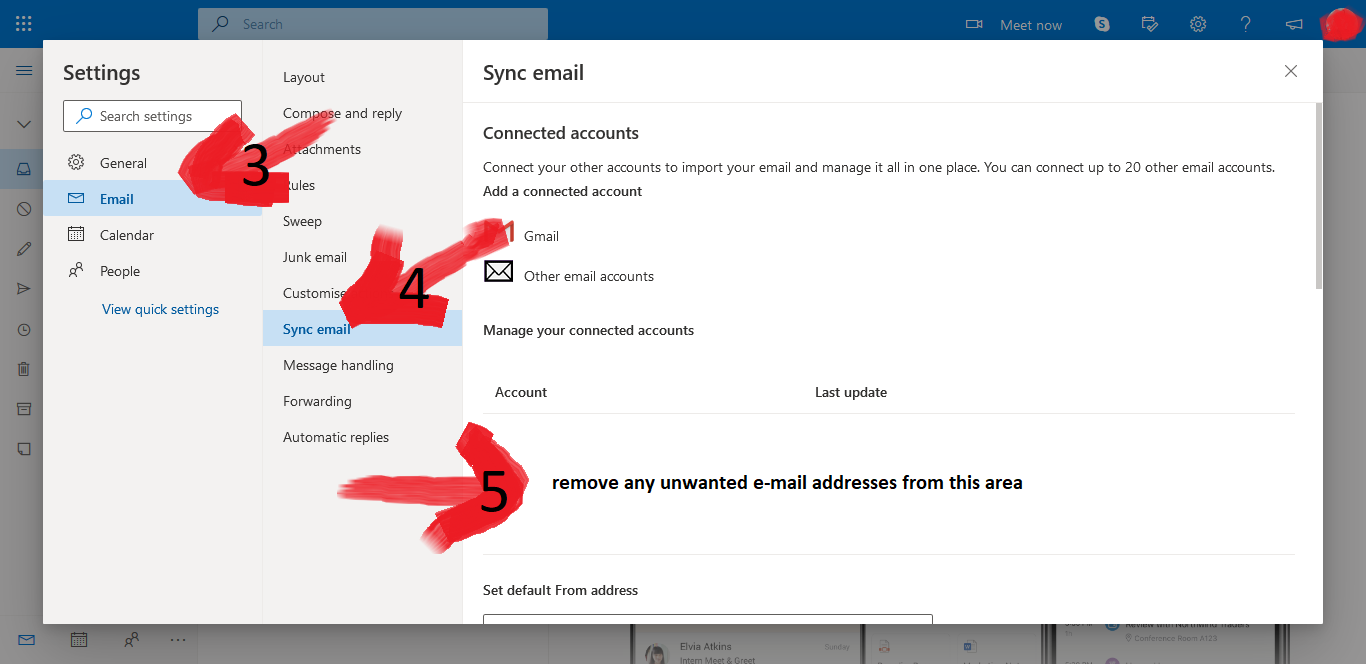 2
2










Confirm your email address to Create Threads and Reply

Categories
- All Categories
- 354.2K Banking & Borrowing
- 254.4K Reduce Debt & Boost Income
- 455.3K Spending & Discounts
- 247.2K Work, Benefits & Business
- 603.9K Mortgages, Homes & Bills
- 178.4K Life & Family
- 261.4K Travel & Transport
- 1.5M Hobbies & Leisure
- 16.1K Discuss & Feedback
- 37.7K Read-Only Boards