We’d like to remind Forumites to please avoid political debate on the Forum.
This is to keep it a safe and useful space for MoneySaving discussions. Threads that are – or become – political in nature may be removed in line with the Forum’s rules. Thank you for your understanding.
📨 Have you signed up to the Forum's new Email Digest yet? Get a selection of trending threads sent straight to your inbox daily, weekly or monthly!
The Forum now has a brand new text editor, adding a bunch of handy features to use when creating posts. Read more in our how-to guide
DVD Separate player for laptop
Comments
-
roddydogs said:Yes ive already posted i obviously tried using both ports together, still no go. And as for the "cheap one" I only need it to load old photos once, so what's the point of paying more than needed? Thanks anyway.You still havent confirmed that you are using a powered port for the power cable.Iv seen the exact problem you are facing before - and that was the solution.You dont seem very keen on helping us to help you - we may be good but we are not magicians - these people are giving you their time to help you , for free0
-
Its an hp laptop, it only has 2 usb ports, tried every combination. The disc spins fine., many thanks.
0 -
Out of interest, how do you know if a USB port is "higher-powered". I don't think I've ever seen a lightning symbol by a USB port. I've seen SS but guess that is super-speed (or I've just made that up :-)
Data sheet for op's laptop is https://www8.hp.com/h20195/v2/GetPDF.aspx/c06523712.pdf
For USB ports says "Data Transfer Only"
Interesting that the unit comes with 2 cables rather than a single 2-1 cable. Obviously the unit itself has 2 connectors. Could be a cable fault I guess...0 -
Maybe you've never seen a Dell or Toshiba laptop. See here:grumpycrab said:I don't think I've ever seen a lightning symbol by a USB port.Sleep-and-charge ports
...
Sleep-and-charge USB ports may be found colored differently than regular ports, mostly red or yellow,[citation needed] though that is not always the case.
On Dell and Toshiba laptops, the port is marked with the standard USB symbol with an added lightning bolt icon on the right side.1 -
Could be a cable fault. OP could also try plugging the "power" cable into a USB charger (e.g. a phone charger) and the "data" cable into the laptop. If OP gives us the Ebay item number we may even be able to say which one is which.1
-
grumpycrab said:Out of interest, how do you know if a USB port is "higher-powered". I don't think I've ever seen a lightning symbol by a USB port. I've seen SS but guess that is super-speed (or I've just made that up :-)
Data sheet for op's laptop is https://www8.hp.com/h20195/v2/GetPDF.aspx/c06523712.pdf
For USB ports says "Data Transfer Only"
Interesting that the unit comes with 2 cables rather than a single 2-1 cable. Obviously the unit itself has 2 connectors. Could be a cable fault I guess...Shot of my Dell XPS desktop .. 0
0 -
Some manufacturers also use other icons, for example Lenovo has a tiny battery next to the USB port if it supports charging.
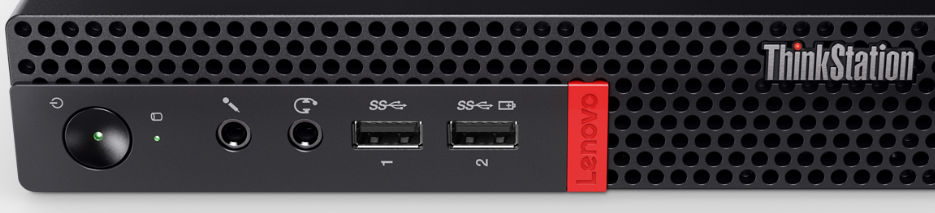
0 -
Do these ports actually supply additional power? I thought they simply supplied power on the port when the PC was shut down:
https://support.lenovo.com/gb/en/solutions/ht503671
https://www.dell.com/support/article/en-uk/sln155147/usb-powershare-feature-on-dell-laptops?lang=en
1 -
roddydogs said:Bought a new laptop, but of course they don't have optical drives nowadays, no problem just get a cheepie fom e-bay, which I did. Dont need to burn stuff, or play Dvds, just to load all my old photos. However it just will not play, just showing "not recognised", is it just pot luck with these chinese cheepies, or is there a solution? Thanks.Since no one else seems to have mentiond it.Yes these cheap no brand chinese ones tend to be made from old laptop drives that end up back there. They are not tested , not new (well the drive at least) and are indeed pot luck.I would not buy one since it's often £5-£10 more to get one with support. I would also not use ebay for this sort of thing. Amazon will at least force an easy refund (if you have a good history with them).0
-
Every USB port supplies power. The question is, is the power supplied enough to make the device connected work or does it require more power than what the USB port can give.Johnmcl7 said:Do these ports actually supply additional power? I thought they simply supplied power on the port when the PC was shut down:
Normal USB 3 ports give 900 mA, which is often enough to power an external DVD drive, especially if you are using 2 ports simultaneously.
It's probably been mentioned already, but battery-powered laptops tend to reduce power to the USB ports, so when the DVD is used, the laptop should be connected to the charger.1









Confirm your email address to Create Threads and Reply

Categories
- All Categories
- 353.6K Banking & Borrowing
- 254.2K Reduce Debt & Boost Income
- 455.1K Spending & Discounts
- 246.7K Work, Benefits & Business
- 603K Mortgages, Homes & Bills
- 178.1K Life & Family
- 260.7K Travel & Transport
- 1.5M Hobbies & Leisure
- 16K Discuss & Feedback
- 37.7K Read-Only Boards