We’d like to remind Forumites to please avoid political debate on the Forum.
This is to keep it a safe and useful space for MoneySaving discussions. Threads that are – or become – political in nature may be removed in line with the Forum’s rules. Thank you for your understanding.
📨 Have you signed up to the Forum's new Email Digest yet? Get a selection of trending threads sent straight to your inbox daily, weekly or monthly!
The Forum now has a brand new text editor, adding a bunch of handy features to use when creating posts. Read more in our how-to guide
Toshiba laptop keeps shutting down when typing
Comments
-
I had a Dell laptop with similar problem.
I replaced battery and cleaned fan, it solved the problem.
It might be getting overheated, or fan running too fast.0 -
I had the same problem with another make of laptop.
Very obscure solution - a complete re-install of Windows did not cure it.
I eventually traced it to having bought a wireless keyboard and mouse to use with my laptop and another, different one, with my smart TV. I left the keyboard for the tv switched on all the time and, when the TV was on, then there was some interaction between the two wireless keyboards that caused the laptop to shut down when a key was pressed, even on the laptop's own built in keyboard. Swapping the keyboards over cured the problem, as did closing down the TV keyboard.
I would just check if you have other equipment using wireless dongles and try turning them off to eliminate this unlikely possibility.0 -
Actually david39 could be close to the answer but it might be your phone. See replies by cbarnes towards the end of here
http://www.minasi.com/forum/topic.asp?TOPIC_ID=343780 -
hi thanks for the replies.
I dont use the battery at all any more so it is always on mains. I will hoover the back now and remove the battery all together and report back in 5.
oh and there arent any gadgets etc plugged into itTopCashback £1792.63My Little World0 -
Just tried to take the back off but couldn't do it so just hoovered through the holes, also removed the battery.
Unfortunately it's still doing it. Just going to check out onzeys link TopCashback £1792.63My Little World0
 -
just tried it with iphones out of the room and it is still doing it TopCashback £1792.63My Little World0
-
theres some kernal errors on the event viewer and someothers, how can i do a print screen to show you?TopCashback £1792.63My Little World0
-
Can you take a picture on your phone and post it perhaps.
Also, just to be clear, can I repeat virtually what Enterprise 1701C asked. Will the laptop stay on indefinately if the keyboard is not touched at all, and does it only start to shut down when you begin to type?0 -
Hi, it only shuts down when I begin to type. On the event view there loads.no it doesn't say it's shutting down it jousts shuts down. Think this will work
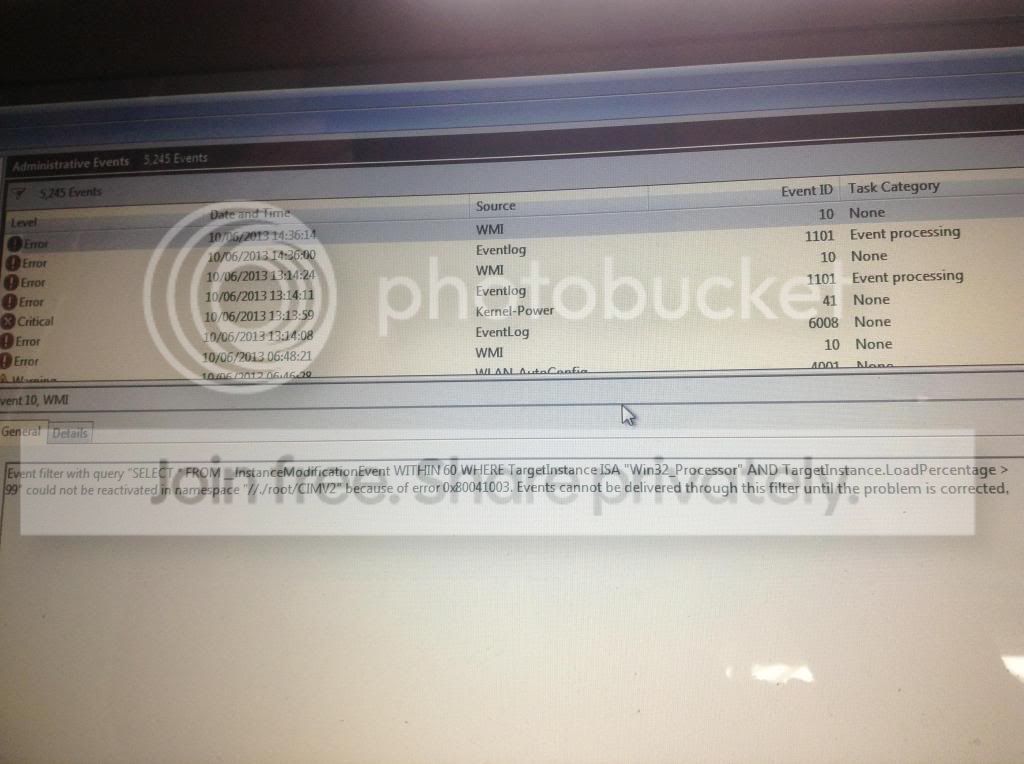 TopCashback £1792.63My Little World0
 -
Can you try bringing up the on screen keyboard.
Start > All programs > Accessories > Ease of Access > On-Screen Keyboard
See if that works (not suggesting as a permanent fix)
Also, do you have a separate USB keyboard by any chance?0





This discussion has been closed.
Confirm your email address to Create Threads and Reply

Categories
- All Categories
- 354.1K Banking & Borrowing
- 254.3K Reduce Debt & Boost Income
- 455.3K Spending & Discounts
- 247.1K Work, Benefits & Business
- 603.8K Mortgages, Homes & Bills
- 178.4K Life & Family
- 261.3K Travel & Transport
- 1.5M Hobbies & Leisure
- 16.1K Discuss & Feedback
- 37.7K Read-Only Boards