We’d like to remind Forumites to please avoid political debate on the Forum.
This is to keep it a safe and useful space for MoneySaving discussions. Threads that are – or become – political in nature may be removed in line with the Forum’s rules. Thank you for your understanding.
📨 Have you signed up to the Forum's new Email Digest yet? Get a selection of trending threads sent straight to your inbox daily, weekly or monthly!
The Forum now has a brand new text editor, adding a bunch of handy features to use when creating posts. Read more in our how-to guide
Is 1.2MB/sec between hard drives slow transfer?
Comments
-
Yes it is. I was going to wire one of the optical drives to the PCI card instead, but its SATA cable didn't stretch far enough so i just hooked it up as it stands now. I didn't think it'd effect the speed.Is it possible to re-arrange the drives so that both are using the motherboard SATA connections or the PCI SATA connections?
Not sure how your system is set up but. You *might* get better throughput if they are both using the same connection.0 -
I'd abandon the copy, and get my photos and other valuables off asap. then run some diags and if the disk passes a chkdsk0
-
That is painfully slow.I'm sorting stuff out on my PC after formatting the discs & right now i'm transferring a stack of files/folders between hard drives & it's shifting slow as anything. Had a look at the rate & it's fluctuating between 1.2-1.4MB/sec.
I have about 50GB to transfer & it was reading off at taking 11 hours!!!!!!
I get about 50 or 60 mps when transferring single large files between disk partitions on my laptop and about 25 to 30 mps when transferring multiple mixed size files.
Something is seriously wrong with your speeds. You should be able to transfer 50gb of data in just an hour or two at most.0 -
For comparison ... copying a 1GB AVI file from my laptop to a SATA drive in a USB cradle takes less than a minute. So that's about 20MB/sec. (USB port is USB3, but I don't think the cradle supports USB3).0
-
Some stats from HD Tune:
HDD transferring FROM
File Benchmark: Write 77385 KB/s
HDD transferring TO
File benchmark: Sequential 2018 KB/s read. 4KB random single 153 IOPS read.
633 IOPS Write.
Not really sure which information i should be relaying as none of it makes sense to me.0 -
I ran chkdsk on both discs.
The one transferring FROM which is a 1TB HDD: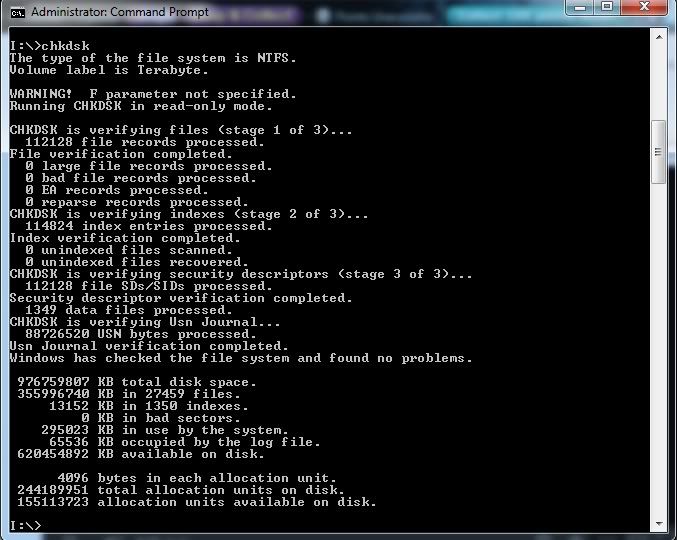
The one transferring TO which is a 500GB HDD which has been split into 3 partitions. The partition in question is 200GB.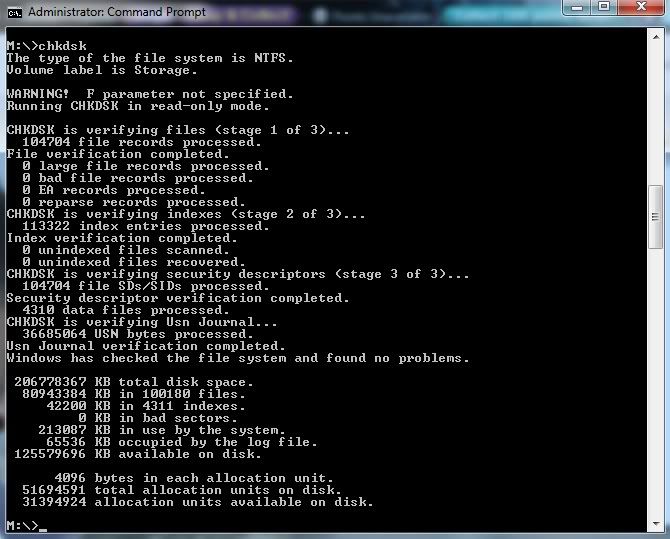
Just to note - the 1TB chkdsk took an age to complete compared to the second chkdsk.0 -
Well 1TB will obviously take longer to check than 200GB. About 5x longer I would estimate.

What's important is the READ rate on the FROM disk, and the WRITE rate on the TO disk. 0
0 -
I installed that crystal disk, but it was taking ages.Well 1TB will obviously take longer to check than 200GB. About 5x longer I would estimate.
What's important is the READ rate on the FROM disk, and the WRITE rate on the TO disk.
There's about 4 boxes on it. Do you need results from them all or just one of them?0 -
When running the test through that crystaldisk - wont it largely be a waste of time?
All i see is read/write numbers. I'll post up the results, people will say it's slow & that'll be it. Where does it go from there?0 -
Right, here we go then. I've done the tests, but i still don't see what they'll achieve beyond it being confirmed the figures are slow.
Drive transferring FROM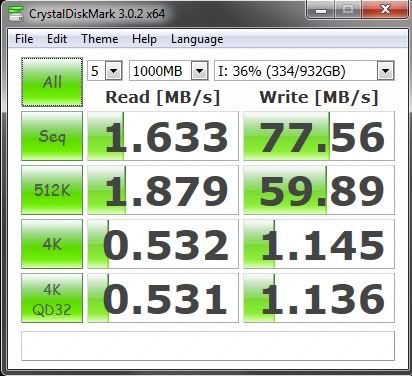
Drive transferring TO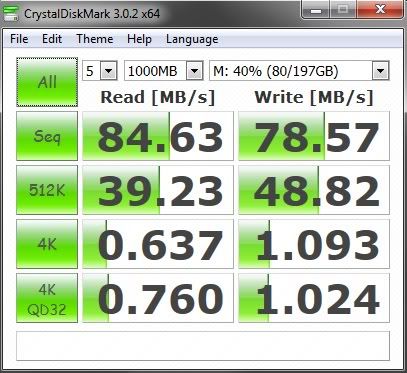
Just out of wonderment, i ran the test on my C drive, which is a Samsung 250GB 830 Series SSD. Stats here: http://www.ebuyer.com/398216-samsung-256gb-830-series-ssd-mz-7pc256b-ww
Performance Stats Apparently:
Performance- Sequential Read: Up to 520MB/s
- Sequential Write: Up to 400MB/s
- Random Read: Up to 80000 IOPS
- Random Write: Up to 36000 IOPS
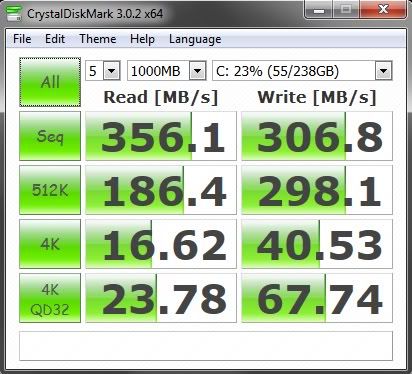
I then ran crystal disk info:
The C drive: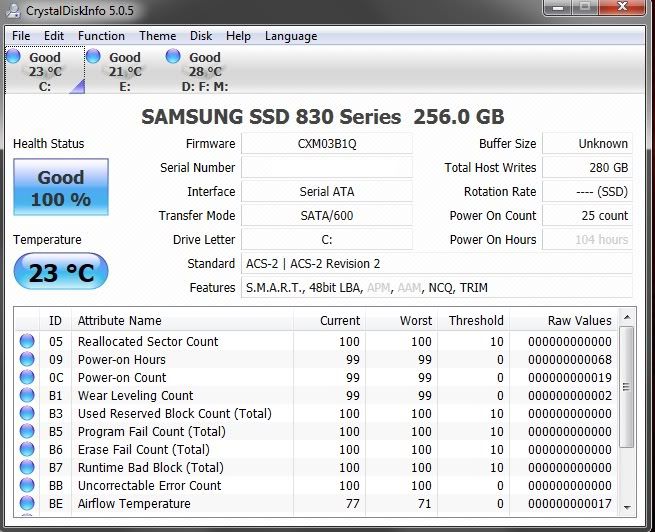
The other SSD drive which is 2 years old & unrelated to this problem: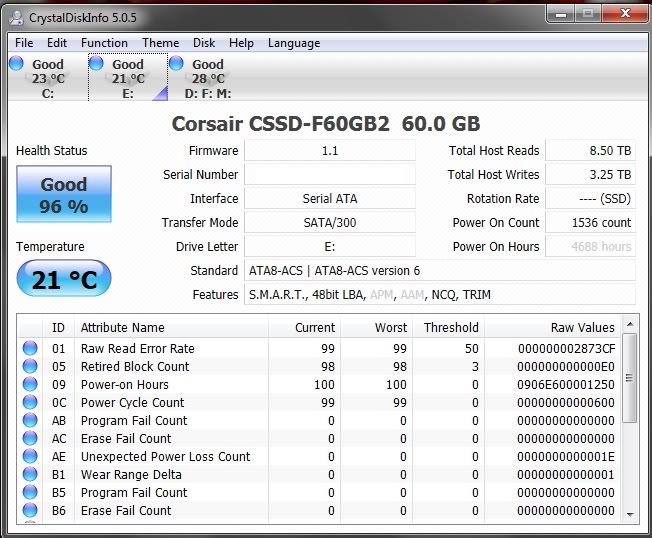
The drive that the files were being transferred TO (same drive as second image)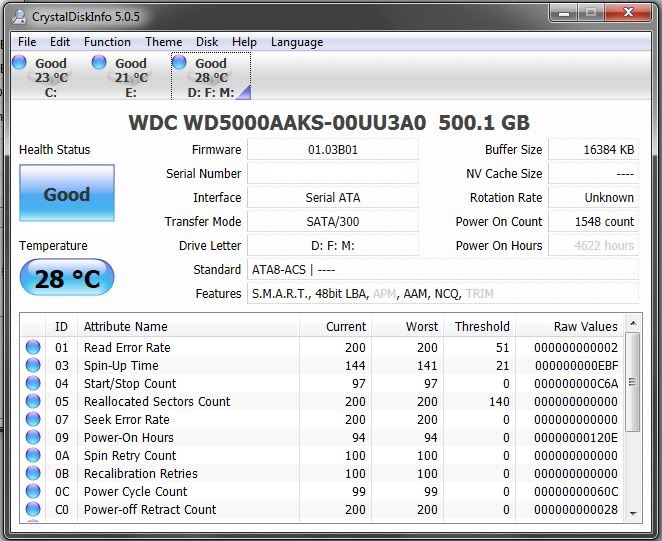
For whatever reason, CrystalDiskInfo wouldn't give me stats for the 1TB HDD.
For the record, the 1TB HDD is approx 12 months old & has barely been used. I bought it to rip all my CDs to it, but haven't got round to it. I've placed the odd Acronis True Image backup on it, but other than that it's not really been used.0

This discussion has been closed.
Confirm your email address to Create Threads and Reply

Categories
- All Categories
- 354K Banking & Borrowing
- 254.3K Reduce Debt & Boost Income
- 455.2K Spending & Discounts
- 247K Work, Benefits & Business
- 603.6K Mortgages, Homes & Bills
- 178.3K Life & Family
- 261.1K Travel & Transport
- 1.5M Hobbies & Leisure
- 16.1K Discuss & Feedback
- 37.7K Read-Only Boards