We’d like to remind Forumites to please avoid political debate on the Forum.
This is to keep it a safe and useful space for MoneySaving discussions. Threads that are – or become – political in nature may be removed in line with the Forum’s rules. Thank you for your understanding.
📨 Have you signed up to the Forum's new Email Digest yet? Get a selection of trending threads sent straight to your inbox daily, weekly or monthly!
No sound from PC yet speakers are on

*manda*
Posts: 1,301 Forumite
in Techie Stuff
Ok this might sound really stupid. I have some fairly basic speakers plugged into my PC through a normal jack socket. The light is on but no sound comes out- have tried all the obvious turning off and on again, make sure volume is up etc. It's a bit of a pain in the behind as i use my PC alot for music especially as i have a USB turntable. Always used to work, stopped about a week ago. Still get crackling through the speakers if i fiddle with the the jack socket.
Not sure whether i'm best off getting new speakers, or whether it's something more technical? Also if it is broken somehow can you get USB speakers or something so i can still play music via the PC without having to connect it to a full stereo?
Not sure whether i'm best off getting new speakers, or whether it's something more technical? Also if it is broken somehow can you get USB speakers or something so i can still play music via the PC without having to connect it to a full stereo?
0
Comments
-
I presume you have tried to right click the speaker thingy next to the clock and check the volume control is not set to mute.:j Arsenal fru & fru :j0
-
Yes nothing is muted.0
-
have you tried uninstalling the drivers, i had same problem on my pc and when they was reinstalled they work fine0
-
Have you got the speakers plugged into the correct socket ?, usually the green one.0
-
Which operating system are you using? and also are you running onboard sound (jack plugs into the motherboard) or a sound card (jack plugs directly to the sound card)
For example I know that a common on board sound chip the Realtek AC97 can be prone to failure on the right channel (only left speaker works) or rarely on both channels - so this could be a problem if your sound card has failed. Using troubleshooter may not find anything wrong.
Dont rush off to buy new speakers yet as you say they are crackling they may be OK. (some speakers will "hum" if you turn the speaker volume right up)
If you can try the speakers in another PC or other audio output - such as a radio, you can at least check wether they are working.Don't try to teach a pig to sing - it wastes your time and annoys the pig0 -
I have no idea whether it plugs into motherboard or into sound card, presuming i'd need to open it up to find out? I use XP Office.0
-
You won't need to open the case - if you're using on-board sound then your speakers will be plugged into one of the sockets shown below as "Audio jacks".
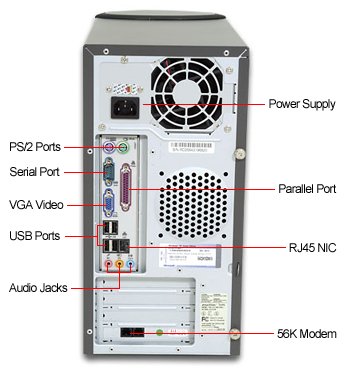
If you have a soundcard it will be in one of the slots such as the one the "56k Modem" occupies (slightly out-of-date pic...).
As Jimmy says in post #4, try Control Panel, System, Device Manager, right-click on the sound device, Uninstall it. Reboot and let it automatically find and reinstall the drivers.0 -
I've had a look in control panel, system device manager and it brings up a list in the sound device section. I'm unsure which i'm meant to be uninstalling as i don't want to uninstall something that can't be fixed. In sound video and game controllers it lists audio codecs, audio controllers, legacy audio drivers,media control devices, MPU-401 compatible devices,unimoden half duplex device,s usb audio device.
In system devices it lists system speaker amongst other things. Which do i try to reinstall?
BTW the speakers are definitely in an audio jack, I don't think there is a sound card in any of the other slots.0 -
If you right-click on each of those devices in the Sound, Video and Games section, you should find that only one can be uninstalled (the rest are usually "virtual devices" that don't correspond to actual hardware).
If you uninstall it and reboot, you should get a "new hardware found" notification. If whoever built your PC installed the correct driver for the motherboard then it should just find the correct driver and install it. If not, you might get a dialogue box asking for its location.0




This discussion has been closed.
Confirm your email address to Create Threads and Reply

Categories
- All Categories
- 355.6K Banking & Borrowing
- 254.8K Reduce Debt & Boost Income
- 456.1K Spending & Discounts
- 248.1K Work, Benefits & Business
- 605.6K Mortgages, Homes & Bills
- 179K Life & Family
- 263.4K Travel & Transport
- 1.5M Hobbies & Leisure
- 16.1K Discuss & Feedback
- 37.7K Read-Only Boards