Ready, steady… save!
You don’t need a chart to join in. Here are 2 ways to record your savings:
1. Cross it off
Pop a chart into your first post. Saved an amount? Cross it out! Read more »
£0.01 £0.02 £0.03
2. Write it down
Skip the chart and add updates to your first post. Read more »
“Another +£3 saved today. Go me!”
Use +£ before each new saving so it counts towards your total.
📨 Have you signed up to the Forum's new Email Digest yet? Get a selection of trending threads sent straight to your inbox daily, weekly or monthly!
Edit box not being cleared when posting





Since yesterday evening I'm finding that when I compose a reply and post it, the editing window retains the content of the post (as if it was an unposted draft), where previously it would be emptied.
Anyone else experiencing this?
Comments
-
Yes. With Windows 11 and latest Firefox.
The result looks like the previous ongoing problem of posting sometimes not working during an autosave, but then hitting 'Post Comment' again still appears to do nothing… until you realise this is a different bug.
0 -
Yes, I did a copy/paste into a quote earlier and found the pasted text to be truncated, not sure if that's part of the same issue or a different one…
1 -
Thanks for letting us know
I've reported this to our provider.
Join the MSE Forum
Get the Free MoneySavingExpert Money Tips E-mail
To report inappropriate posts: click the report button
Flag a news story: news@moneysavingexpert.com1 -
Mine is doing this too but its stranger… if I dont note the post has actually gone and assume I have missed the button or forgot to press it and therefore click Post again I get an error message saying the body is empty despite the fact the textbox still has my full post in it.
0 -
I have had this problem since midnight earlier today.
I worked out to clear it by hitting the refresh button in the browser.
The other way is to go up to the menu and then come back down by selecting the particular thread.
0 -
Yes I have the same
But on the positive side the editor is not duplicating my first letter
On balance I'd say it is an improvement
0 -
I've had this 'body is empty' message too but also another problem.
When directing a response to a particular person on a thread like 'maman', I would normally choose the name from the drop down menu. Today, every time I type the 'at' symbol the menu appears but if I use it the post locks and won't let me type anything else after it. Using the space bar just repeats the username. I can't delete it or even add a full stop.
I've deliberately not used the symbols or usernames so far in this post but it's like this @maman
0 -
It might have manifested itself in the same software update but isn't obviously linked to the main issue of this thread so might be worth reporting in a separate one?
1 -
It is the same issue. You write your post, click post, apparently nothing happens, so you click again, and this happens:
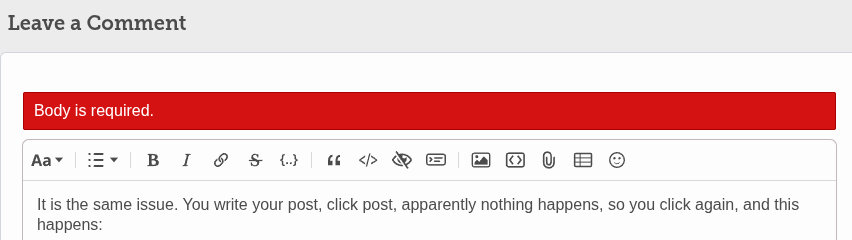
A page refresh is supposed to be triggered immediately after posting and this seems to be failing. If you manually refresh the page after clicking once, you see your post and the empty comment box.
1 -
I was referring to the other issue freshly raised in that post, about username tagging!
1








Confirm your email address to Create Threads and Reply

Categories
- All Categories
- 355.9K Banking & Borrowing
- 255K Reduce Debt & Boost Income
- 456.2K Spending & Discounts
- 248.4K Work, Benefits & Business
- 606.1K Mortgages, Homes & Bills
- 179.1K Life & Family
- 264K Travel & Transport
- 1.5M Hobbies & Leisure
- 16.2K Discuss & Feedback
- 37.7K Read-Only Boards