We’d like to remind Forumites to please avoid political debate on the Forum.
This is to keep it a safe and useful space for MoneySaving discussions. Threads that are – or become – political in nature may be removed in line with the Forum’s rules. Thank you for your understanding.
📨 Have you signed up to the Forum's new Email Digest yet? Get a selection of trending threads sent straight to your inbox daily, weekly or monthly!
Pasting tables into posts "breaking" the post




What I did:
I tried replacing a table from this post of the Top Regular Savers Discussion Thread with another table from excel. I did this by deleting the table from the post and then clicking on the end of the heading and pasting the table.
Comments
-
Continued from opening post as it was saying my post was too long
The post I was trying to edit was this one:
https://forums.moneysavingexpert.com/discussion/comment/81861124#Comment_81861124What happened:
If I try pasting a table into the post it makes the screen look rather like this:

You cannot edit the post, but if you click cancel everyone appears to lose their profile pictures but the forum works as normal and the pictures re-appear if you try to edit the post again.

If on the other hand you click save, the post comes out looking like this:
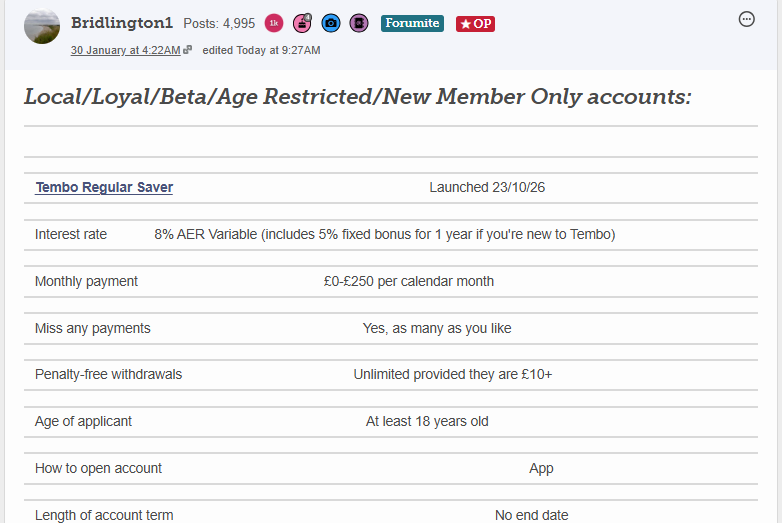
As you can see the table is all over the shop.
Another strange feature is that for this post, the table now autofits to the width of your device screen, e.g if I zoom in to 250% on my laptop, the table looks like this, which doesn't happen with tables normally:

The bigger issue is that once a post has been saved like this, I cannot edit it, if I go to edit the post, the screen jumps straight to looking like this and I cannot edit the post so it's stuck like that:
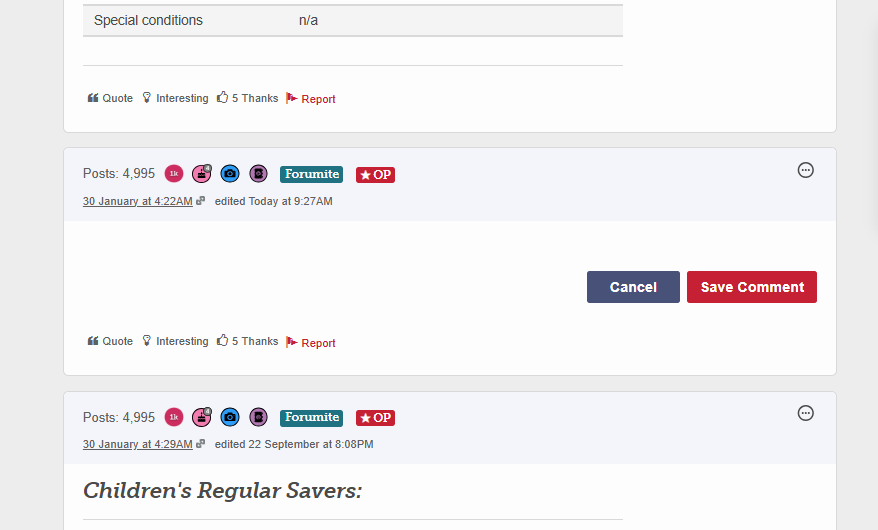
If you start a new line first and then paste onto the new line it works fine and pastes the table without issues, but if you paste them on the end of a heading, it breaks as above.
What Should happen:
Previously there was an issue where if you pasted things into the forum, it would add extra lines. This appears to've been fixed.
However the workaround I was using when pasting tables onto p1 of the regular savers thread was to try pasting them at he end of the previous line so that the extra space wasn't added. This used to make the tables look like this with no extra line:
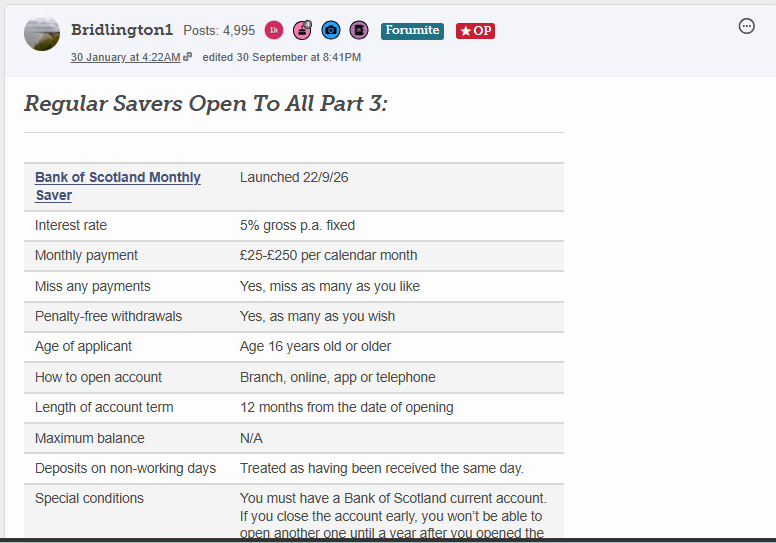
When pasting tables into the forum at the end of headings, it should either paste them like the screenshot above or possibly come up with an error message and tell you to start a new line if you want to be able to edit the post.
It should, at the very least, allow you to edit the post though.
Why it matters:
I regularly update posts on The Top Regular Savers Discussion Thread, because of this issue, I can no longer edit one of the posts on the thread.
I haven't tried deleting the post yet as I wanted to leave it there for a few days in case a fix can be found and so that you have it as an example, but if it can't be fixed I'm going to have to try deleting the post.
Device/Browser:
Any device, I've tried a laptop, phone, it's, both chrome and edge (presumably others), it's not having any of it.
0 -
To illustrate:Hinckley & Rugby BS Regular Saver Issue 3
Launched 16/10/26
Interest rate
6% AER Fixed
Monthly payment
£0-£250 per calendar month
Miss any payments
Yes, as many as you wish
Penalty-free withdrawals
None
Age of applicant
No minimum age stated
How to open account
Branch or post
Length of account term
12 months from date of first deposit
Maximum balance
N/A
Deposits on non-working days
Treated as having been received the next working day.
Special conditions
You may only hold one Regular Saver account of any issue at any given time.
0
Confirm your email address to Create Threads and Reply

Categories
- All Categories
- 355.8K Banking & Borrowing
- 254.9K Reduce Debt & Boost Income
- 456.2K Spending & Discounts
- 248.4K Work, Benefits & Business
- 606K Mortgages, Homes & Bills
- 179K Life & Family
- 263.8K Travel & Transport
- 1.5M Hobbies & Leisure
- 16.2K Discuss & Feedback
- 37.7K Read-Only Boards