We’d like to remind Forumites to please avoid political debate on the Forum.
This is to keep it a safe and useful space for MoneySaving discussions. Threads that are – or become – political in nature may be removed in line with the Forum’s rules. Thank you for your understanding.
PLEASE READ BEFORE POSTING:
Hello Forumites! In order to help keep the Forum a useful, safe and friendly place for our users, discussions around non-MoneySaving matters are not permitted per the Forum rules. While we understand that mentioning house prices may sometimes be relevant to a user's specific MoneySaving situation, we ask that you please avoid veering into broad, general debates about the market, the economy and politics, as these can unfortunately lead to abusive or hateful behaviour.
Threads that are found to have derailed into wider discussions may be removed. Users who repeatedly disregard this may have their Forum account banned. Please also avoid posting personally identifiable information, including links to your own online property listing which may reveal your address. Thank you for your understanding.
📨 Have you signed up to the Forum's new Email Digest yet? Get a selection of trending threads sent straight to your inbox daily, weekly or monthly!
Housing Association trying to exclude my garden
Comments
-
Thank uiu so much for your help
Thank you so much for your help
0 -
I’m new to the form but how do I read the post please?
0 -
Click the view post.
As for you saying they could go through the boundary hedge and tree line without a photo, map or aerial pic it doesn't mean much to the forum user's as we don't know the layout of you property and where the trees and hedges are.
0 -
Morning Boohoo Im sorry I have no idea how to get a photo off google map and then up load it here. I’m new to all of this, I’m not on any platform FB Instagram and so on. I will see if my daughter can do this for me.
0 -
I presume you can locate the property using Google Maps? Zoom in, and the easiest thing then would be a screenshot.
Type your address or just the postcode into Google, select 'Maps', and you should get a map of that address/postcode, along with a panel on the left hand that shows the details. Zoom in on the map so you get the best image of the whole property. Place your mouse on the LH panel, right-click and choose 'Screenshot'. 'Save' or 'Download' 'visible', or click-and-drag to get just the part of the map you want, and then download it.
Use the 'Upload Image' icon on your post to add the image.
Here's a typical full screen 'Screenshot' of a random postcode;
 0
0 -
@WIAWSNB the OP will have to change the Layers to satellite image so they can see what is surrounding their property.
I asked for a map earlier but I was thinking more of a landline registry type map as I think that could show more detail of the OP's boundaries and the like.
OP if you do get a map or Google screenshot try and remove details of you post code and street name so no to tell people where you are.
1 -
one plot of land that is served by the gate
0 -
Is the gate for your property and your property only?
0 -
yes just for my use
0 -
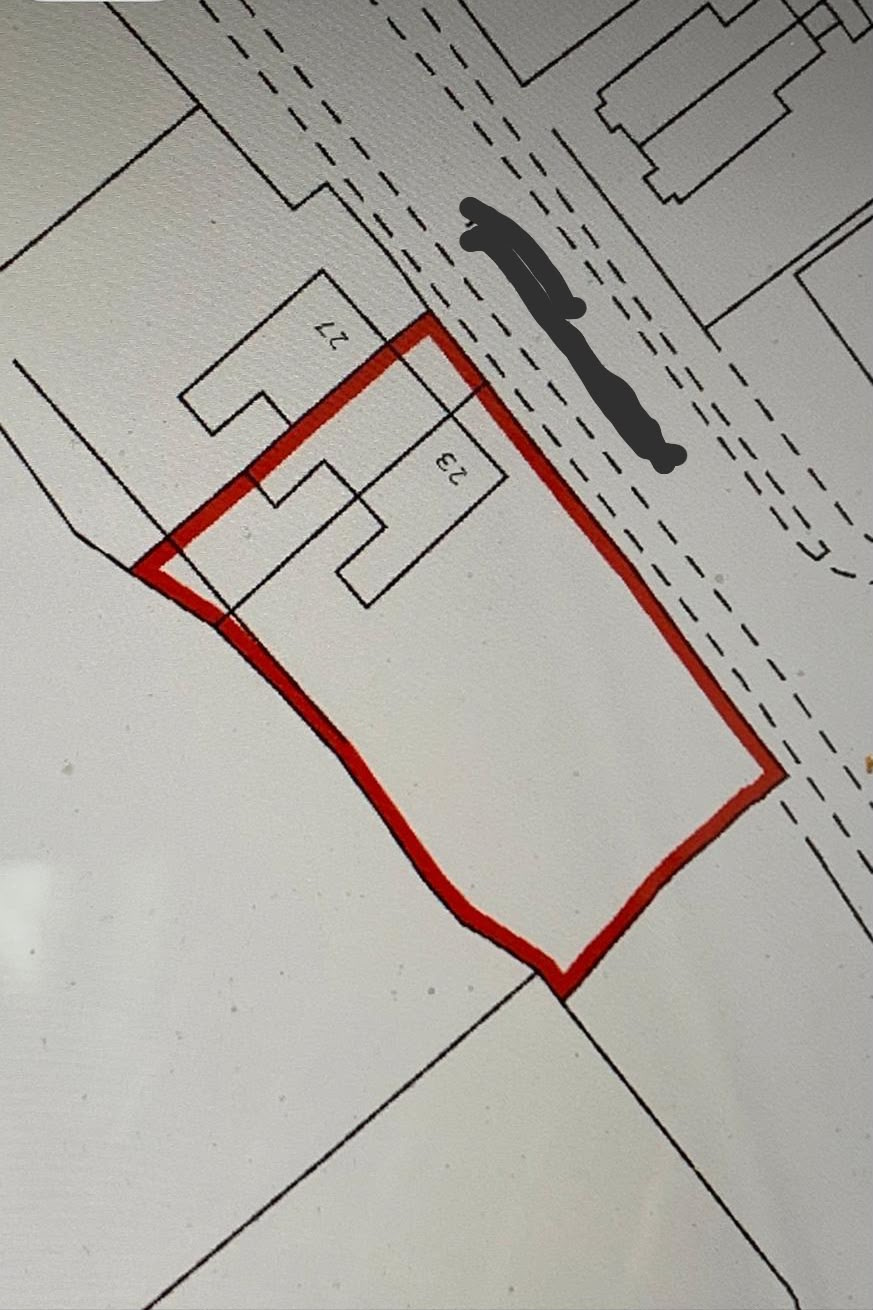
the house in the middle is owned by HA the plan they send me puts a line right through the middle of the two houses
0







Confirm your email address to Create Threads and Reply

Categories
- All Categories
- 355.8K Banking & Borrowing
- 254.9K Reduce Debt & Boost Income
- 456.2K Spending & Discounts
- 248.3K Work, Benefits & Business
- 605.9K Mortgages, Homes & Bills
- 179K Life & Family
- 263.7K Travel & Transport
- 1.5M Hobbies & Leisure
- 16.2K Discuss & Feedback
- 37.7K Read-Only Boards